A 90-day local SEO plan for a new client, week by week
A plan the client can see goes a long way toward keeping them. This order puts the heaviest factors first: the profile, then the website, then reviews and links. On day 90, review everything against the baseline.
By the DrawnLocal team · · Updated · 14 minute read
The 90-day local SEO plan at a glance
Adjust the weeks to the client’s market, but keep the order: the heaviest factors first.
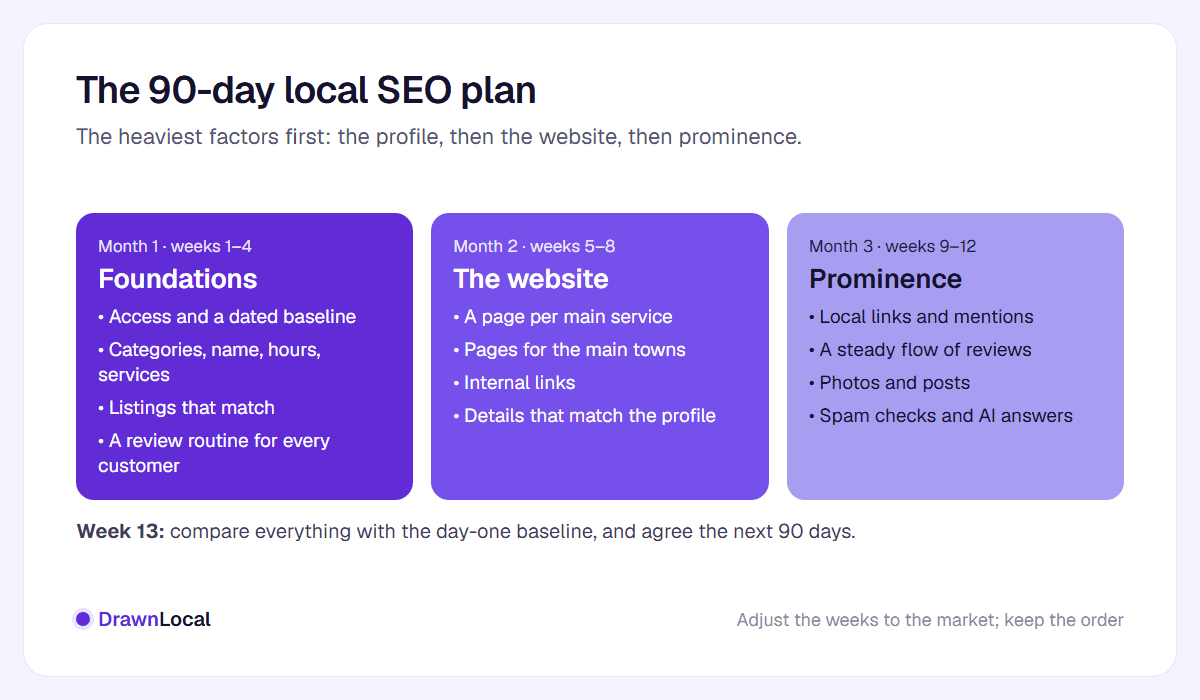
| Weeks | Focus | Done when |
|---|---|---|
| 1–2 | Access, baseline, kickoff call | Heat maps, rankings, reviews, AI answers and audit saved |
| 2–3 | Google profile: categories, name, hours, services, service area, photos | Profile matches Google’s guidelines and the services that pay |
| 3–4 | Listings: name, address and phone consistent on the main directories | Top listings match the profile |
| 4 | Review routine live for every customer | Requests going out after each job |
| 5–6 | Service pages for the main services | One page per service, linked from the profile and menu |
| 7–8 | Area pages, internal links, structured data | Pages for the main towns, each with real local detail |
| 9–10 | Local links and mentions | Associations, suppliers, sponsorships, local news pitched |
| 11–12 | Spam check, posts and photos, AI answers check | Fake or stuffed listings reported; fresh photos |
| 13 | Day-90 review | Report against the baseline; next 90 days agreed |
Month 1: foundations (weeks 1 to 4)
Start with access and a dated baseline before changing anything; the onboarding checklist has the detail. Then fix the profile, because its factors weigh most: in Whitespark’s 2026 survey the primary category ranked first of 187 Maps factors and additional categories eighth. How to choose a primary category and keywords in the business name cover two common mistakes.
Next, make the name, address and phone match on the main directories, and start a review routine that asks every customer. A steady flow ranked 14th in the survey; review gating covers what’s allowed.
Month 2: the website (weeks 5 to 8)
Give each main service its own page: a dedicated page for each service ranked first for local organic results and 24th for Maps in the survey. Each page says what’s done, where, how fast and what it roughly costs, with photos of real jobs and the questions customers ask.
Then add pages for the main towns served, with real local detail rather than a swapped city name. Link the pages to each other, and make sure the contact details and structured data match the Google profile. Does the website affect Google Maps rankings explains which website work moves Maps.
Month 3: prominence (weeks 9 to 12)
Prominence is how well known a business is, and Google says it includes how many websites link to the business and how many reviews it has. Go after local links: trade associations, suppliers’ dealer lists, sponsorships and local news. Keep reviews flowing, add photos of recent jobs, and check whether fake or keyword-stuffed listings hold the top 3; reporting them can be the fastest win of the quarter.
Check AI answers too: ask ChatGPT and Google AI Mode the questions customers ask and note who’s named. Google AI Mode and local SEO explains what helps.
Week 1: access and the baseline
Send the welcome email with the questionnaire and the access steps on day one. While the invites arrive, record the baseline from public results: a heat map of each main keyword, rankings, reviews against the top 3, and AI answers.
Here’s the kind of baseline to save, from DrawnLocal’s free heat map on Nov 21, 2026. A Boise plumbing company, for “plumber”, is first at its address and in the top 3 at 7 of 9 points.
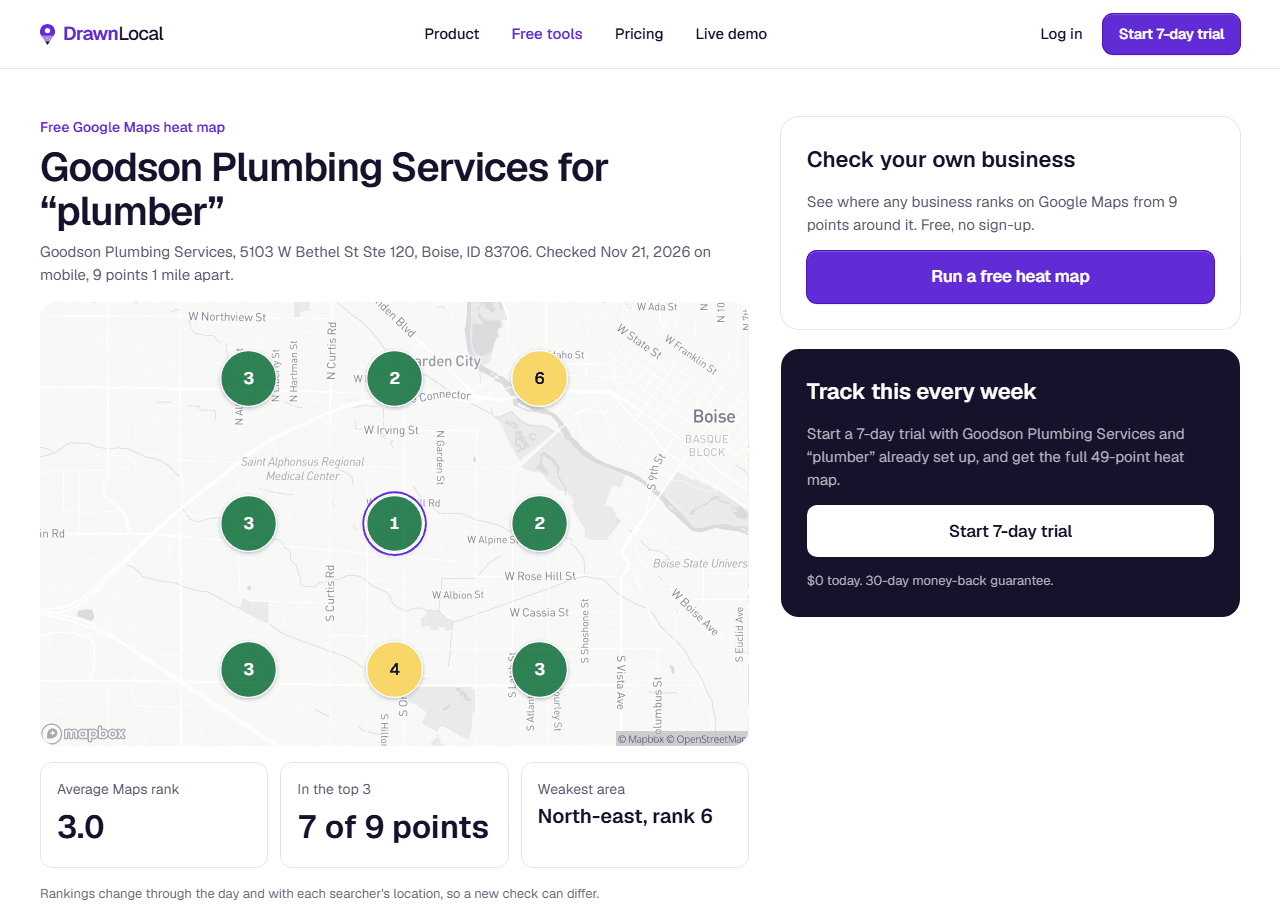
Use the same keyword, center and grid size for every map from now on, so day 90 compares like with like.
Week 1, continued: the AI baseline
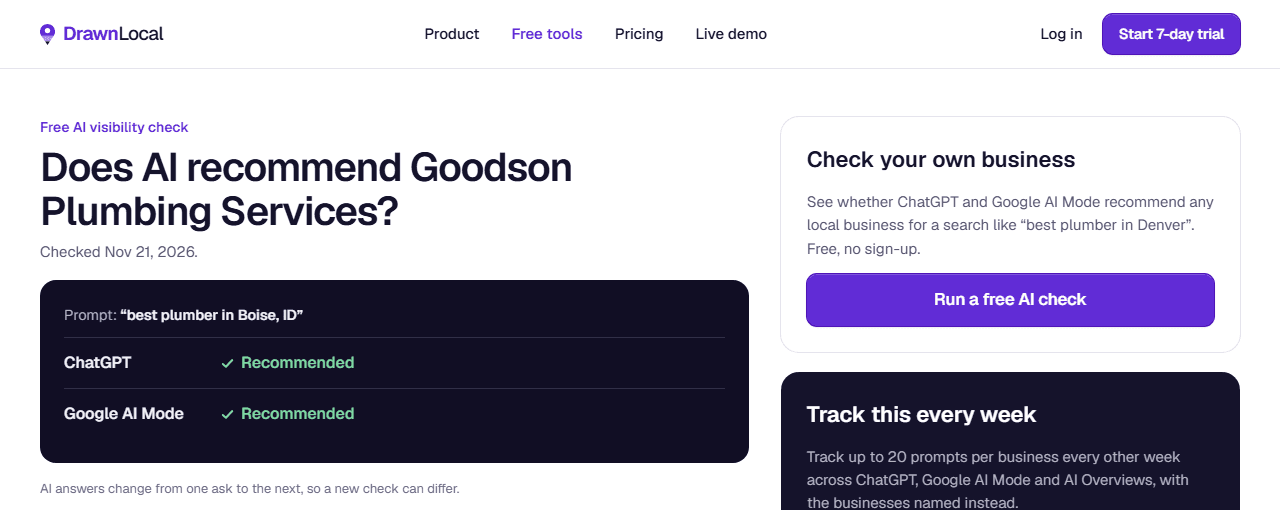
Ask ChatGPT and Google AI Mode two or three questions customers would type, such as “best plumber in [city]”, and note who’s named. The same Boise plumber was recommended by both on Nov 21, 2026:
Then hold the kickoff call: agree the services and towns that matter, the keywords, the review routine and what the monthly report will show.
Weeks 2 and 3: the Google profile
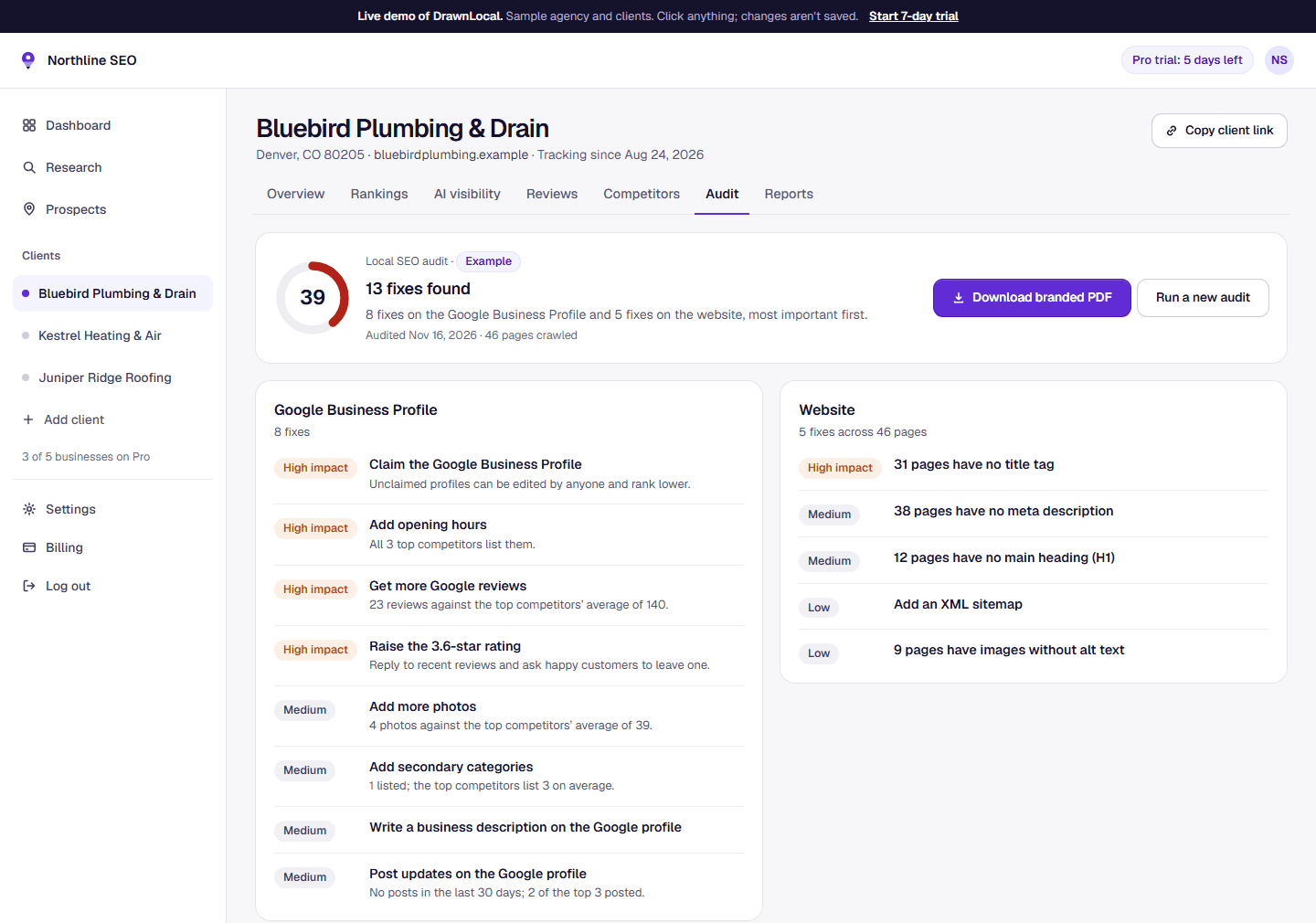
Audit the profile against the top three, then fix the heaviest items first: the primary category, additional categories, the name, hours, services and service area. Note the date of every change, so the report can show what moved afterwards.
Don’t add keywords to the name; Google’s guidelines forbid it. If the business name is long or unusual, leave it as the real-world name and work on everything else.
Week 3: listings
Check the name, address and phone on the main directories, the business’s own website and its social profiles. Fix anything that doesn’t match the profile, starting with the listings customers actually use.
Look for duplicates too: an old listing at a former address, or a second profile someone created. Do citations still matter? explains where to spend time and where not to.
Week 4: the review routine
Set up one direct review link and a message that goes to every customer after every job, with a line inviting private feedback too. Reply to every existing review, oldest unanswered first.
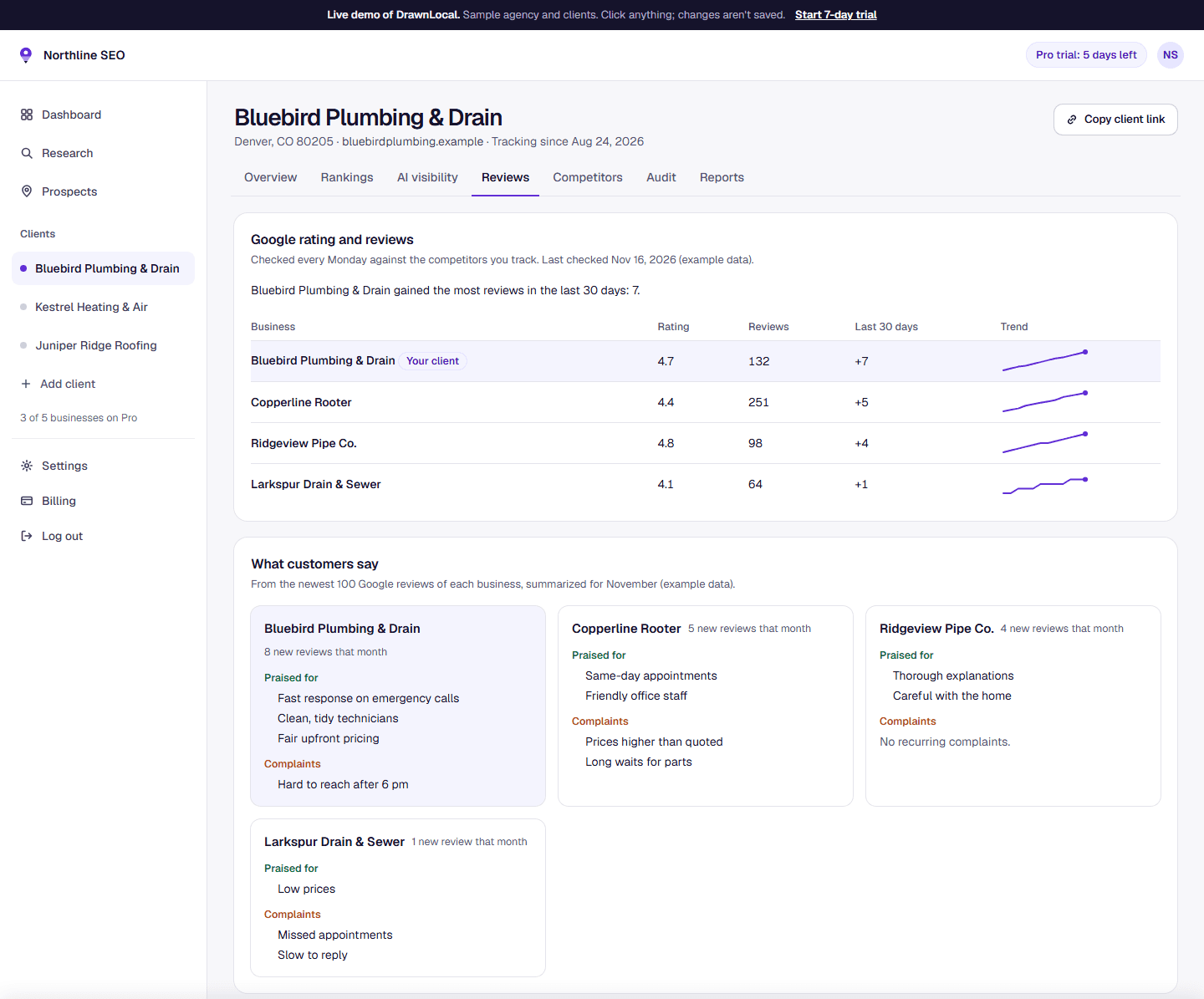
Record the client’s monthly pace against the top 3 now, so you can report whether the gap is closing. Do Google reviews help SEO? has a formula for the monthly target.
Weeks 5 and 6: service pages
Write one page for each main service, starting with the one that brings the most valuable jobs. Each page answers what the service is, where it’s offered, how fast, roughly what it costs, and the questions customers ask, with photos of real jobs.
Link each page from the main menu and from the profile where it fits. Ask the owner to check every page for accuracy before it goes live; they know the work better than anyone.
A service page outline you can reuse
Each service page in weeks 5 and 6 can follow the same outline. It keeps pages consistent and quick to write:
- A heading with the service and the main town, such as “Water heater installation in Aurora”.
- A short opening: what the service is and who it’s for, in two sentences.
- Where: the towns and neighborhoods covered.
- How fast: same-day, next-day or by appointment, and when the phone is answered.
- Roughly what it costs, or what the price depends on.
- Proof: licenses, years in business, and two or three short reviews about this service.
- Photos of real jobs, with a few words on each.
- Questions customers ask, each answered in two or three sentences.
- One clear next step: call, book or request a quote.
Keep the hours, phone and service area identical to the Google profile. A page that contradicts the profile helps nobody.
Weeks 7 and 8: area pages and the details
Write a page for each main town the business serves, with real local detail: neighborhoods covered, typical jobs there, response times. Avoid pages that only swap the town’s name; they help nobody.
Then tidy the details: contact information matching the profile on every page, internal links between services and areas, and structured data that matches what’s visible.
Weeks 9 and 10: local links and mentions
Make a list of local sites where the business could genuinely appear: trade associations, the chamber of commerce, suppliers’ dealer lists, local sponsorships and local news. Start with the ones that already know the owner.
Never buy links. The aim is real mentions that a customer might see, which also count toward how well known the business is.
Local link ideas by trade
Weeks 9 and 10 go faster with a list to start from. Ideas that suit common trades, all earned rather than bought:
| Trade | Ideas |
|---|---|
| Plumbing and HVAC | Manufacturer dealer or installer lists; local builders’ supplier pages; a home show sponsorship |
| Roofing | Manufacturer certification listings; a storm-season safety piece for local news |
| Electrical | EV charger installer directories from manufacturers; a local school or club sponsorship |
| Landscaping | Garden club or community garden sponsorships; nursery partner pages |
| Any trade | The chamber of commerce; trade associations; a youth sports team sponsorship |
Start with relationships the owner already has. A supplier who knows them is more likely to list them than one asked cold.
Photos: what to shoot
Weeks 11 and 12 add fresh photos. Ask the owner or the team for a few each week: finished jobs, the team at work, the vehicles with the business name, and the storefront if there is one.
Real photos tell customers more than stock images. Keep them recent, label them with what the job was, and add a handful every month rather than a hundred at once.
Weeks 11 and 12: spam check, photos and AI answers
Check the names holding the top 3 on the latest heat maps. Report any that break Google’s rules, with evidence. Add fresh photos of recent jobs to the profile, and re-run the AI questions from week one.
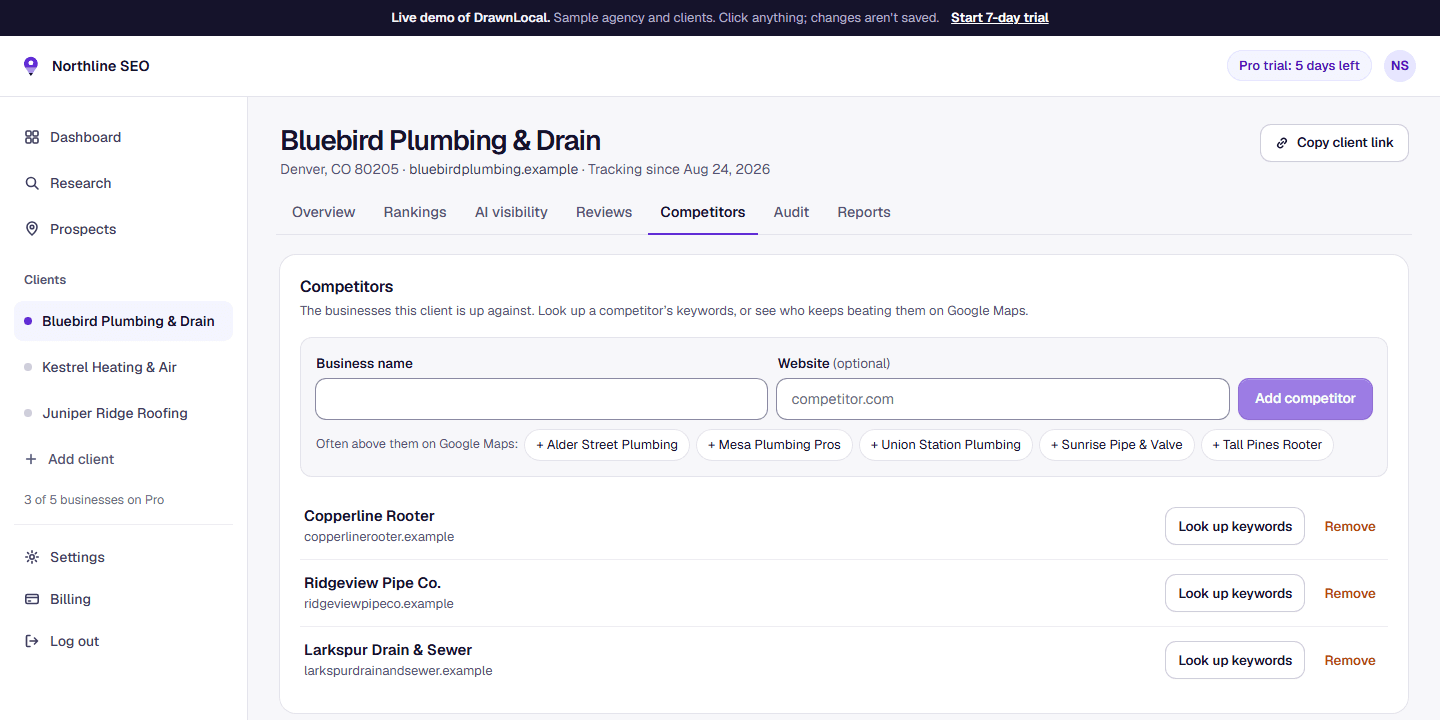
How to report fake listings on Google Maps has the routes and an evidence log.
Every week: watch the rankings
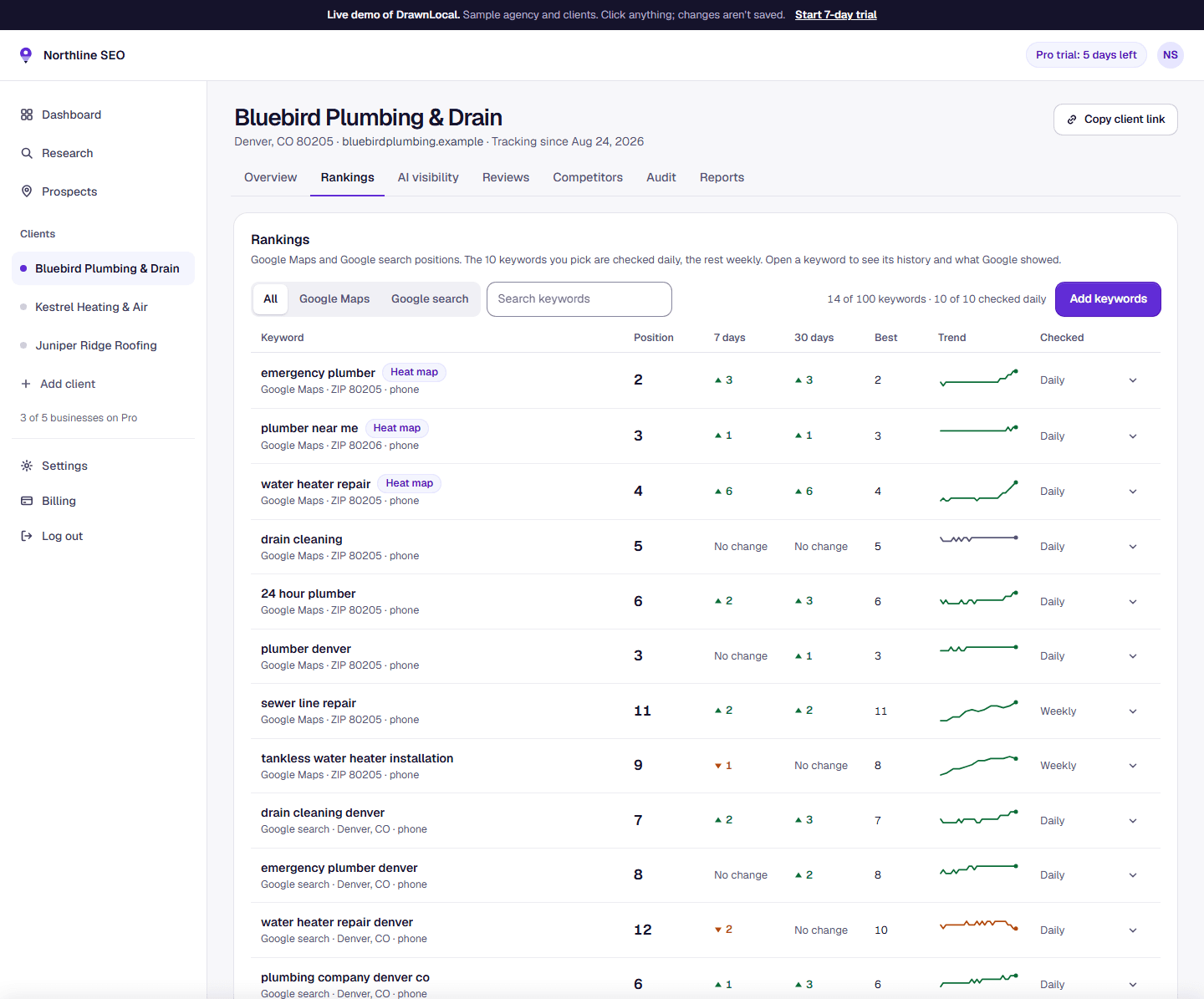
Throughout the 90 days, check the main keywords every week. A drop explained before the client notices keeps trust; one they find first costs it.
Week 13: the day-90 review call
Book 30 minutes and run it in this order:
- The day-one heat map next to today’s, for each main keyword.
- Keywords now in the Maps top 3, against the baseline.
- Reviews gained, and the gap with the top 3.
- Calls, clicks and direction requests from the profile, against the starting months.
- What’s next: the next 90 days, agreed together.
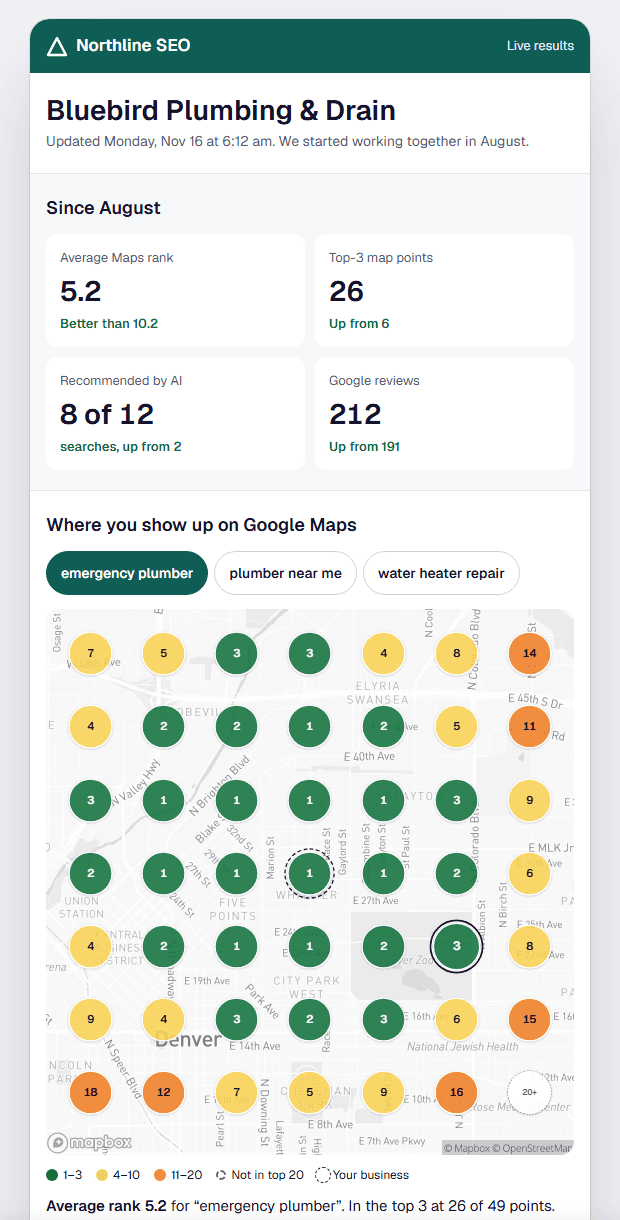
Then send the client their live page, so they can keep checking between reports:
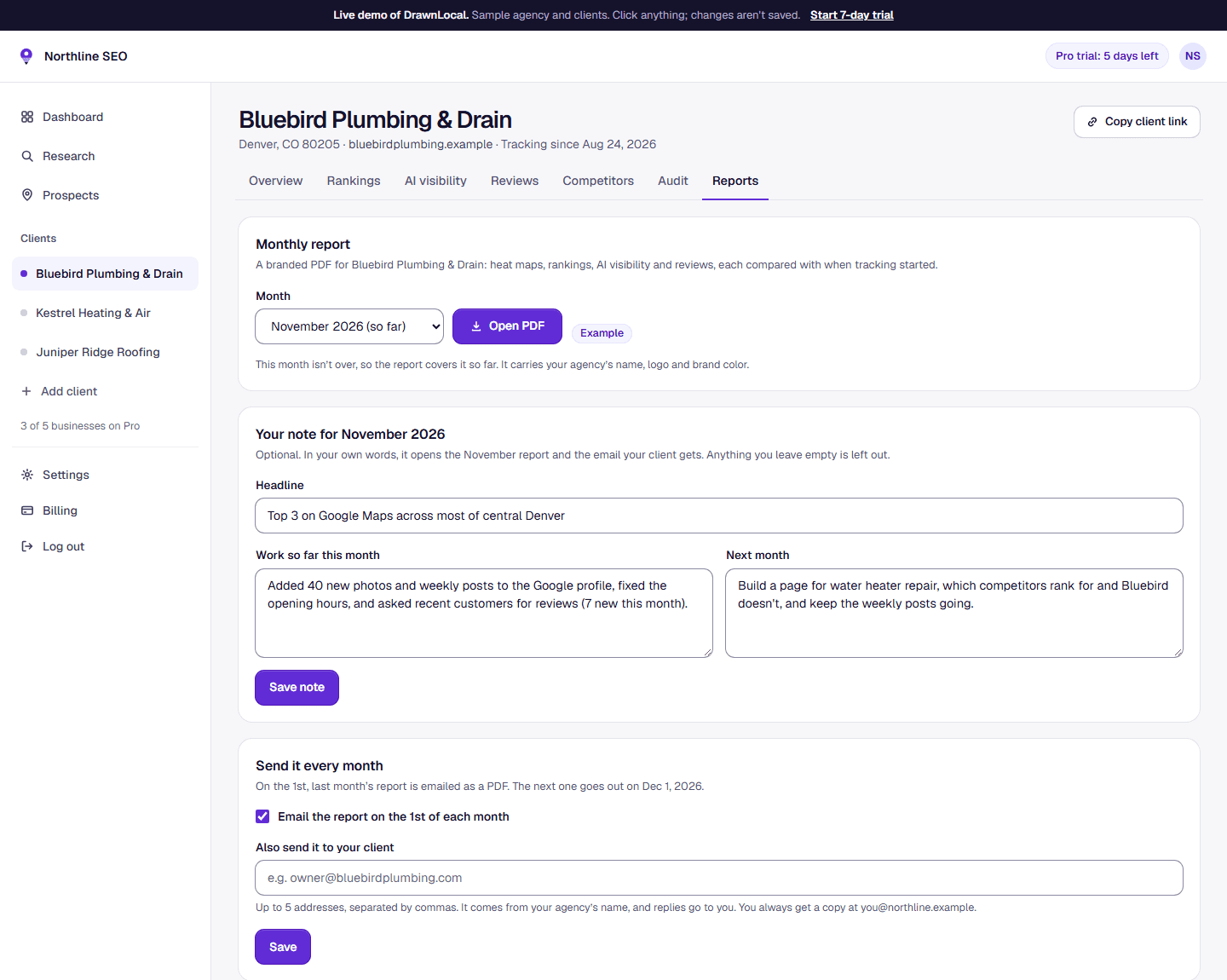
The client’s live page
Every number on the page sits next to where it started, which is the day-90 comparison in a form the owner can open any time.
Hours for each month
The plan is front-loaded: month one carries the setup. Example hours for one location in a mid-sized market, not a benchmark:
| Month | Main work | Example hours |
|---|---|---|
| 1 | Onboarding, baseline, audit, profile fixes, listings, review routine | About 14 |
| 2 | Two to four service and area pages, details, internal links | About 10 |
| 3 | Local links outreach, spam check, photos, AI check, day-90 review | About 9 |
| From month 4 | Ongoing pages, links, reviews, reporting | About 6 to 9 |
That’s why a setup fee, or a higher first month, can make sense. How much to charge for local SEO shows how to price it.
Who does what: agency and client
A plan can stall when the client doesn’t know it has a part to play. Agree the split at kickoff:
| Task | Agency | Client |
|---|---|---|
| Access and consent | Sends steps, accepts invites | Adds the agency, signs consent |
| Baseline and audit | Does it | – |
| Profile fixes | Makes the agreed changes | Approves them |
| Review routine | Sets it up, writes the message | Sends it to every customer |
| Service and area pages | Writes and publishes | Checks facts and prices |
| Photos | Uploads and arranges | Takes photos of real jobs |
| Local links | Finds and pitches | Introduces contacts it already has |
Adjusting the plan to the market
The order stays the same everywhere; the pace changes. In a small town where the top 3 have 40 reviews and thin websites, the profile and two good service pages may move the map within the first months. In a big city where the leaders have hundreds of reviews and a page for everything, month two may need twice the pages, and reviews and links become the long game.
Use the baseline heat map and the competitor check to decide. If the top 3 are strong everywhere, say so early, and stretch the plan rather than promise the same results on the same timeline.
Service-area businesses
For a business that visits customers and hides its address, center the heat maps on the main ZIP code or the area it most wants work from. Add a second map for a town it wants to grow in. Month two’s area pages matter more here, because they’re how the business shows which towns it serves.
Google Maps rankings for service-area businesses covers the differences in detail.
Several locations
Run month one per location: each has its own profile, competitors and map. Months two and three can share work, such as a template for location pages and links from associations that cover the whole region.
Report per location, with the weakest one’s plan called out. Multi-location local SEO covers the rest.
When the client already had SEO
Taking over from another agency changes week one. Check who has access to the profile, look for pages or tracking the old agency added, and ask for old reports so the history isn’t lost.
Record your own baseline anyway. Old reports may use other keywords, grids or tools, so your starting point is the only fair comparison for your work. Then look for quick fixes the previous agency missed; they can be in the profile.
What to report in each month of the plan
The first three reports tell a story. Keep each one to the point:
| Report | Lead with | Then |
|---|---|---|
| Month 1 | The baseline, and the fixes made | The review routine’s first results |
| Month 2 | Pages published, and any early map movement | Reviews against the top 3 |
| Month 3 | Day one against today, on the map | The plan for the next 90 days |
Every report compares with the baseline, not just last month. Small changes from one month to the next can look like noise; against the start, the direction is clear.
Why 90-day plans slip, and how to stop it
- Access takes weeks. Record the baseline from public results while you wait, and agree a date in writing.
- The client is slow to approve. Agree an approval time at kickoff, such as two working days, and a default if they don’t reply.
- Pages wait for photos. Publish with what you have, and add photos when they arrive.
- The review routine isn’t sent. Check after the first week that requests are really going out to every customer.
- Scope creep. New requests go into the next 90 days unless they replace something in this one.
A one-page version for the proposal
Put a short version of the plan in the proposal, so the client knows what they’re buying before they sign:
“Month 1: we record where you stand today, fix your Google profile and listings, and start asking every customer for a review. Month 2: we write pages for your main services and towns. Month 3: we build local links and mentions, check for spam listings, and on day 90 we show you the map then and now.”
End it with one honest line: no one can guarantee a ranking, but you’ll see the work and the results against today, every month. The proposal template shows where it fits.
Day 90: review against the baseline
Show the heat map from day one next to today’s, the keywords now in the Maps top 3 and the reviews gained. Add calls, clicks and direction requests from the profile, against the starting months. Then agree the next 90 days: more service areas, more content, harder keywords. The monthly report template shows the order that reads well.
In DrawnLocal every monthly report compares with the month the client started, so the day-90 comparison is ready without digging out old files.
An example day-90 summary
What a day-90 summary might look like for a made-up plumber, to show the format rather than a promise:
| Measure | Day one | Day 90 |
|---|---|---|
| Top 3 on the 49-point map, main keyword | 6 of 49 points | 14 of 49 points |
| Keywords in the Maps top 3 | 2 of 12 | 5 of 12 |
| Google reviews | 38 | 61 |
| Calls from the profile, last 30 days | 42 | 55 |
| Named by ChatGPT for the main question | No | In 1 of 3 checks |
Each row compares with day one, and each comes with one line on what drove it. Then the next 90 days start from these numbers.
Keep the client informed during the 90 days
The first quarter is when the owner sees least and wonders most. A short note every Friday in month one, then every two weeks, keeps them with you: what was done, anything found, and what’s next.
Four lines are enough. The point is that the client never has to ask whether anything is happening. Save the longer explanation for the monthly report and the day-90 call.
After day 90: what the next quarter can hold
The day-90 review sets the next plan. Common directions, chosen by what the numbers show:
- More of what worked: another service page, a second keyword on the heat map, more towns.
- The weak spots on the map: points where a named rival still wins, and why.
- A wider area: a new town the business wants work from, with its own page and map.
- The review gap: a higher monthly target if the top 3 are pulling away.
- AI answers: a fixed set of prompts tracked every other week, if the owner cares about them.
Agree two or three, not all five. A focused quarter reports better than a busy one.
Write the chosen directions into a new one-page plan, with the same format as the first: weeks, work and what done looks like. The client approves it, and day 180 becomes the next comparison point. Over a year, four of these plans tell the whole story of the account, which is useful at renewal and if a new account manager takes over.
Keep the original baseline too. Comparing day 180 with day 90 shows the quarter; comparing it with day one shows everything the client has gained since they signed.
Tools that make the plan easier
You can run the whole plan with free tools and a spreadsheet. What saves the most time is having the baseline, weekly heat maps, rankings, reviews and reports in one place, compared with the start automatically.
DrawnLocal does that from $29 a month, with every tool on every plan; see pricing. Whatever you use, keep the day-one data. The plan is only as convincing as the comparison at the end.
What results to expect in 90 days
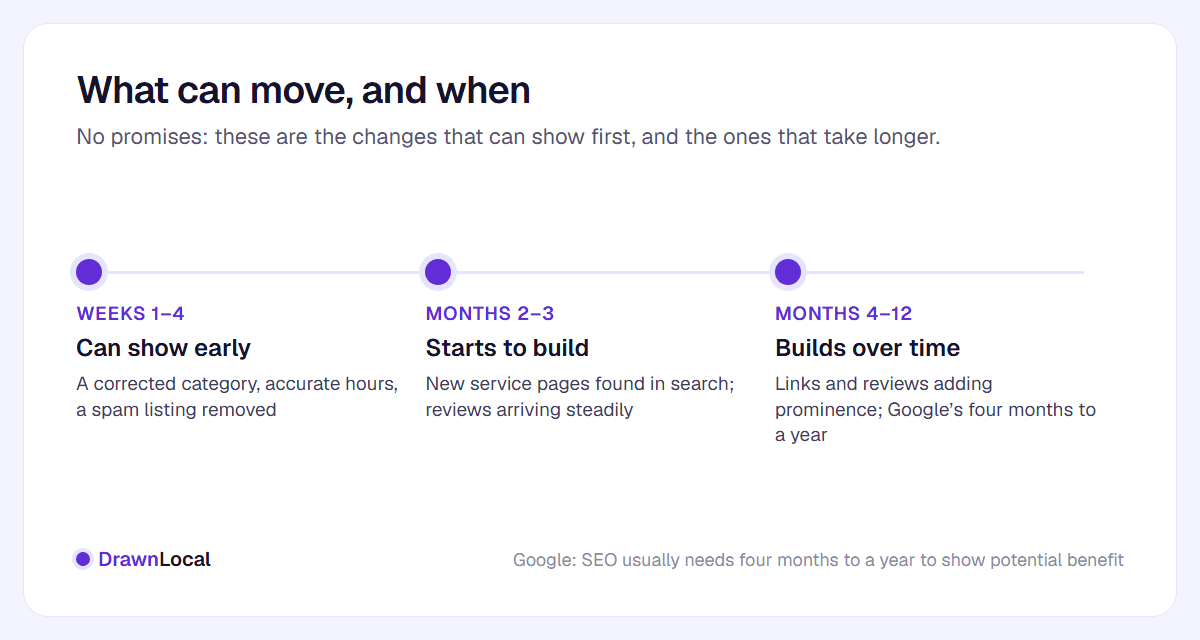
Be honest about timing. Google’s own guidance says SEO improvements often take four months to a year to show benefit. Some changes can show sooner, such as a corrected category or a spam listing removed, but don’t promise them. Promise the work, the reporting and a comparison with the baseline every month; never a ranking.
Questions
How long does local SEO take to work?
Google’s own guidance says SEO improvements often take four months to a year to show benefit. Profile fixes and spam removals can show sooner, while pages, reviews and links build over months.
What should I do first for a new local SEO client?
Record a baseline (heat maps, rankings, reviews, AI answers, an audit), then fix the Google profile’s categories, name, hours and services, because those weigh most in Maps rankings.
How many hours does a 90-day local SEO plan take?
It depends on the market. As an example, one location in a mid-sized market might take about 14 hours in month one, 10 in month two and 9 in month three, before settling lower.
What if the client already worked with another agency?
Check access, pages and tracking the old agency added, and ask for old reports. Then record your own baseline, because it’s the only fair comparison for your work.
What should a 90-day local SEO plan include?
Month one: access, baseline, profile and listings, review routine. Month two: service and area pages, internal links, structured data. Month three: local links, reviews, photos, spam checks and AI answers. Then a review against the baseline.
Sources
- Google: do you need an SEO?
- Google Business Profile Help: tips to improve your local ranking
- Whitespark: Local Search Ranking Factors 2026 (published Nov 6, 2025)