The best AI visibility trackers for local SEO in 2026, compared
Clients now ask whether ChatGPT recommends them. Five tools can answer it on a schedule, and they differ more than their feature lists suggest. They vary in which AI platforms they check, how many prompts, how often, and what it costs across a client list.
By the DrawnLocal team · · Updated · 14 minute readPrices checked Nov 21, 2026
- $0 today
- Cancel online in one click
- 30-day money-back guarantee
On this page
- What AI visibility means for a local business
- How AI visibility tracking works
- AI visibility trackers for local SEO, side by side
- Why one AI check isn’t enough
- AI visibility cost for 5 and 20 local clients
- 1. DrawnLocal: AI visibility inside the monthly local report
- 2. BrightLocal Local AI Visibility
- 3. Local Falcon AI scans
- 4. Local Dominator AI Tracker
- 5. Semrush AI Visibility Toolkit
- 6. SE Ranking AI visibility
- Worked example: AI tracking for 12 local clients
- How often each tool checks AI answers
- What to look for in a local AI visibility tracker
- DrawnLocal vs BrightLocal for AI visibility
- How to choose the prompts to track for a local client
- Who’s named instead: turning AI results into a plan
- Rankings and AI answers: track both
- What to work on when AI doesn’t name your client
- Reporting AI visibility to a client
- Common mistakes when tracking AI visibility
- AI visibility terms, explained
- Questions to ask an AI visibility tracker before you buy
- When the credit-based tools make sense
- Free ways to check AI visibility
- How to run a free AI visibility check
- Our pick for agencies
- Questions
What AI visibility means for a local business
AI visibility is whether AI assistants recommend a business when a customer asks for one. For a plumber, the question is simple: when someone asks ChatGPT or Google’s AI for the best plumber in their city, is this business named?
Customers ask in full sentences, such as “who can fix a burst pipe in Denver tonight?”. So an AI visibility tracker asks those questions on a schedule, reads the answers and records whether the business was named, and who was named instead.
Because the answers vary from one search to the next, the useful number is a share: how often the business was named across many answers in a month.
How AI visibility tracking works
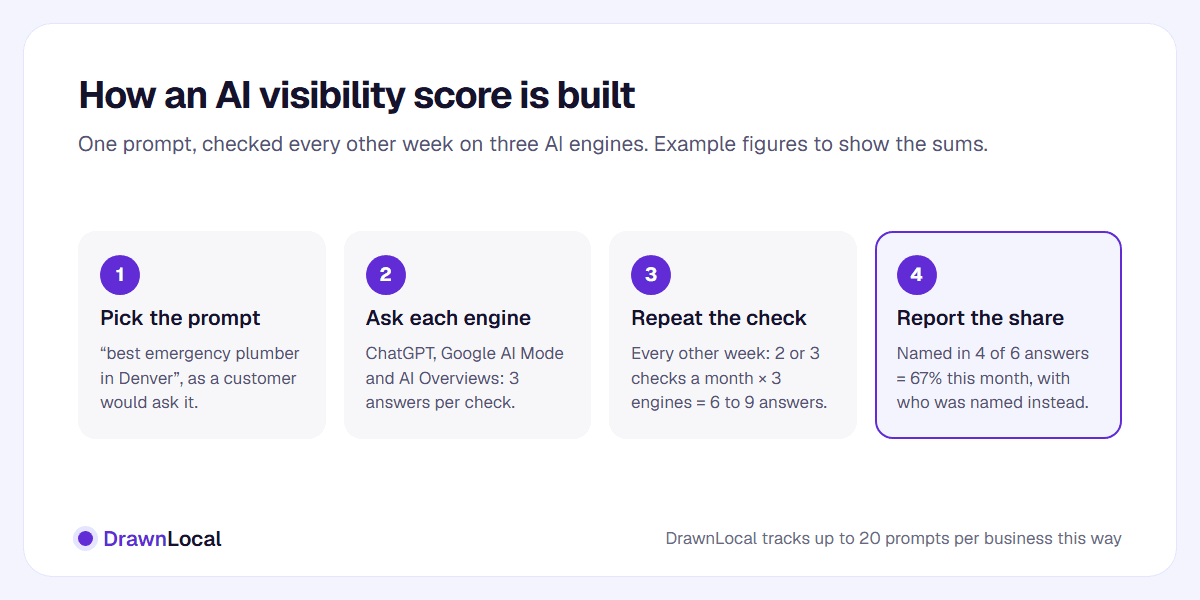
Every tracker in this post follows the same three steps. It sends a list of prompts to one or more AI engines, records each answer, and turns the answers into a score.
The differences are in the details: which engines, how many prompts, how often, and whether the score is reported per location or per website. For a local agency, per location matters, because each client competes in its own town.
AI visibility trackers for local SEO, side by side
| Tool | AI platforms | How it counts | Cost for 5 local clients |
|---|---|---|---|
| DrawnLocalOur pick | ChatGPT, Google AI Mode, AI Overviews | Up to 20 prompts per business, every other week, competitors named | $49 on Pro, with heat maps, rankings, reviews and branded reports |
| BrightLocal Local AI Visibility | ChatGPT, Google AI Mode, AI Overviews | Up to 20 prompts per location, twice a month | $62 on Track for 2 to 5 locations |
| Local Falcon AI scans | AI Overviews, AI Mode, Gemini, ChatGPT, Grok | Credits, one per grid point, shared with map scans | From $24.99 for 7,500 credits; the cost depends on grid size and frequency |
| Local Dominator AI Tracker | ChatGPT, Gemini, AI Mode, Perplexity, Claude, Grok | Credits; the cost per check isn’t published | $59 on Advanced (5 profiles) |
| Semrush AI Visibility Toolkit | ChatGPT, Google AI, Gemini, Perplexity | 25 prompts tracked daily | $99 per domain, billed yearly; not location-based |
| SE Ranking | 5 AI engines | 25 prompts tracked daily, on Core and Growth | $129 on Core, billed monthly, as part of a full SEO suite (checked Nov 26, 2026) |
Why one AI check isn’t enough
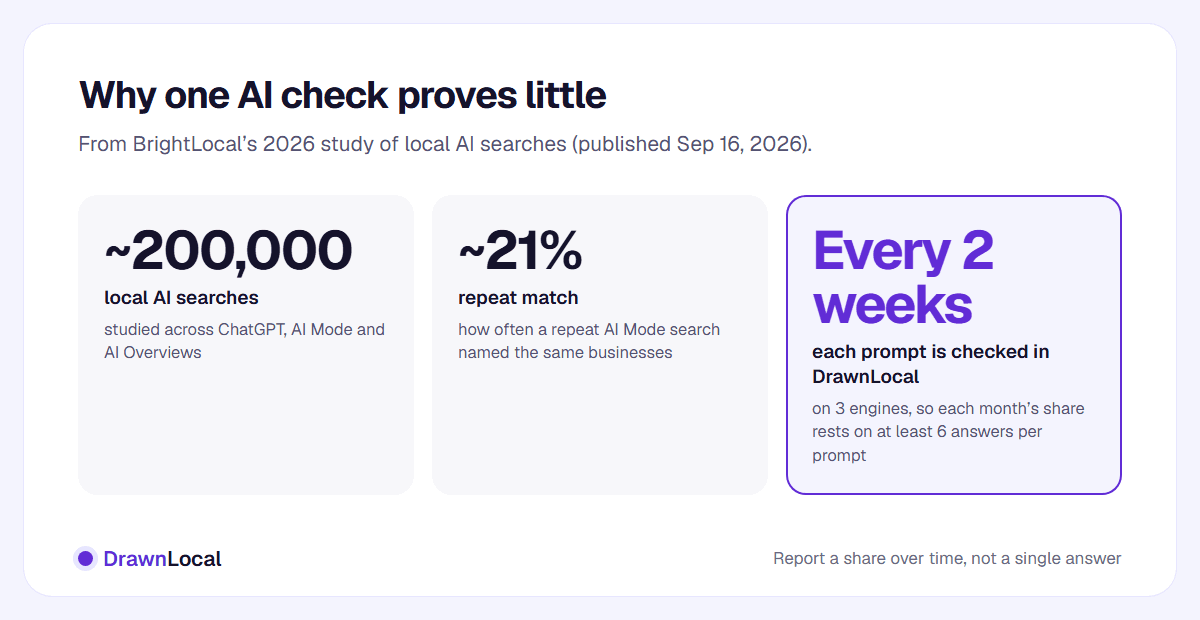
BrightLocal’s 2026 study of about 200,000 local AI searches found that a repeat AI Mode search named the same businesses only about 21% of the time. A single check is a snapshot, and the next one may differ.
So judge any tracker by how often it repeats each prompt, and whether it reports a share over a month. DrawnLocal checks each prompt every other week on three engines, so each month’s share rests on at least 6 answers per prompt.
AI visibility cost for 5 and 20 local clients
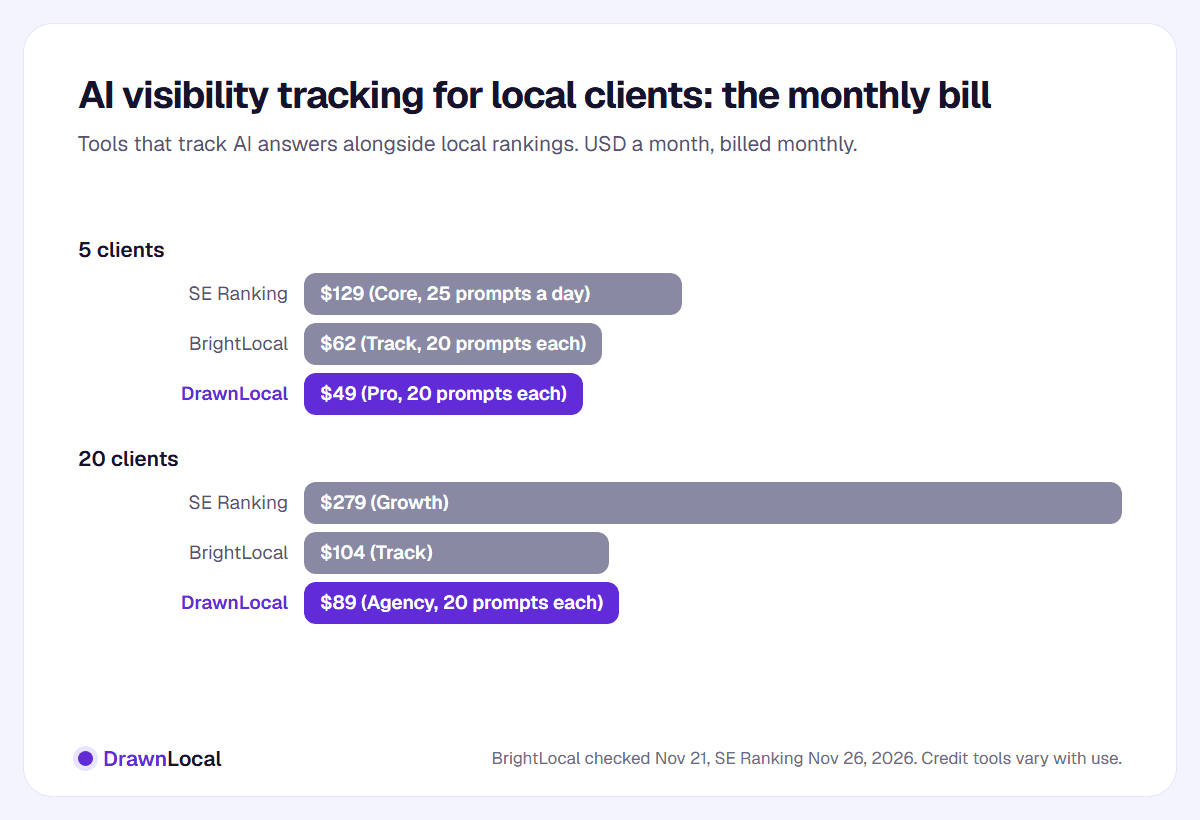
Here are the trackers with fixed monthly prices, for the same client counts:
| Tool | 5 clients | 20 clients | AI checks included |
|---|---|---|---|
| DrawnLocalOur pick | $49 (Pro) | $89 (Agency) | 20 prompts per business, every other week, on 3 engines |
| BrightLocal Track | $62 | $104 | 20 prompts per location, twice a month, on 3 engines |
| SE Ranking | $129 (Core) | $279 (Growth) | 25 prompts a day on 5 engines |
Local Falcon and Local Dominator charge AI checks in credits, so their cost depends on how many prompts you scan and how often. Semrush’s toolkit is $99 a month per domain, billed yearly.
DrawnLocal costs the least at both sizes, and its price also covers weekly heat maps, daily rank tracking, reviews and branded reports.
1. DrawnLocal: AI visibility inside the monthly local report
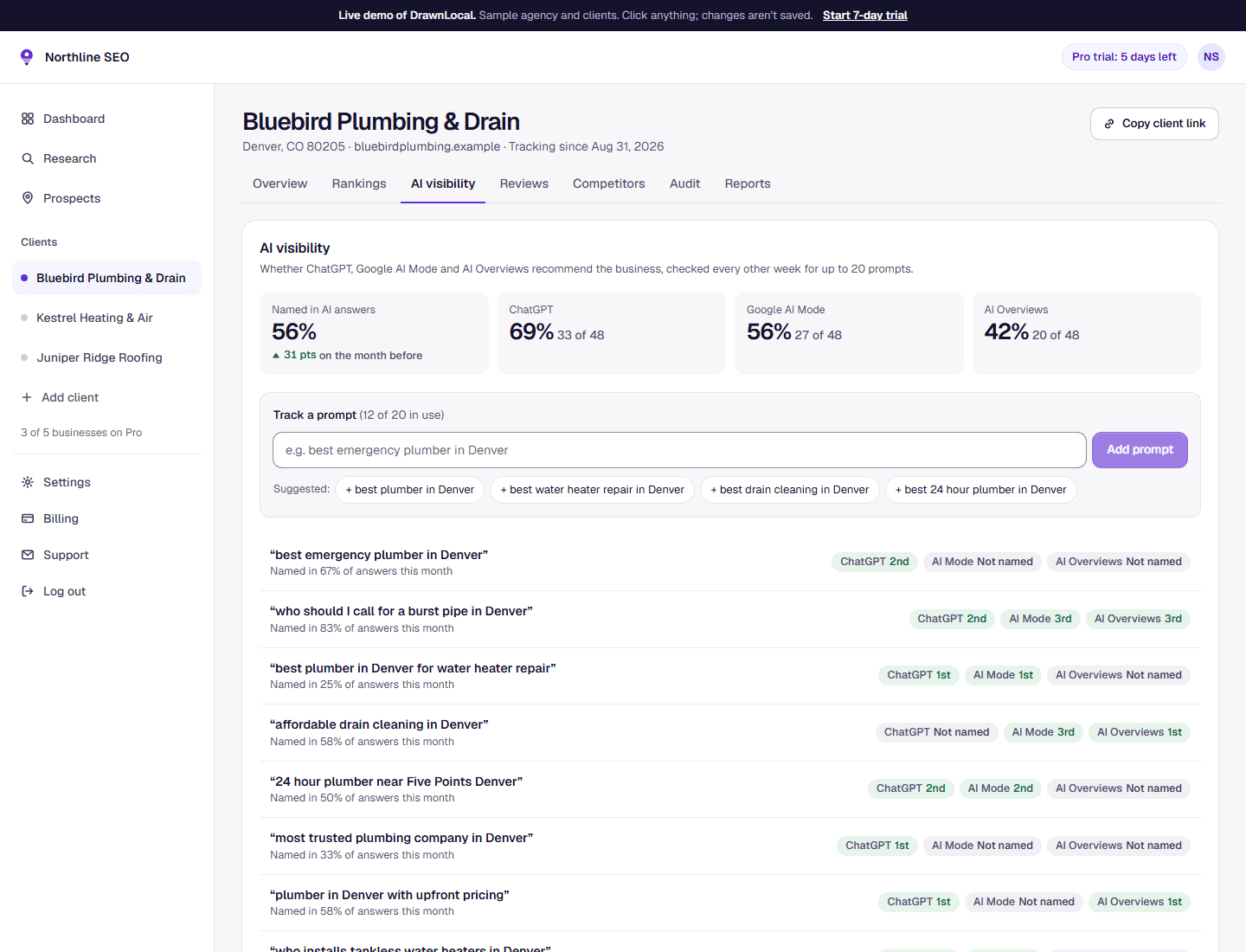
DrawnLocal checks up to 20 prompts per business on ChatGPT, Google AI Mode and AI Overviews, every other week. Each prompt shows whether the business was named, its place in the answer, and the businesses named instead.
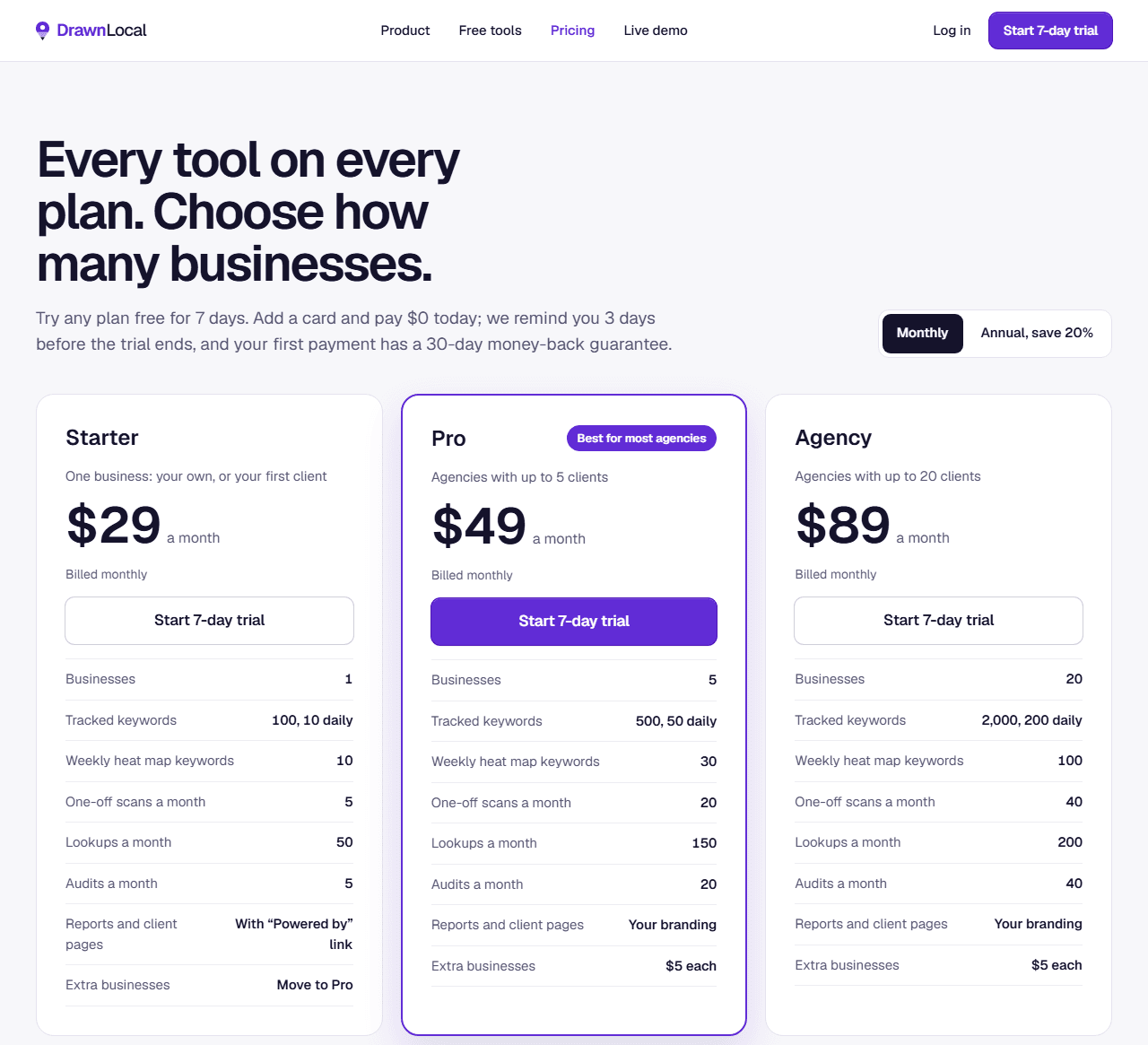
It’s on every plan, from $29 a month for one business to $89 for twenty, and sits next to weekly heat maps, daily rank tracking, reviews and audits. On Pro and Agency, the report and the client’s live page carry your branding.
Best for: agencies that want AI visibility as one part of a monthly local report. Not for: clients who need Gemini, Perplexity or Grok tracked.
2. BrightLocal Local AI Visibility
BrightLocal tracks the same three engines, with up to 20 prompts per location checked twice a month, on its Track plan and above. Track costs $41 a month for one location, $62 for 2 to 5 and $104 for 11 to 20, billed monthly.
Its free AI checker sends a one-off report for one location, with up to 5 prompts on one platform. Best for: agencies already on BrightLocal for citations.
3. Local Falcon AI scans
Local Falcon checks Google AI Overviews, AI Mode, Gemini, ChatGPT and Grok. AI scans use the same credits as its map scans, and its pages give no fixed cost per AI scan.
Plans start at $24.99 a month for 7,500 credits, and new accounts get 100 free credits. Best for: agencies that need the most AI engines and already budget in credits.
4. Local Dominator AI Tracker
Local Dominator’s AI Tracker covers ChatGPT, Gemini, AI Mode, Perplexity, Claude and Grok, on every plan. It’s paid in credits, and the pricing page doesn’t publish how many credits a check uses.
The Advanced plan, at $59 a month, manages 5 profiles. Best for: agencies that want AI tracking next to Google Business Profile management. Local Dominator pricing has the detail.
5. Semrush AI Visibility Toolkit
Semrush’s toolkit tracks 25 prompts daily on ChatGPT, Google AI, Gemini and Perplexity, at $99 a month per domain, billed yearly. It’s built around brands and websites rather than a business in a particular town.
Best for: brands and agencies already using Semrush for national SEO. For many small local clients, per-domain pricing adds up quickly.
6. SE Ranking AI visibility
SE Ranking’s Core and Growth plans include 25 AI prompts checked daily across 5 AI engines. Core costs $129 a month, billed monthly, as part of a full SEO suite with local tracking and listings.
Best for: agencies that sell general SEO and want daily AI checks in the same account. SE Ranking for local SEO prices it for local agencies.
Worked example: AI tracking for 12 local clients
Say you look after 12 single-location trades businesses and want 20 prompts tracked for each. These figures are an example to show the sums, billed monthly.
- DrawnLocal: Pro covers 5 businesses for $49, and 7 extra businesses add $35. That’s $84 a month for 240 prompts, every other week, plus heat maps, rank tracking and reviews for all 12.
- BrightLocal Track: 12 locations fall in its 11 to 20 band, so $104 a month, with 20 prompts per location twice a month.
- SE Ranking: 12 clients need more than Core’s 10 projects, so Growth at $279 a month, with 25 AI prompts a day.
Agency, at $89 for up to 20 businesses, matches Pro plus extras at 13 clients, so DrawnLocal never costs more than $89 a month up to 20 clients.
How often each tool checks AI answers
Frequency decides how much a monthly share can be trusted, and how much each check costs:
| Tool | How often | Prompts |
|---|---|---|
| DrawnLocalOur pick | Every other week | Up to 20 per business |
| BrightLocal | Twice a month | Up to 20 per location |
| Semrush AI Visibility Toolkit | Daily | 25 per domain |
| SE Ranking | Daily | 25 on Core and Growth |
| Local Falcon | When you scan, in credits | As many as your credits cover |
| Local Dominator | In credits; cost per check not published | As many as your credits cover |
Daily checks give more answers to average. For a monthly client report, two or three readings a month on three engines give enough answers to show a trend over a few months.
What to look for in a local AI visibility tracker
- The platforms your clients’ customers use. For home-service searches, start with Google’s AI answers and ChatGPT.
- Repeated checks. In BrightLocal’s 2026 study of about 200,000 local AI searches, a repeat AI Mode search named the same businesses only about 21% of the time. One check proves nothing; a share over a month does.
- Competitors named. Knowing who’s recommended instead is what turns a score into a plan.
- A price that works across clients. Per-domain and credit pricing can be cheap for one business and expensive for twenty.
- It sits in the client report, next to the heat map and reviews, so AI visibility isn’t one more login.
Google AI Mode and local SEO explains what makes a business more likely to be named, and does ChatGPT recommend your business covers ChatGPT.
DrawnLocal vs BrightLocal for AI visibility
They track the same three platforms with the same 20-prompt limit per business, so price and the rest of the plan decide it. DrawnLocal costs $29 against BrightLocal Track’s $41 for one business, $49 against $62 for up to five, and $89 against $104 for up to twenty, billed monthly. Both include rank tracking; DrawnLocal also includes review tracking against competitors on every plan, where BrightLocal keeps review monitoring for its Grow plan. BrightLocal pricing has the full table.
How to choose the prompts to track for a local client
Twenty prompts go further when they cover the different ways customers ask. For a plumber in Denver, a set could look like this:
- 5 “best” prompts: “best plumber in Denver”, “best emergency plumber in Denver”, one for each main service.
- 5 neighborhood prompts: the same services with the areas the client serves, such as “24 hour plumber near Five Points Denver”.
- 5 problem prompts: what the customer is facing, such as “who should I call for a burst pipe in Denver?”.
- 3 trust prompts: “most trusted plumbing company in Denver”, “plumber with good reviews in Denver”.
- 2 price prompts: “plumber in Denver with upfront pricing”, “affordable drain cleaning in Denver”.
Keep the list the same from month to month, so the share is comparable. Swap a prompt only when the client adds or drops a service, and note the change in the report.
Who’s named instead: turning AI results into a plan
A useful part of any AI check is the list of businesses named in your client’s place. Those are the competitors the AI engines lean on for that search.
Compare them with your client on the things you can see: Google Business Profile categories and completeness, review count and rating, and the service pages on their websites. BrightLocal’s study found the Google Business Profile was the most cited source across the three platforms it measured.
Then pick one gap to close each month, and watch the share over the next two or three checks.
Rankings and AI answers: track both
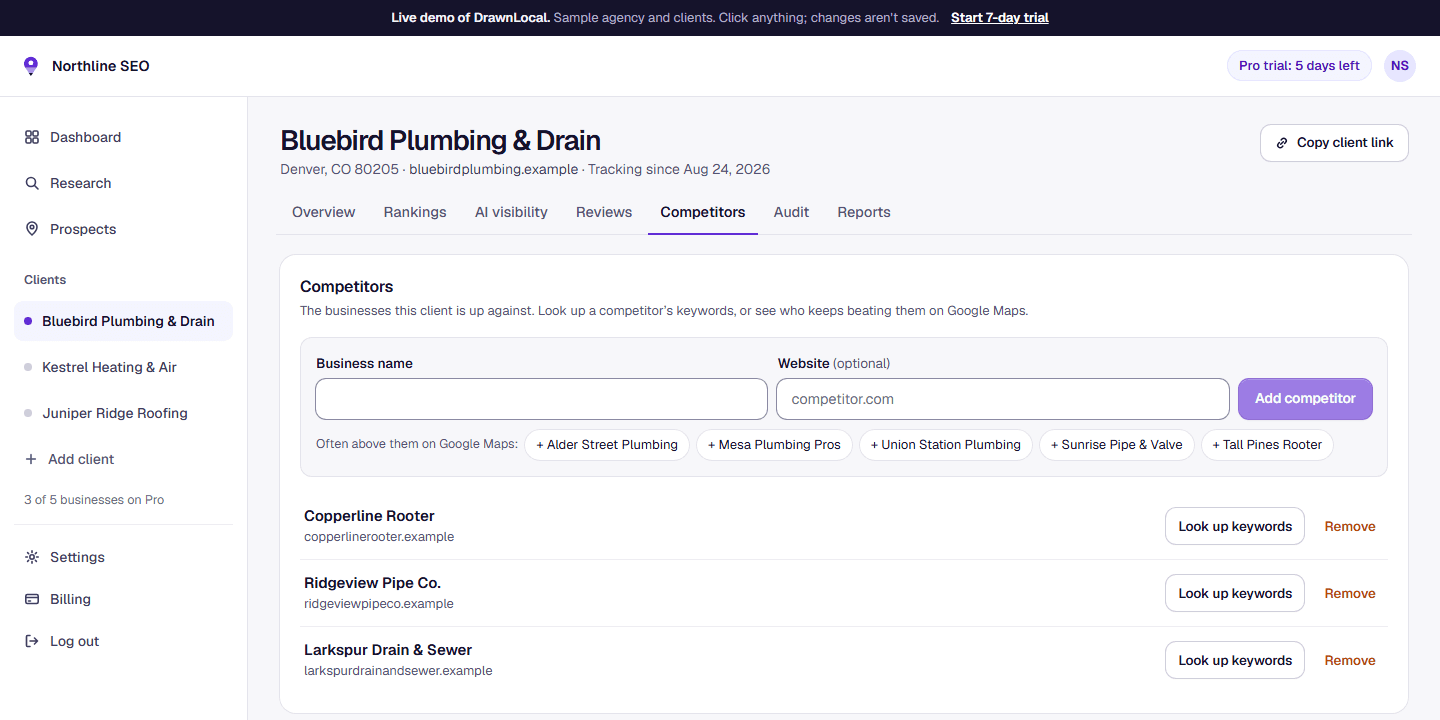
Maps rankings and AI answers measure different things, and they can disagree. A business can sit in the Maps top 3 near its office and still be missing from ChatGPT’s answer for the same city, or the reverse.
So report them side by side: the heat map shows where the business wins on Google Maps, and the AI share shows whether assistants recommend it. When both move up together, the client sees the work paying off twice.
What to work on when AI doesn’t name your client
We know of no published formula for how AI engines pick local businesses, so treat this as a checklist of the basics:
- Complete the Google Business Profile. In BrightLocal’s 2026 study it was the most cited source across ChatGPT, AI Mode and AI Overviews.
- Match categories and services to the prompts you track, in the profile and on the website.
- Keep reviews coming in. They’re part of the profile that AI answers can draw on.
- Give each main service its own page that names the city and the areas served.
- Keep the name, address and phone number the same everywhere the business is listed.
Google AI Mode and local SEO goes through each in detail. Track the AI share and the heat map together to see whether the same work moves both.
Reporting AI visibility to a client
Clients understand a share faster than a list of answers. Put three things in the monthly report: the share of answers that named them, the change since last month, and the one or two businesses named most often instead.
DrawnLocal puts AI visibility on each client’s live page, next to the heat map and reviews, so the client sees it between reports too.
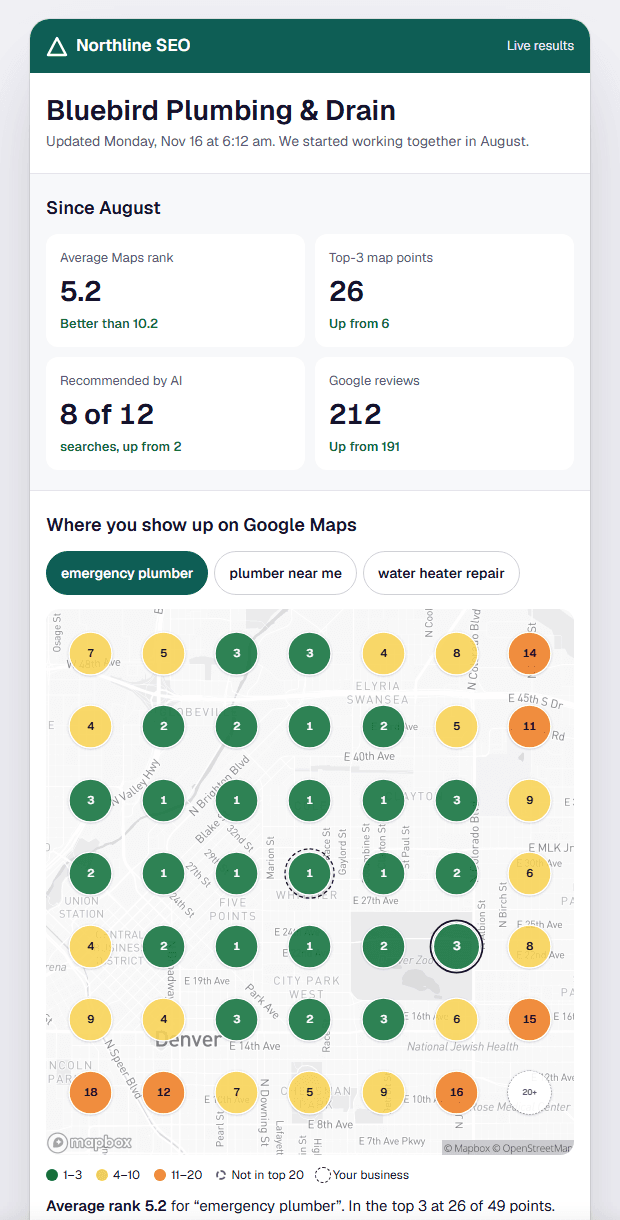
- The share this month, such as “named in 56% of AI answers”.
- The change since last month, in points.
- The share by engine: ChatGPT, Google AI Mode and AI Overviews.
- The businesses named most often instead, with one line on why they might be preferred.
- One action for next month, tied to that gap.
Common mistakes when tracking AI visibility
A few habits make AI numbers look better or worse than they are:
- Tracking only “best [trade] in [city]”. Customers also ask about problems, neighborhoods and prices. Mix the prompt types.
- Changing prompts every month. Then this month’s share can’t be compared with last month’s.
- Reporting one answer. A single answer can flip on the next search. Report the share across the month.
- Ignoring who’s named instead. The businesses recommended in your client’s place show what to work on.
- Checking from the wrong place. DrawnLocal’s free checker asks ChatGPT from the city’s country and AI Mode from the city itself, so local answers come back.
AI visibility terms, explained
Tools use these words in slightly different ways:
- Prompt: the question sent to the AI, written the way a customer would ask it.
- Engine: the AI product that answers, such as ChatGPT, Google AI Mode or AI Overviews.
- Share of answers: how many answers named the business, out of all the answers checked in a period.
- Named instead: the businesses an answer recommends in place of your client.
- Cited source: a web page or profile the AI links to or draws on, such as a Google Business Profile.
Questions to ask an AI visibility tracker before you buy
Feature pages blur together. Ask these six questions, in the trial or by email:
- Which engines, exactly? Ask for names, not a count.
- Is it per location or per website? Local clients need per location.
- How often is each prompt checked, and is the score a share over time?
- Does it show who’s named instead for every prompt?
- Where is each check run from? A city, a country, or nowhere in particular.
- What does it cost at 20 clients, not just at one?
DrawnLocal’s answers: ChatGPT, Google AI Mode and AI Overviews, tracked per business. Each prompt is checked every other week and reported as a monthly share, with the businesses named instead. At 20 clients it costs $89 a month.
When the credit-based tools make sense
Local Falcon and Local Dominator check more AI platforms: Local Falcon adds Gemini and Grok, and Local Dominator adds Gemini, Perplexity, Claude and Grok. Local Falcon’s AI scans use the same credits as its map scans, at one credit per grid point. The monthly cost depends on how many prompts you scan, how often and at what grid size. Local Dominator doesn’t publish its credits per check. If a client’s customers rely on Perplexity or Gemini, one of these is worth the extra math. Our posts on Local Falcon pricing and Local Dominator pricing show how to work it out.
Semrush’s toolkit checks daily and covers Gemini and Perplexity, but it’s priced per domain and built for brands rather than local businesses in a particular town.
Free ways to check AI visibility
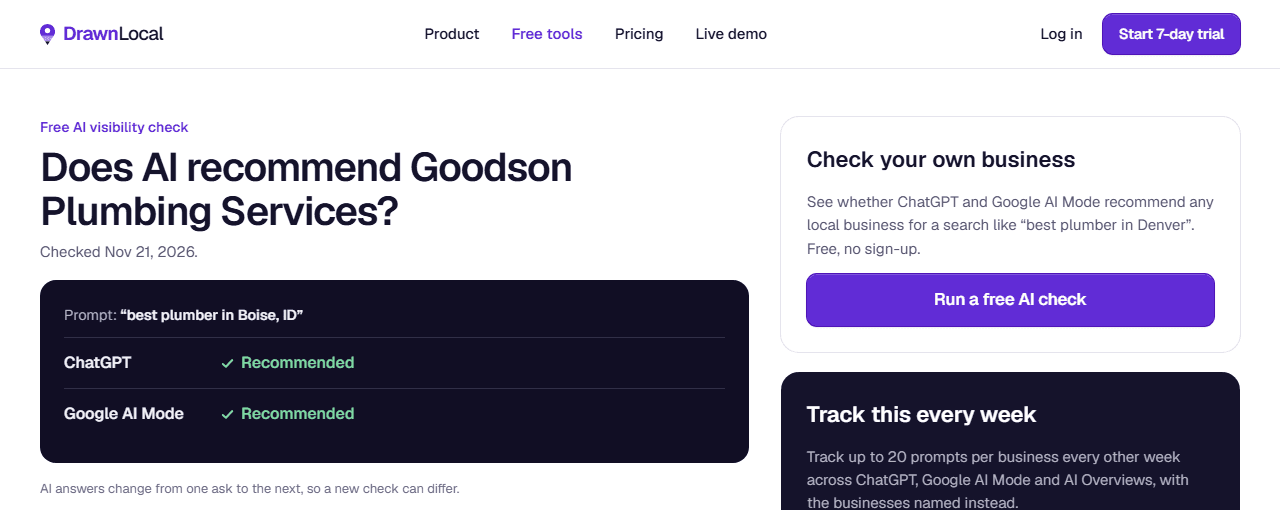
DrawnLocal’s free AI visibility checker tests one prompt on ChatGPT and Google AI Mode, with no account, and emails the businesses recommended instead. BrightLocal’s free checker sends a one-off report for one location, up to 5 prompts on one platform, and Local Falcon gives 100 free credits on sign-up with no card. Free local rank trackers lists the free map options too.
How to run a free AI visibility check
You can test one business in about a minute, with no account:
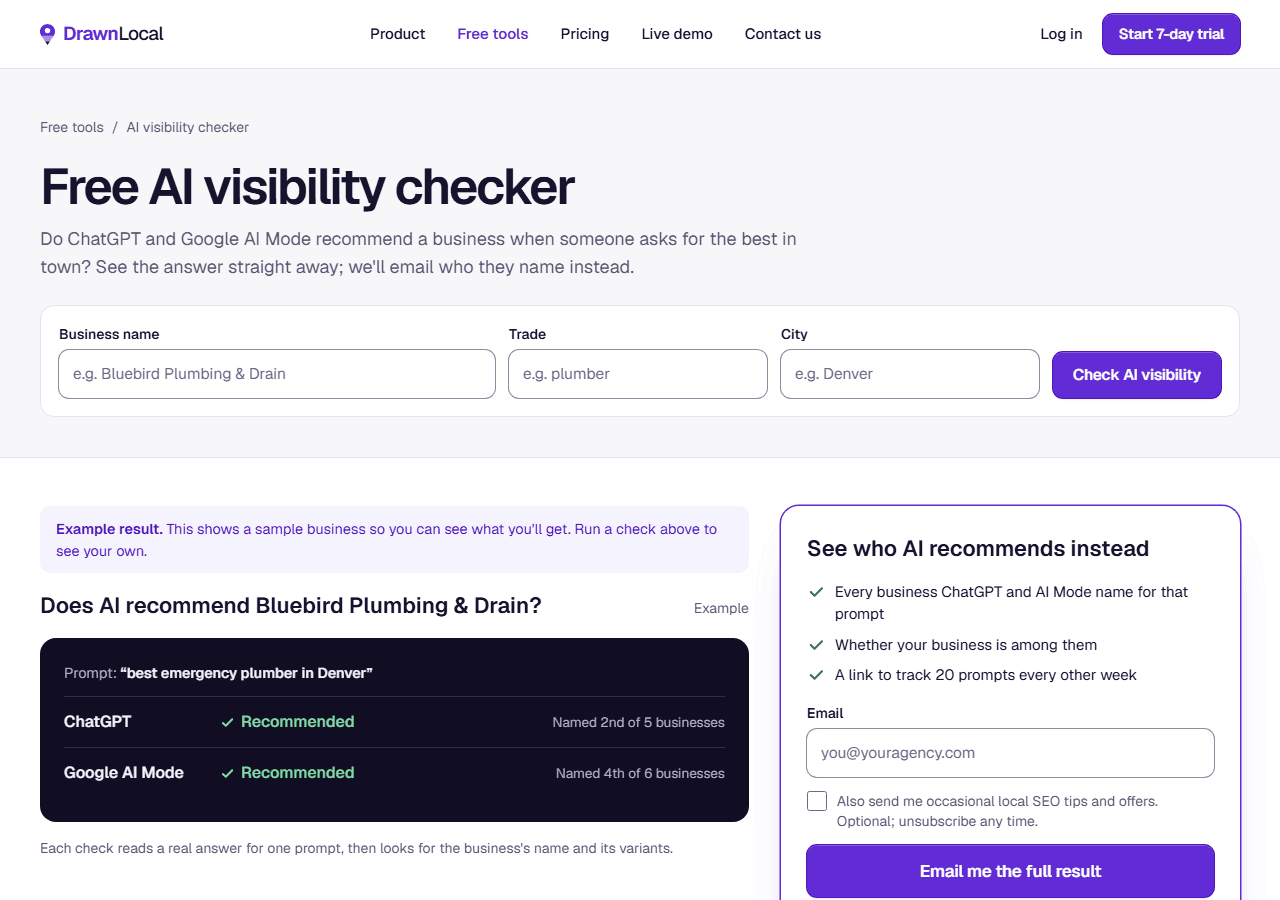
- Open the [free AI visibility checker](/tools/ai-visibility-checker).
- Enter the business name, its trade and its city, such as “Bluebird Plumbing”, “plumber”, “Denver”.
- Read both answers. The checker asks ChatGPT and Google AI Mode for the best business of that trade in that city, and shows whether this one is named.
- Note who’s named instead, with the date. Leave your email to get the full list.
- Check again another day before drawing a conclusion. One answer is a snapshot.
Our pick for agencies
For agencies with local clients, DrawnLocal is the AI visibility tracker to start with. It covers the three engines BrightLocal’s 2026 study measured for local searches, with 20 prompts per business, and names who’s recommended instead.
It costs less than BrightLocal at every size, and the same price covers heat maps, daily rank tracking, reviews and branded reports. Choose a credit-based tool only if a client’s customers lean on Gemini, Perplexity or Grok.
Questions
What is an AI visibility tracker?
A tool that asks AI assistants such as ChatGPT and Google AI Mode the questions customers ask, on a schedule, and records whether a business is recommended and who is named instead.
Which AI platforms matter most for local businesses?
Start with Google’s AI answers (AI Overviews and AI Mode) and ChatGPT, the three platforms BrightLocal’s 2026 study measured. In that study, the Google Business Profile was the most cited source across them.
How often should AI visibility be checked?
Often enough to see a trend, because answers vary between searches. Every other week across 20 prompts gives a monthly share you can report and compare over time.
Does SE Ranking track AI visibility?
Yes. Its Core and Growth plans include 25 AI prompts checked daily across 5 AI engines, checked Nov 26, 2026. It’s part of a full SEO suite from $129 a month, billed monthly.
What is the cheapest AI visibility tracker for agencies?
Among tools that track ChatGPT, Google AI Mode and AI Overviews per location, DrawnLocal. It costs $29 a month for one business, $49 for five and $89 for twenty, with heat maps and rank tracking included.
Sources
Facts about other companies come from their own websites, checked on Nov 21, 2026.
- BrightLocal: Local AI Visibility
- BrightLocal: pricing
- BrightLocal: local AI visibility study (published Sep 16, 2026)
- Local Falcon: pricing
- Local Falcon: AI search visibility
- Local Falcon Knowledge Base: how to run AI visibility scans
- Local Dominator: pricing
- Local Dominator: AI Tracker
- Semrush: AI Visibility Toolkit pricing
- SE Ranking: pricing