Local pack vs local finder vs Google Maps: what’s the difference?
Three places, one ranking system, different results. Here’s what each one is, why a business can be third in one and missing from another, and which one agencies should track and report.
By the DrawnLocal team · · Updated · 14 minute read
Local pack vs local finder vs Google Maps at a glance
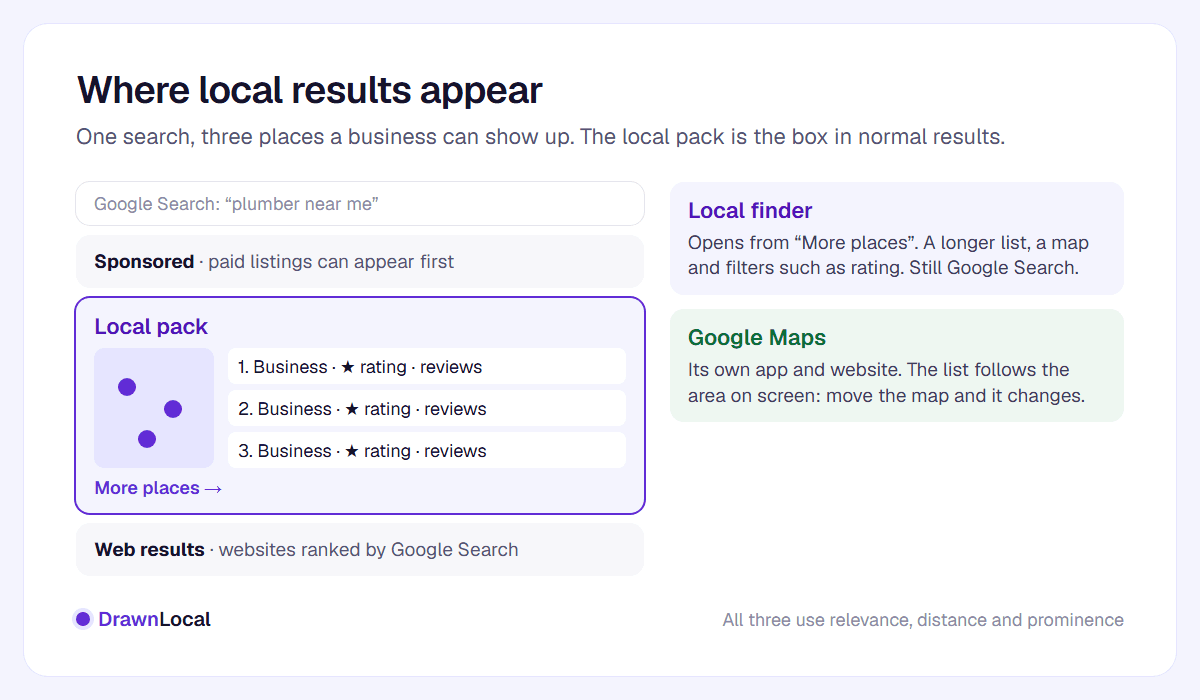
The local pack is the short list of businesses with a small map inside normal Google results. The local finder is the longer list behind it, one click away. Google Maps is a separate app with its own map-led list. All three rank businesses the same way, but each one shows a different slice of the results.
For an agency, the difference matters because clients judge results by what they see on their own phone. Knowing which shelf a client is on, at which points in their area, is the start of every useful report and plan.
The local pack
Search “plumber”, “plumber near me” or “plumber Aurora” on Google, and you’ll usually see a small map with a short list of businesses above or among the normal results. Each shows its name, rating, review count and hours, with buttons to call, get directions or visit the website. That box is the local pack.
It shows only the top few businesses for that search from that location, so it’s the first set of businesses many searchers see. Paid listings can appear above it, labeled as sponsored.
Google shows the pack when a search has local intent. That includes searches with a service and a place (“plumber Aurora”), with “near me”, or with just a service that people usually want nearby (“plumber”). A search for a how-to or a product to buy online may not trigger one.
People also call it the “map pack” or the “3-pack”. The names mean the same box.
The local finder
Below the pack is a link to see more places. It opens the local finder: a longer list with a map beside it, plus filters such as rating or opening hours. The list continues past the businesses in the pack, ordered by the same ranking, and the searcher is still on Google Search, not in Maps.
The finder is where comparing happens. Someone who opens it wants more choice than the pack gave them, and filters can cut the list further. A business with a low rating can drop out of view the moment a searcher filters by rating, whatever its position.
Google Maps
Google Maps is its own app and website. Searching there shows businesses on a full map with a list beside or under it, and the results follow the area on screen: drag or zoom the map and the list changes.
Some people search straight from the Maps app on their phone, for example when they’re out and need someone fast. That’s why agencies measure Maps positions directly, from points across the client’s area, rather than only checking the pack in a browser.
Same ranking system, different results
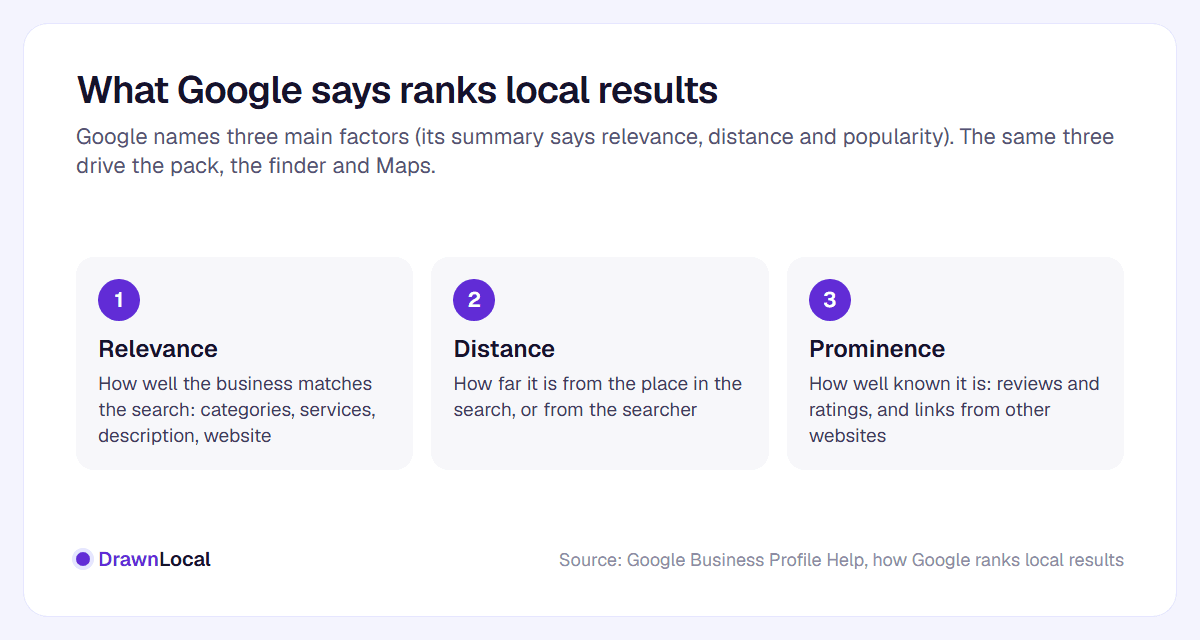
Google says local results are ranked mainly on three things. Relevance is how well a business matches the search. Distance is how far it is from the location in the search, or from the searcher. Prominence is how well known it is; Google says that includes how many websites link to the business and how many reviews it has. Google’s own summary calls the three relevance, distance and popularity.
| What it shows | Where it lives | What changes the list | |
|---|---|---|---|
| Local pack | A few businesses, usually three, and a small map | Google Search results | The search and the searcher’s location |
| Local finder | A longer list with a map and filters | Google Search, after selecting more places | The same, plus any filters chosen |
| Google Maps | Businesses on a full map, with a list | The Maps app and website | The search, the searcher’s location and the area on screen |
So a business can be third in the pack for someone on its street and eighth in the finder for someone across town. In Maps, it can be off the screen for someone zoomed into another neighborhood. Nothing is wrong: each view answers a slightly different question. How Google Maps rankings work explains the three factors in more depth.
What each factor means in practice
Google’s three factors are broad. Here’s what an agency can and can’t change for each one:
| Factor | What it covers | What you can change | What you can’t |
|---|---|---|---|
| Relevance | How well the business matches the search | Primary and additional categories, services, the description, a website page for each service | What the business actually does |
| Distance | How far it is from the searcher or the place searched | Area pages for towns it serves, so it matches searches that name them | Where the business is; a fake address breaks Google’s rules |
| Prominence | How well known the business is | Reviews and ratings, links from local websites, mentions | Competitors’ reputations |
Distance is the one that surprises owners. It’s why a business can be first on its own street and missing two towns away, and why no amount of work makes it first everywhere. Does the website affect Google Maps ranking? covers the website side of prominence.
A live example: one plumber, nine points
Here’s a real business checked with DrawnLocal’s free heat map on Nov 21, 2026: a plumbing company in Boise, Idaho, for “plumber”, from 9 points 1 mile apart.
At its own address it ranks first. It’s in the top 3 at 7 of the 9 points, so searchers standing there will likely see it in the local pack. At the other two points it’s fourth and sixth: below the pack, and only in the local finder or further down the Maps list.
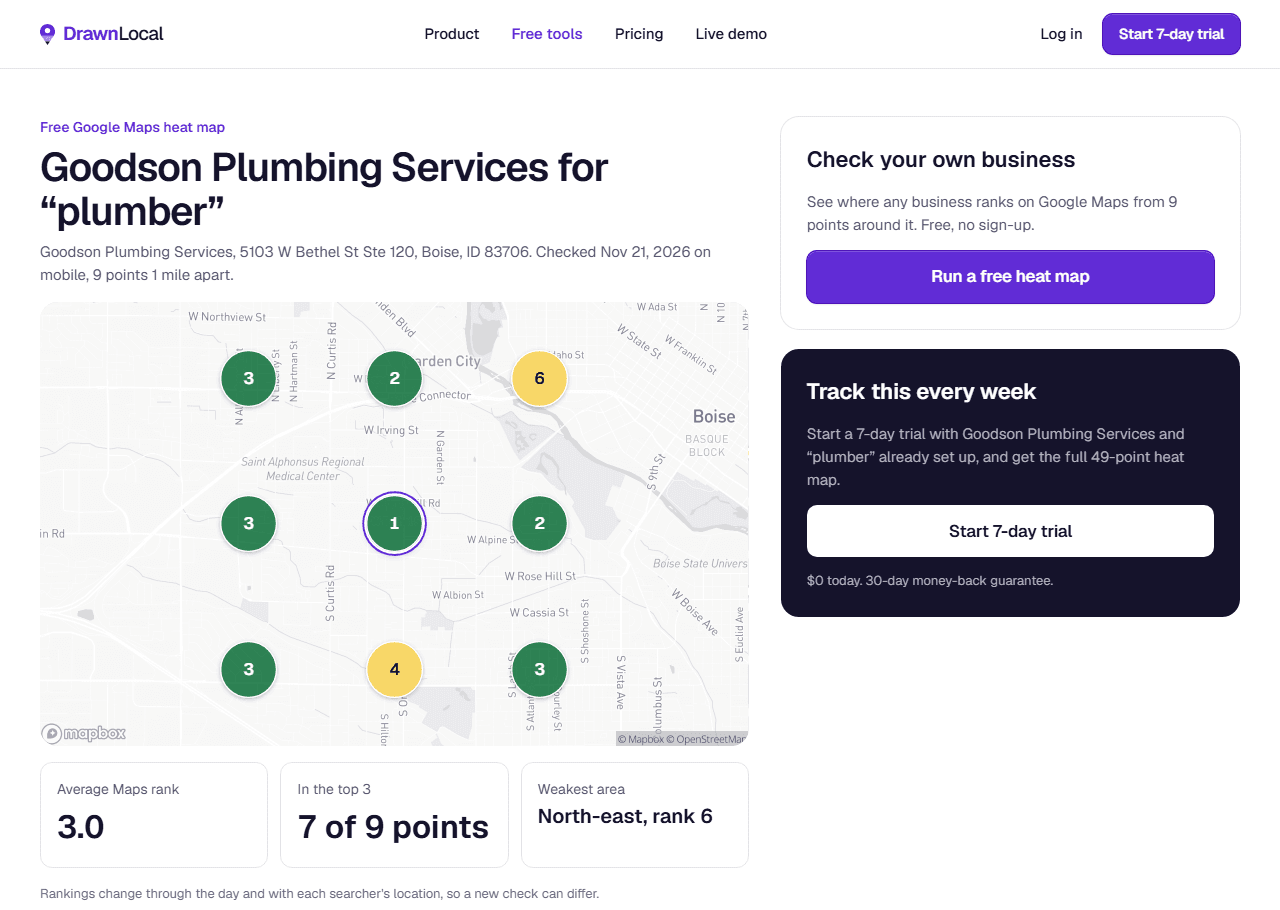
That’s the whole difference between the pack and the finder, on one map. The same business, the same search, and a different shelf depending on where the searcher stands.
Inside the pack at some points, below it at others
The same nine results, sorted into the two shelves. Green points are likely pack positions; yellow points mean a searcher there has to open the local finder to see the business.
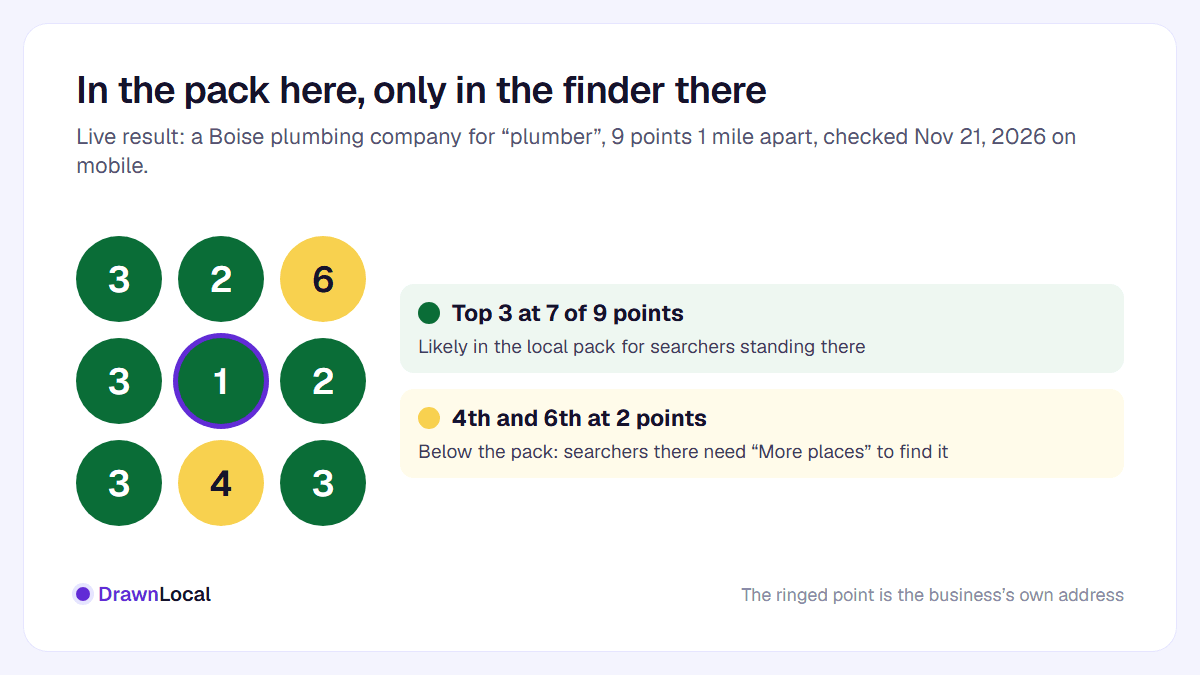
For an agency, the yellow points are the opportunity. A business at fourth is one place from the pack, and the work that moves it is usually the work above: relevance and prominence, with distance taken as given.
Same city, two different top 3s
Wording changes the list too. On the same day, two live Google Maps lookups in Boise returned different top 3s. “Plumber” searched from the city center put one company first; “plumber Boise, ID” put a different one first and swapped in a new third.
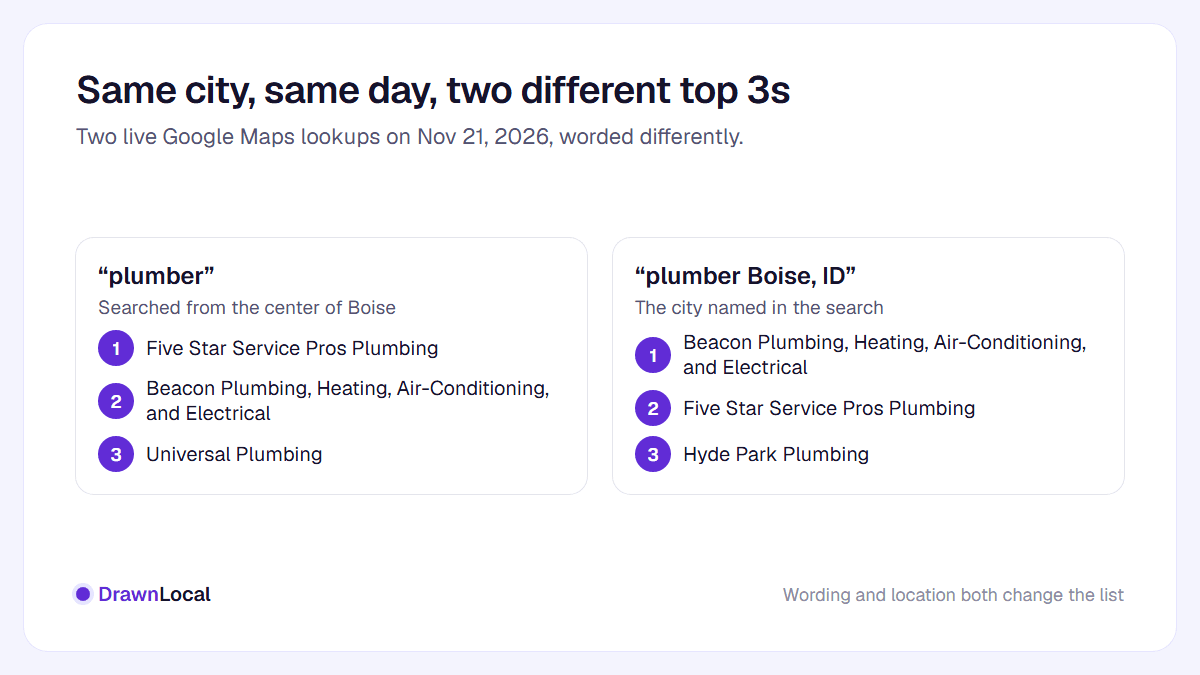
So track the searches customers really use, in their words, and from the places they search. A report built on one phrasing from one spot can be right and still mislead.
When the local finder matters
Positions four to ten aren’t wasted. The finder is where careful buyers compare, so a business there still gets seen by people who want more choice. Three cases where it matters most:
- Bigger jobs. People replacing a roof or a furnace often compare several businesses before they call.
- Filtered searches. A searcher who filters by rating or opening hours sees a reordered list, so a strong rating can lift a business into view.
- Dense markets. In a busy city the pack changes every few streets, and the finder is where a business appears across a wider area.
Still, the pack is the prize. It’s the first set of businesses the searcher sees, before they decide whether to look further.
A practical rule for clients: aim for the pack at the points nearest the business and in the towns it most wants work from. Accept the finder further out, where distance works against it, and watch those points for steady movement instead.
How to move a client from the finder into the pack
Work on the points where the client sits just below the top 3, in this order:
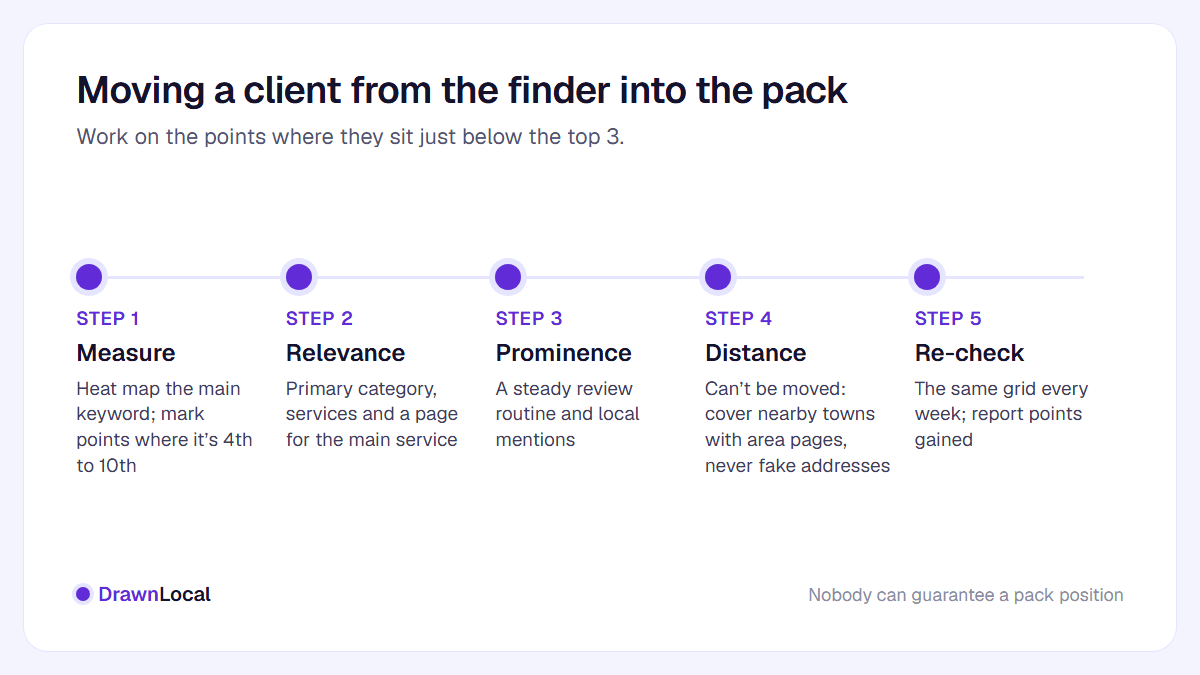
- Measure. Run a heat map of the main keyword and mark the points where the client is fourth to tenth.
- Fix relevance. Check the primary category, add real additional categories and services, and make sure the website has a page for the main service.
- Build prominence. Start a review routine that asks every customer, reply to every review, and earn local mentions.
- Work with distance. Write a page for each nearby town the business serves. Never add a fake address to get closer.
- Re-check the same grid every week, and report how many points moved into the top 3.
Nobody can guarantee a pack position, so report the points gained rather than promising a place. How to rank higher on Google Maps has the full step-by-step.
Which one should an agency track?
Track Google Maps positions across a grid of points for each main keyword. A heat map shows where the business is in the top 3 and where it disappears. Being in the Maps top 3 at a point usually means appearing in the local pack for searchers there. A single rank from one spot can’t show that; how to read a local SEO heat map covers what the patterns mean.
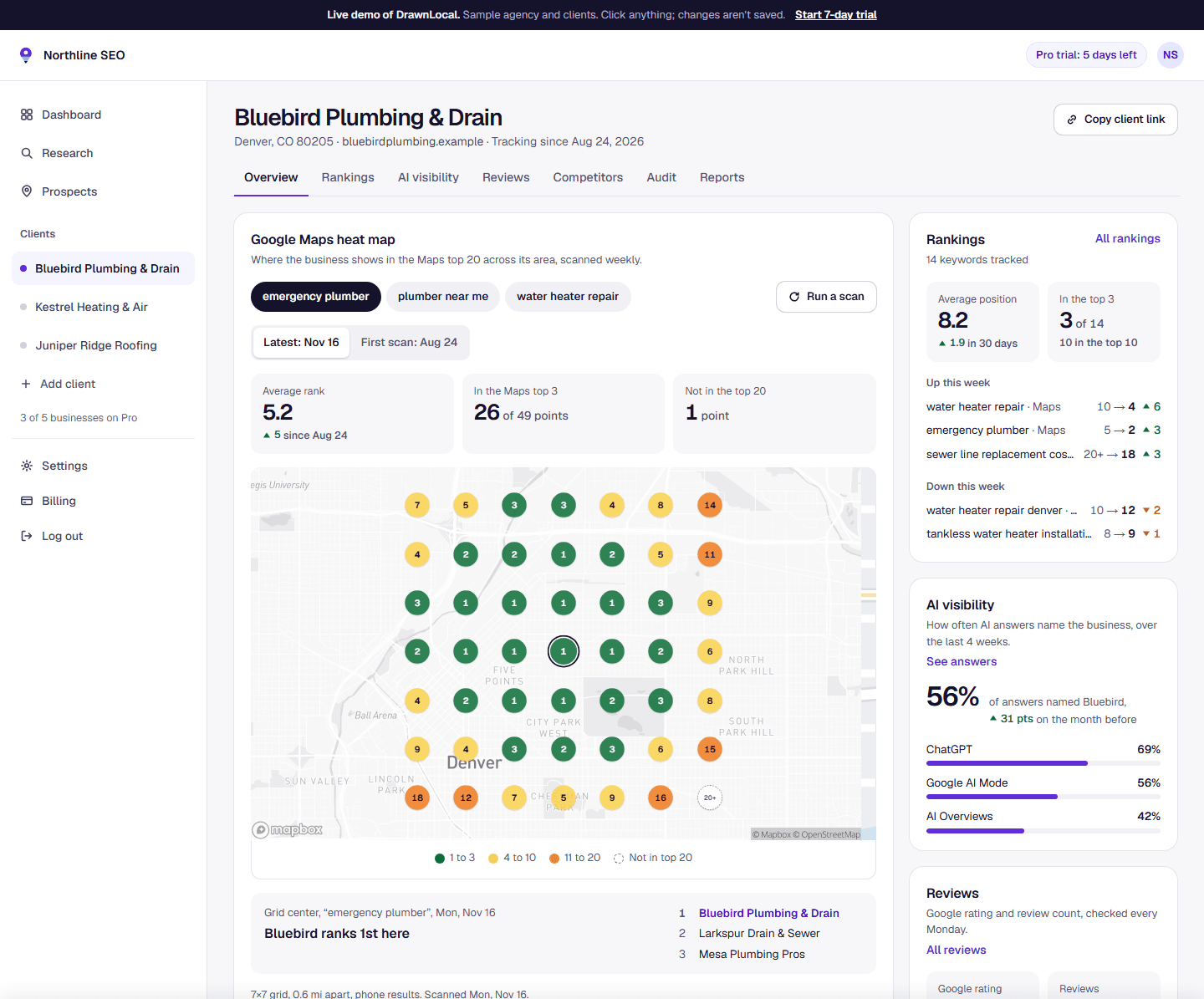
Then check Maps and organic positions daily for the client’s most important searches, from the town or ZIP code they care about. DrawnLocal does both: weekly heat maps from up to 49 points, and daily rank checks for the keywords you choose, each showing the location, device and date it was checked.
Track Maps and web positions side by side
A heat map shows the area. Daily rank checks show the trend for the searches that matter most. In DrawnLocal each keyword is labeled with where it was checked: Google Maps or Google search, the ZIP code or city, and the device.
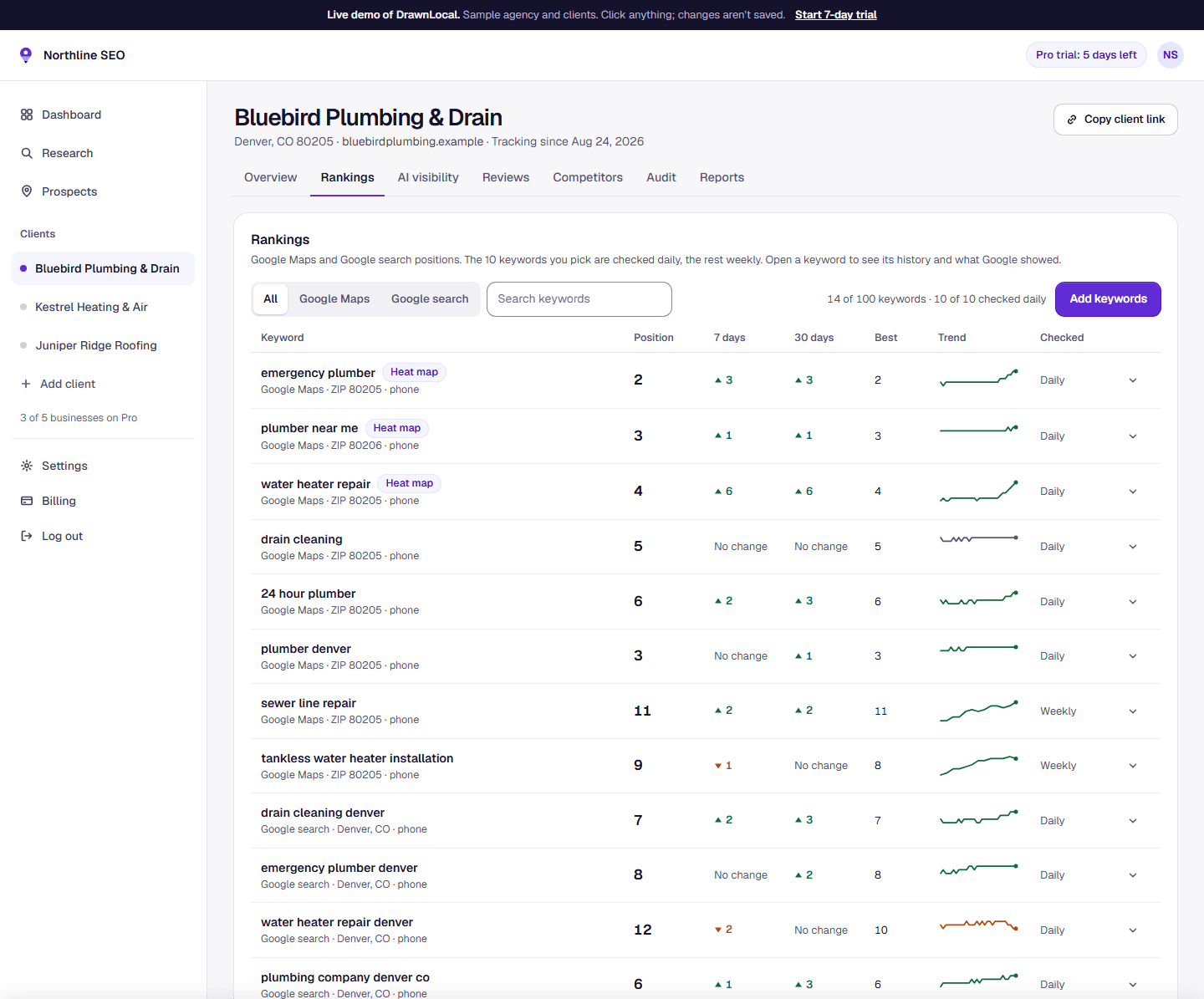
Checking both is useful because the pack mixes them. The local pack ranks businesses on Maps signals, while the web results under it rank websites. A client can rise in one and not the other.
How to report the pack, the finder and Maps to clients
Owners don’t need three reports. They need one clear number and a picture. Lead with the share of map points where they’re in the top 3, compared with the month they started. Then show the heat map, so they can see where they win and where they don’t.
Avoid reporting a single rank. It describes one spot and one moment, and it invites the owner to check from their shop and get a different answer. A live client page helps, because they can check the map whenever they like:
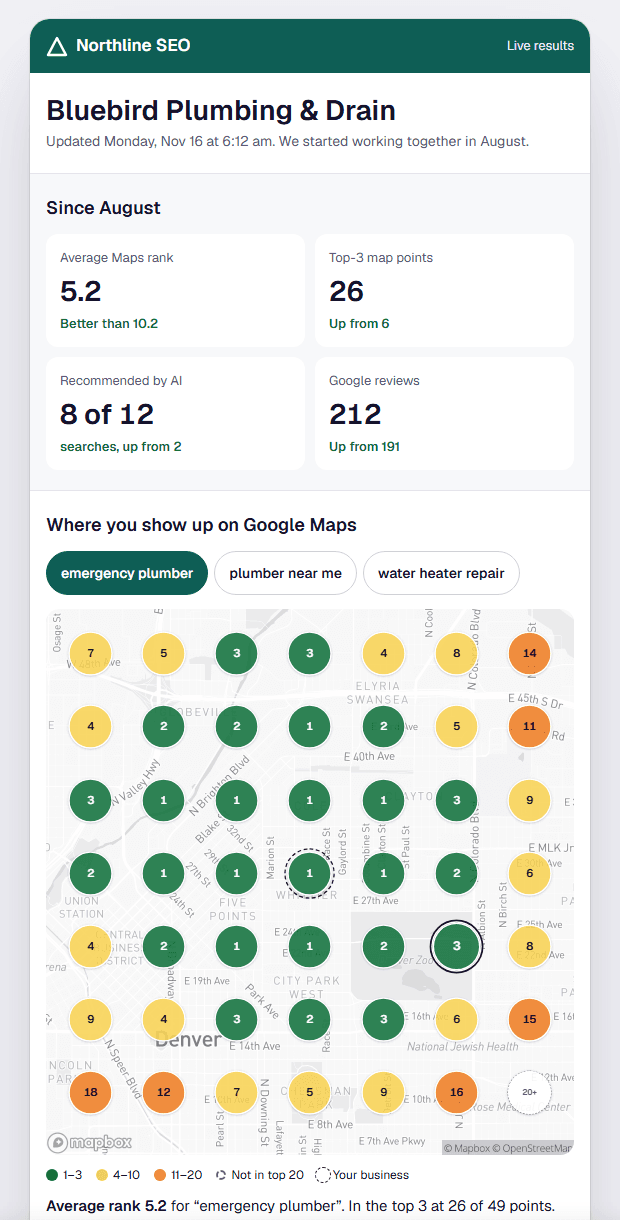
The local SEO report template shows the order to put it all in.
Run your own check in a minute
To see the pack-and-finder split for any business, run a free heat map. Pick the business as it appears on Google, enter a keyword, and the tool checks 9 points around it on Google Maps.
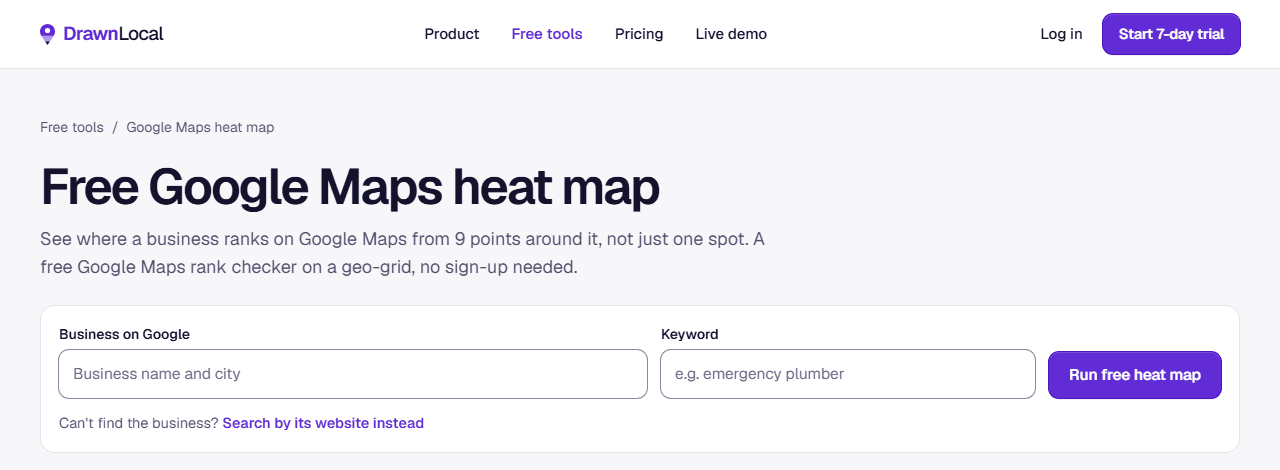
Run it for a prospect before a sales call, or for a client before you change anything, and keep the result as the starting point. The free check uses 9 points; DrawnLocal’s paid plans check 49 points every week, which shows the edges of the pack more clearly.
Worked example: measuring pack coverage
“Pack coverage” is a simple way to turn a heat map into one number: the share of grid points where the business is in the top 3. It tells an owner how much of their area sees them first.
| Grid | Points in the top 3 | Pack coverage |
|---|---|---|
| Boise plumber, live, 9 points | 7 of 9 | 78% |
| Sample Denver plumber, 49 points, first scan | 6 of 49 | 12% |
| Sample Denver plumber, 49 points, latest scan | 26 of 49 | 53% |
| Example: 4 more points next month | 30 of 49 | 61% |
A 49-point grid is more useful than 9 for reporting, because each point is a smaller share of the area and progress shows sooner. Report the change against the first scan, not last month, so the trend is clear.
Is a client ready for the pack? A 10-point check
Before you promise any work, check the basics that decide whether a business can compete for the pack at all:
- It has a verified Google Business Profile at a real address, or as a service-area business.
- The primary category matches its main service.
- Services and additional categories cover the work it really does.
- The name on the profile is the real business name, with no added keywords.
- Hours are complete and up to date.
- Reviews arrive every month, and each one gets a reply.
- The rating holds up against the top 3 for its main search.
- The website has a page for the main service and the main towns.
- Name, address and phone match across the website and main listings.
- No duplicate or old profiles exist for the same location.
Each “no” is a fix to make before ranking work pays off. The local SEO audit checklist covers these and more.
When an owner asks “why aren’t we in the 3-pack?”
It’s a common question, and a fair one. A short answer that works:
“From your shop, you probably are. The pack changes with where each customer is standing, so we check from 49 points across your area every week. Right now you’re in the top 3 at 26 of them, up from 6 when we started. The rest is where we’re working next.”
Use the client’s real numbers, and show the map while you say it. If they aren’t in the pack anywhere yet, say so plainly and point to the first fix.
Local Services Ads and the pack
Some searches show Local Services Ads above everything else. They’re paid, labeled as sponsored, and charged per lead. They sit apart from the local pack, which is ranked, not bought.
A business can appear in both, and many trades use both. Local Services Ads vs Google Maps compares the two in detail.
How often the pack changes
Positions move as competitors collect reviews, edit their profiles or open new locations, and when Google changes how it ranks results. A business can slip from the pack without doing anything wrong.
That’s why weekly checks matter more than a monthly snapshot. A weekly heat map catches a drop early, so you can tell the client, with a cause and a plan, before they notice it themselves. Why a business drops out of the Maps top 3 lists the usual causes.
The local pack vs the web results below it
The same results page holds two different rankings. The local pack ranks businesses on Google’s local factors. The web results underneath rank websites, and they follow Google’s normal search ranking.
A local business can win one and miss the other. A plumber with a strong profile and plenty of reviews can sit in the pack while its website is on page two. Another with a well-written website can rank in the web results and still be outside the pack.
Both are worth tracking, and they can help each other. Google says prominence includes how many websites link to a business, so the links that help a website in web results can count on the Maps side too.
Service-area businesses and the pack
Plumbers, roofers and cleaners often work at customers’ homes and hide their address on the profile, listing service areas instead. They still compete for the same pack, and the same three factors still apply.
The difference is in what to measure. A grid across the whole service area matters more than any single spot, because the business wants calls from every part of it. Google Maps rankings for service-area businesses covers the details.
A one-page pack report for clients
Keep the monthly pack report to one page, in this order:
- Pack coverage: the share of grid points in the top 3, against the first scan.
- The heat map for the main keyword, this month next to the first month.
- Points gained or lost since last month, with the reason for any big change.
- What you did, in three lines.
- What’s next: the area or keyword you’re working on, and why.
That’s enough for most owners. Put the full keyword list and every map in an appendix, or on a live page they can open when they want more.
Common myths about the local pack
- “We’re number one on Google.” Usually true from one spot only. Check a grid before believing it, or repeating it.
- “The pack is separate from Maps.” It’s a different view, but it ranks on the same three factors.
- “Paying for ads lifts the pack.” Sponsored listings sit apart and are labeled. Google says there’s no way to request or pay for a better local ranking.
- “Keywords in the business name are a shortcut.” Google’s rules forbid adding them, and a profile can be suspended for it; see keywords in the business name.
- “The finder doesn’t matter.” It’s where comparing buyers look, and where a near miss becomes a pack position with the right work.
Terms used in this guide
| Term | Meaning |
|---|---|
| Local pack (map pack, 3-pack) | The box of a few businesses with a small map in Google Search results |
| Local finder | The longer list that opens from “More places” under the pack |
| Google Maps | The separate Maps app and website, with results that follow the area on screen |
| Local intent | A search where Google expects people want something nearby |
| Heat map (geo-grid) | Maps positions checked from a grid of points across an area |
| Sponsored listing | A paid result, labeled as sponsored, that can appear above the pack |
More terms are in the local SEO glossary.
Why the client sees something different
Owners search from their shop, on their phone, after clicking their own listing a hundred times, and then ask why the report says something else. Location is usually the main reason, and personalization and the device add more. Why your client’s rank looks different has a short explanation to send them.
Questions
Is the local pack the same as Google Maps?
No. The local pack is a box of a few businesses inside Google Search results; Google Maps is a separate app and website. Both use the same local ranking factors, but Maps shows results for the area on screen, so the lists can differ.
How many businesses are in the local pack?
Usually three, with a small map. Paid listings, labeled as sponsored, can appear above them. The full list is in the local finder, one click away.
What is the local finder?
The longer list of businesses that opens when a searcher selects more places under the local pack. It shows a map, filters and the businesses ranked below the pack, and it’s still part of Google Search.
Why does my client show in Google Maps but not in the local pack?
Usually because they rank just below the top 3 from where the searcher is. The pack shows only the top few; positions four and lower are in the local finder and further down the Maps list.
Does ranking first in Google Maps mean ranking first in the local pack?
At the same location and for the same search the order is usually close, because both use relevance, distance and prominence. Maps also follows the area on screen, so they don’t always match.
Sources
- Google: how local results are ranked