Free local rank trackers: 5 options, and what each really gives you
Free is fine for a one-off check or a sales pitch. Here are five free ways to see where a business ranks in Google Maps, what each one really gives you, and the point where tracking clients means paying.
By the DrawnLocal team · · Updated · 14 minute readPrices checked Nov 21, 2026
- $0 today
- Cancel online in one click
- 30-day money-back guarantee
On this page
- What a local rank tracker does
- Local rank checker, tracker or heat map: which do you need?
- Free local rank trackers compared
- 1. DrawnLocal’s free heat map, rank checker and AI checker
- 2. Semrush Map Rank Tracker free tier
- 3. Local Falcon’s free credits
- 4. BrightLocal’s free trial and AI checker
- How to check local rankings online for free, step by step
- How to check rankings by city or ZIP code
- Phone or computer: which results to check
- How often to check local rankings
- Heat map rank tracking (geo-grid), explained
- Why searching Google yourself isn’t a free rank tracker
- Common mistakes when checking local rankings
- What free local rank trackers can’t do
- Worked example: checking one plumber by hand vs on a plan
- When free stops being enough
- The best paid local rank tracker for agencies
- What to look for in a paid local rank tracker
- A free rank check log you can copy
- Questions
What a local rank tracker does
A local rank tracker checks where a business shows up in Google’s local results, as seen from a place you choose. It answers two questions: where does the business appear in Google search, and where does it sit on Google Maps?
The place matters because Google’s help pages list distance as one of the main things local results depend on. So a local tracker searches from a city, a ZIP code or a set of map points, not from your own desk.
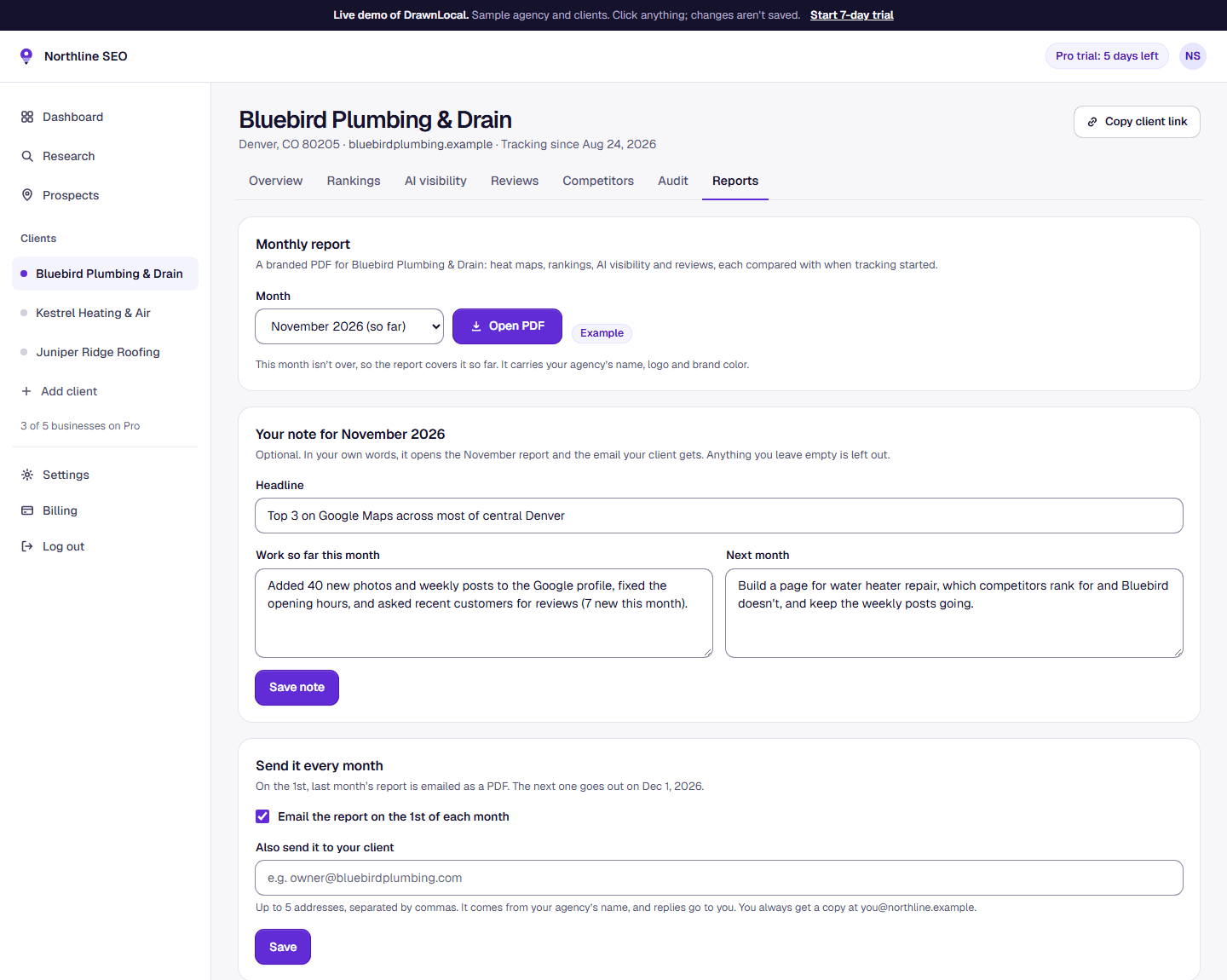
Over time, a tracker repeats the same checks on a schedule and keeps the history. That history shows whether the work is moving the business up, and it’s what a monthly client report is built on.
Local rank checker, tracker or heat map: which do you need?
Three kinds of tool share the name, and each answers a different question. Pick the one that answers the question you have today.
| Tool | The question it answers | Where it checks from | Best for |
|---|---|---|---|
| Local rank checker | Where does this business rank right now? | One city or ZIP code, once | A prospect call or a quick check |
| Local rank tracker | Is the business moving up over time? | Set places, every day or week | Monthly client reports |
| Heat map (geo-grid) | Where in town does it win, and where does it lose? | A grid of points, such as 7×7 | Showing reach across a service area |
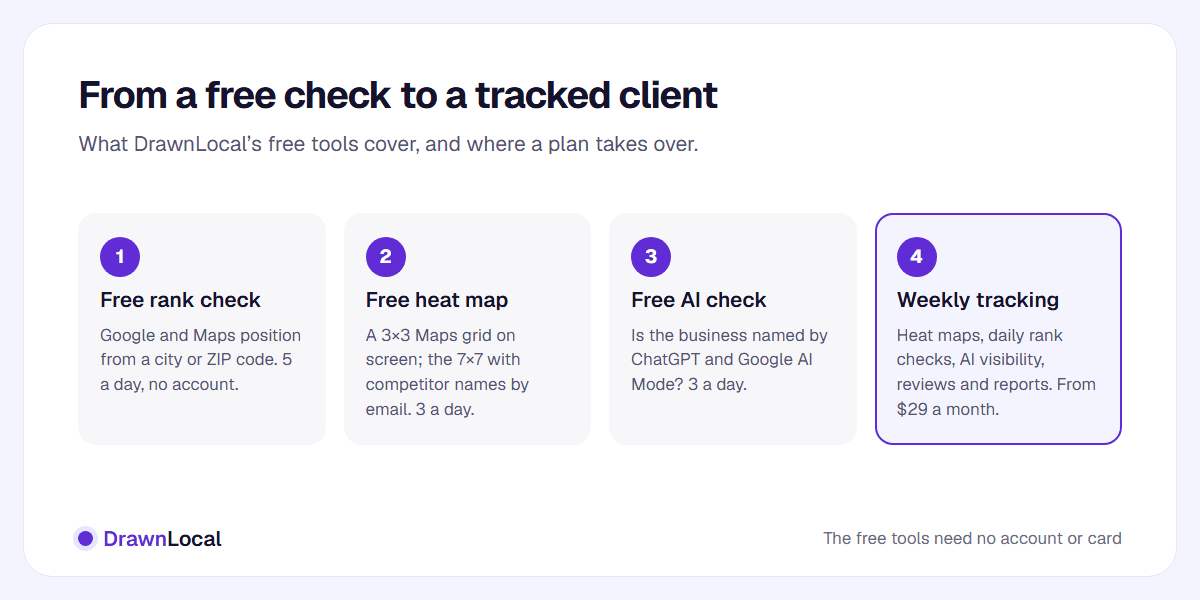
You can use all three: a checker before the sales call, a heat map to show the gap, and a tracker once the client signs. DrawnLocal’s free tools cover the checker and the heat map, and its plans run all three on a schedule.
Free local rank trackers compared
| Option | What’s free | Limits |
|---|---|---|
| DrawnLocal free toolsOur pick | 3×3 heat map on screen, full 7×7 heat map with competitor names by email, rank checker, AI visibility checker | No account; 3 heat maps, 5 rank checks and 3 AI checks a day |
| Semrush Map Rank Tracker (free tier) | One map tracking campaign | One keyword, 5×5 grid only, 50 credits a month |
| Local Falcon | 100 credits on sign-up | No card; one credit per grid point, so two 7×7 scans |
| BrightLocal | 14-day trial of the full product; free one-off AI visibility report | No card for the trial; the AI report covers one location, up to 5 prompts, one platform |
| Whitespark | Lists a Free Local Ranking Checker among its free tools | We didn’t test it |
1. DrawnLocal’s free heat map, rank checker and AI checker
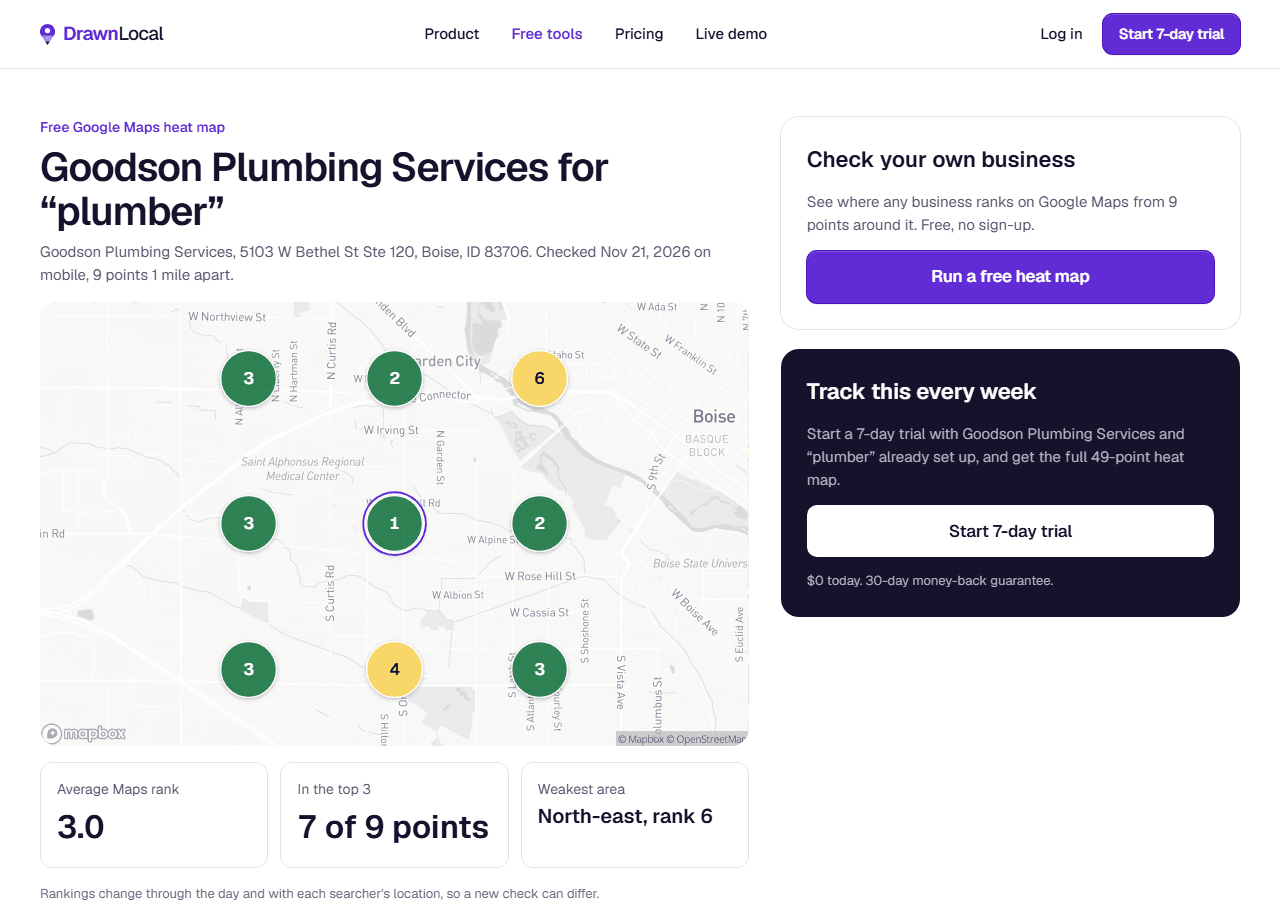
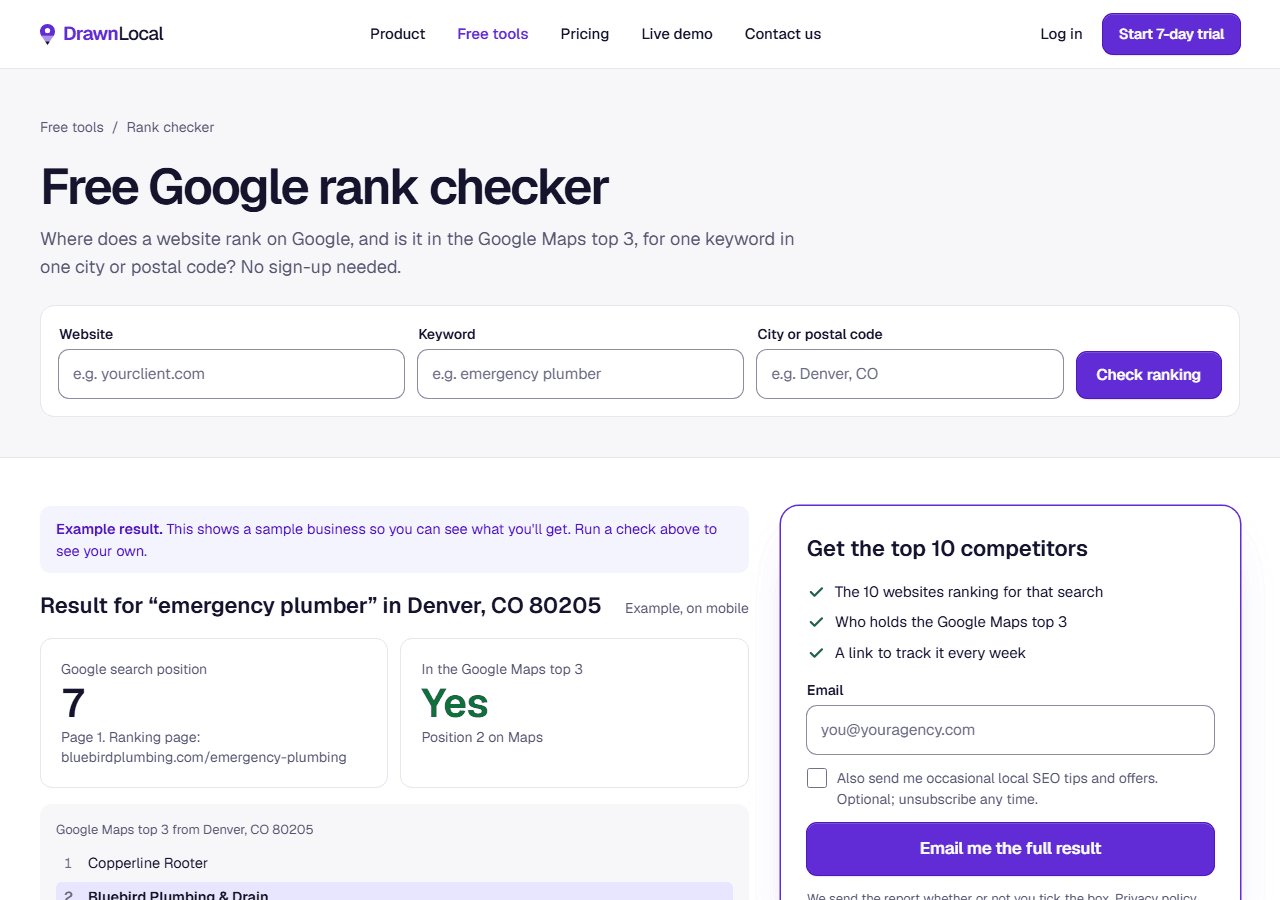
The free heat map takes a business name and one keyword and shows a 3×3 Google Maps grid and average rank on screen. It then emails the full 7×7 grid with the competitors ranking at each point. The rank checker takes a website, a keyword and a city or ZIP code. It shows the Google position and whether the business is in the Maps top 3, and emails the top 10 competitors. The AI visibility checker tests one prompt on ChatGPT and Google AI Mode.
No account is needed for any of them. The heat map and the AI checker allow three runs a day and the rank checker five, which is plenty for checking a prospect before a call. How to read a local SEO heat map explains what the colors mean.
2. Semrush Map Rank Tracker free tier
Semrush’s help center describes a free tier of its Map Rank Tracker with one campaign, one keyword, a 5×5 grid and 50 credits a month. One credit is one map point, so that’s two 5×5 scans a month. That’s enough to see one keyword’s grid twice, but not to watch a client week to week. Paid Semrush Local plans start at $30 per location a month, billed yearly; see Semrush Local pricing.
3. Local Falcon’s free credits
Local Falcon gives 100 free credits on sign-up, with no card. At one credit per grid point, that’s two 7×7 scans or eleven 3×3 ones. Once they’re spent, it’s a trial rather than a free tracker. After that, credits cost $0.05 each pay-as-you-go, or come with plans from $24.99 a month; Local Falcon pricing has the math.
4. BrightLocal’s free trial and AI checker
BrightLocal offers 14 days of full access with no card, a full free look at a paid tool. Its free AI visibility checker emails a one-off report for one location, with up to 5 prompts on Google AI Mode or ChatGPT. After the trial, Track starts at $41 a month for one location; see BrightLocal pricing.
How to check local rankings online for free, step by step
This routine takes about ten minutes per business and needs no account. It gives you a rank, a map and an AI answer to show a prospect or a new client.
- Pick one keyword the business wants calls for. Use the customer’s words, such as “water heater repair”, not the owner’s, such as “residential plumbing services”.
- Check the Google position from the customer’s area. Enter the website, the keyword and the city or ZIP code in the free rank checker. It runs one Google search and one Google Maps search, as a phone in that place would.
- Run the free heat map on the same keyword. The heat map checks Google Maps from 9 points around the business. Leave your email to get the full 7×7 grid with the businesses ranking above it.
- Note who holds the Maps top 3. Those are the competitors to study: their categories, their reviews and their websites.
- Test one AI prompt. The AI visibility checker asks ChatGPT and Google AI Mode for the best business of that trade in that city, and shows whether this one is named.
- Write it down with the date and place. Rankings move, so a result without both can’t be compared later. The log template at the end of this post keeps it tidy.
How to check rankings by city or ZIP code
Check from the place your client’s customers search from, not the place you sit. For a plumber who serves a whole metro area, that means several ZIP codes, not just the one around the shop.
A rank checker that takes a city or ZIP code runs the search as if from that spot. DrawnLocal’s free rank checker does it for Google search and Google Maps together, on mobile, and shows the time of the check.
The live heat map in this post shows why one place isn’t enough. The same search for “plumber” put one Boise company first at its own address, but sixth a mile to the north-east.
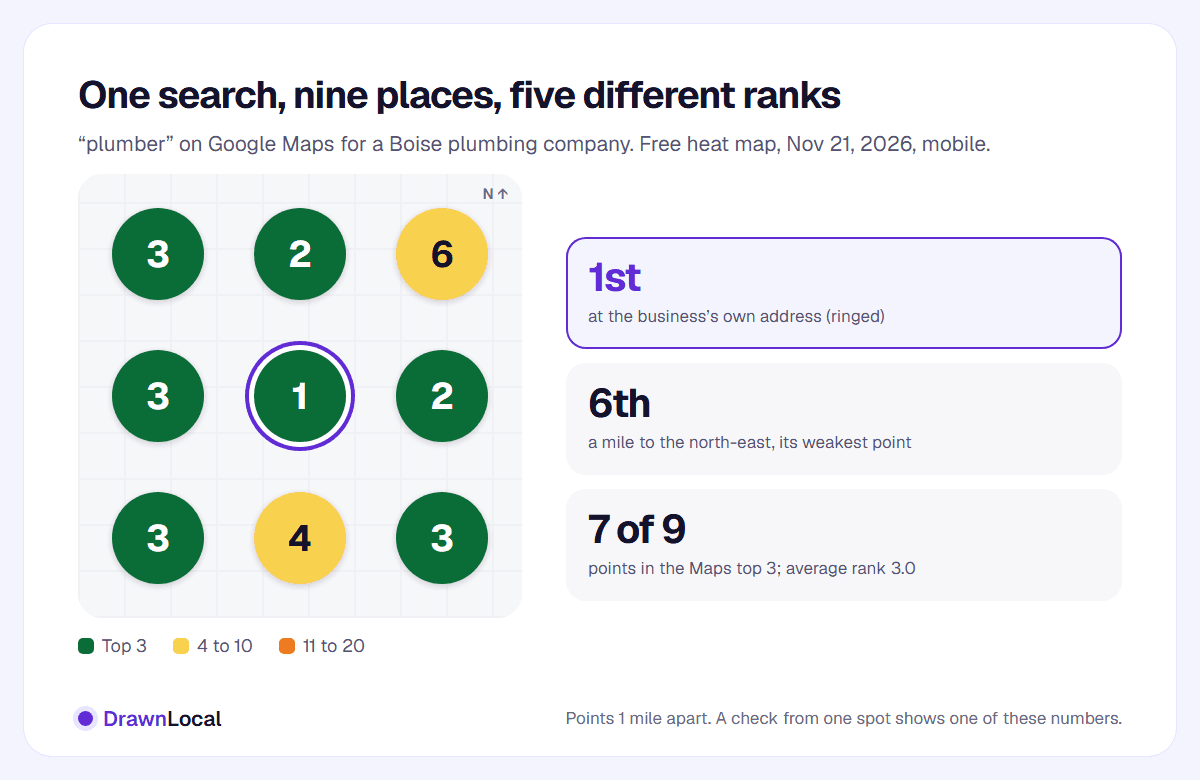
So when a client asks “where do we rank?”, the honest answer is a range. Track two or three ZIP codes for each service area, or use a grid that covers the whole area.
Phone or computer: which results to check
Check on a phone unless the client’s customers mostly search at a desk. Google lays out mobile and desktop results differently, so the same business can sit in a different place on each.
For trades like plumbing, HVAC and locksmiths, the customer may be searching on a phone in the middle of the problem. A desktop check can make the client look better or worse than the search that brings the calls.
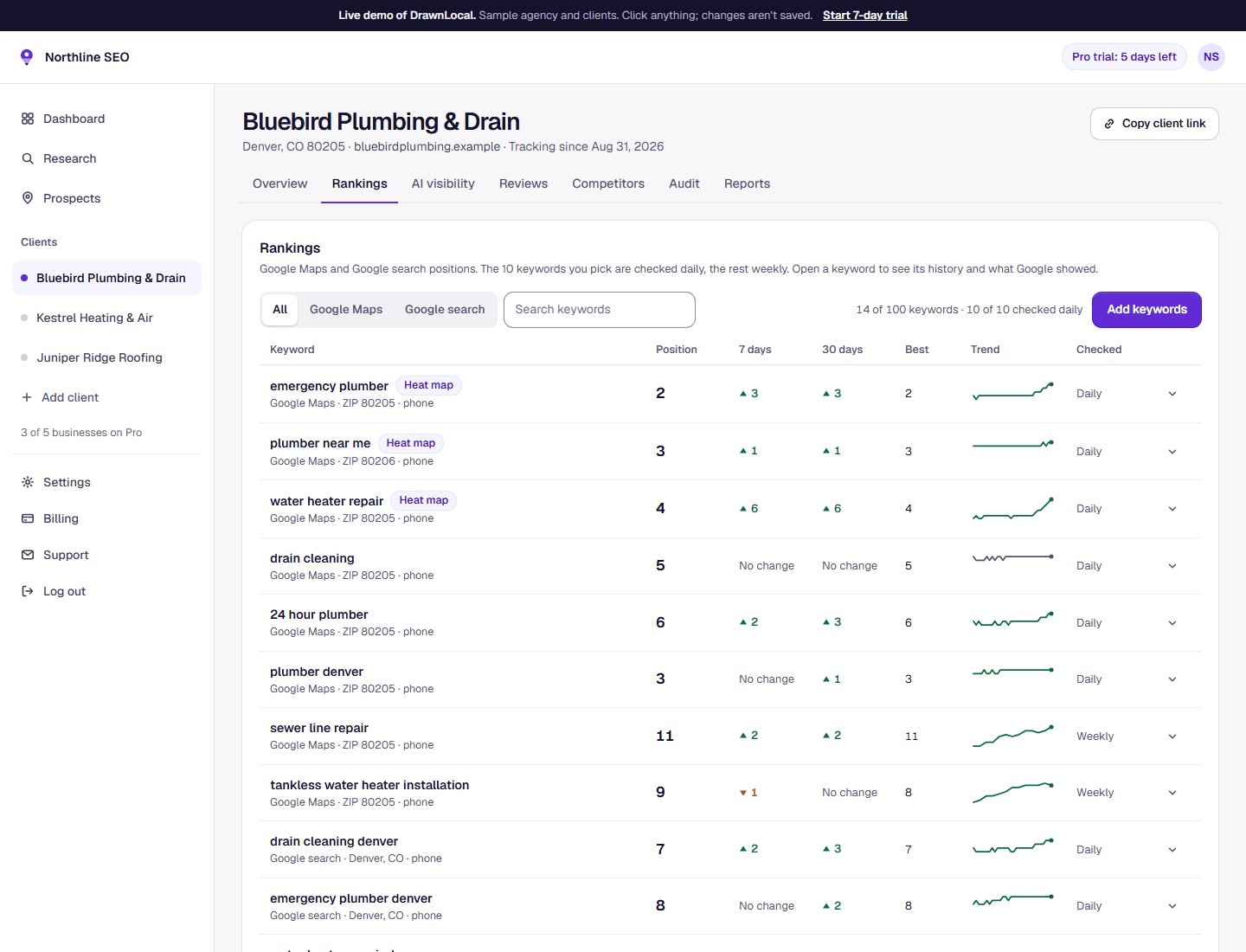
Whatever you choose, keep it the same every time. A switch from desktop to mobile between two reports looks like a ranking change when it isn’t one. DrawnLocal records the device next to every keyword, as the rankings screen above shows.
How often to check local rankings
Check as often as the answer can change what you do next. Checking more often than that adds noise, not information.
| When | What to check | How often |
|---|---|---|
| Before a sales call | A rank check from the prospect’s area and a free heat map on their main keyword | Once |
| First month with a client | 7×7 heat maps on the main keywords, plus the top 10 keywords | Heat maps weekly, top keywords daily |
| Every month after that | The same heat maps and keywords, compared with the starting month | Heat maps weekly, top keywords daily, the rest weekly |
| After a big change | A one-off heat map after a new category, name, address or website | Within a week of the change |
| When the client says “we dropped” | A heat map, not a single search, to see whether the drop is real | The same day |
That’s the schedule DrawnLocal’s plans run on their own: weekly 7×7 heat maps, the top 10 keywords daily, the rest weekly, and one-off scans for the moments in between.
Heat map rank tracking (geo-grid), explained
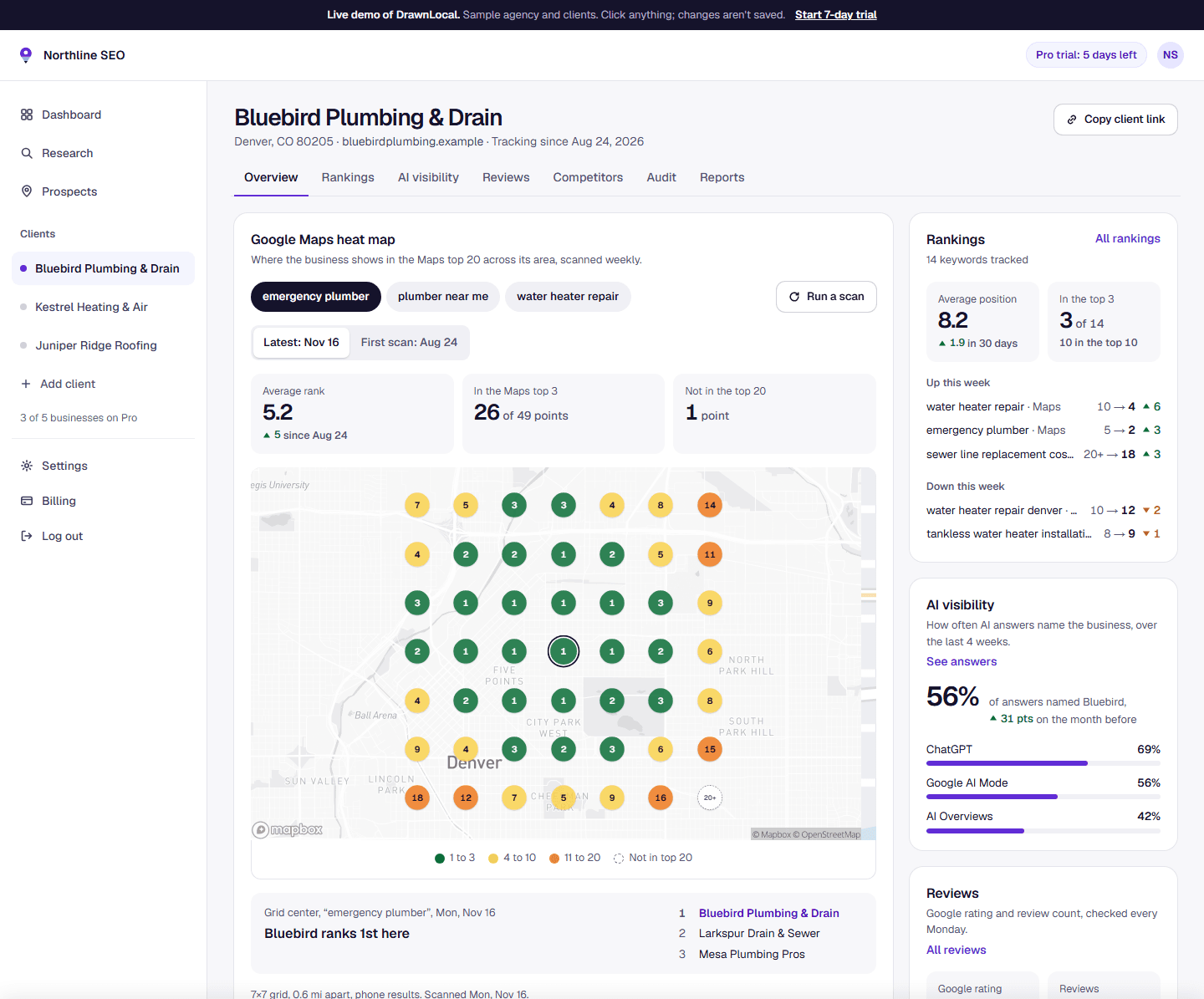
A heat map rank tracker runs the same Google Maps search from a grid of points around the business and colors each point by rank. A 7×7 grid is 49 checks, spaced evenly across the service area.
In DrawnLocal, green points are in the Maps top 3, yellow points rank 4 to 10, and orange points rank 11 to 20. An empty point means the business isn’t in the top 20 there.
Scanned every week, the grid shows the business’s reach growing or shrinking. A client can see the change at a glance, which a list of keyword positions rarely shows.
DrawnLocal’s free heat map shows a 3×3 grid on screen and emails the 7×7. Paid plans scan 7×7 grids every week for a set number of keywords: 10 on Starter, 30 across 5 businesses on Pro and 100 across 20 on Agency.
Why searching Google yourself isn’t a free rank tracker
Searching from your own phone shows the ranking from where you’re standing, shaped by your history. Signed-in history, recent searches and the exact spot you stand on can all change the list. Maps rankings change street by street, so one search says little about a business’s area. Why a client’s rank looks different explains it; a grid of checks from fixed points is the fair measure.
Common mistakes when checking local rankings
How a check is run can mislead as much as the tool itself. Watch for these:
- Checking from your office. Your location shapes the result. Check from the client’s service area instead.
- Mixing phone and computer results. Pick one device per keyword and keep it.
- Watching one keyword. A plumber who ranks for “plumber” may be missing on “water heater repair”, which can bring the bigger jobs.
- Treating one point as the truth. A single check is one spot on a map that changes street by street. Use a grid for the full picture.
- Skipping the date. Results change over time, so an undated screenshot can’t be compared with anything.
- Reacting to one bad day. Check again, then run a heat map before changing the profile. Why a business drops out of the Maps top 3 lists the checks to run first.
What free local rank trackers can’t do
Free tools answer one question at one moment. These are the gaps that show up once a client is paying you:
- No history. A free check doesn’t keep last month’s result, so you can’t show progress.
- No schedule. Someone has to remember to run every check, from the same place, on the same device.
- Small limits. A few runs a day, or a credit pot that runs out, can’t cover several clients every week.
- No daily checks. A sudden drop can go unnoticed for weeks between manual checks.
- No report. The client gets screenshots, not one page that compares this month with the month you started.
- No competitor record. Free tools show who outranks the business today, not who has been gaining on it.
None of this matters for a one-off pitch. It matters a great deal once you promise a client a report every month.
Worked example: checking one plumber by hand vs on a plan
Say you track a plumber on 5 keywords from 3 ZIP codes, plus a weekly heat map on each keyword. These figures are an example to show the sums, not a benchmark.
- Rank checks: 5 keywords × 3 ZIP codes = 15 checks a week. The free rank checker allows 5 a day, so that takes 3 days.
- Heat maps: 5 keywords = 5 free heat maps a week. At 3 a day, that takes another 2 days.
- Time: 20 runs at about 2 minutes each to run and log is 40 minutes a week. Over a month (52 weeks ÷ 12) that’s about 173 minutes, or 2.9 hours.
- Cost of your time: at an example rate of $50 an hour, 2.9 hours is about $144 a month for one client.
- On a plan: DrawnLocal Starter runs the same checks on a schedule for $29 a month and keeps the history. On Pro, 5 such clients cost $49, or $9.80 each.
Free tools stay the right choice for prospects and spot checks. For clients you report on, the hours cost more than the plan.
When free stops being enough
Free tools answer “where does this business rank today?”. Agencies also need “is it getting better?”: the same grid every week, rankings every day, history, alerts and a report the client understands. That’s the point to pay. DrawnLocal starts at $29 a month for one business, $49 for five with your branding and $89 for twenty. Heat maps, rank tracking, AI visibility and reviews are on every plan; see the pricing page.
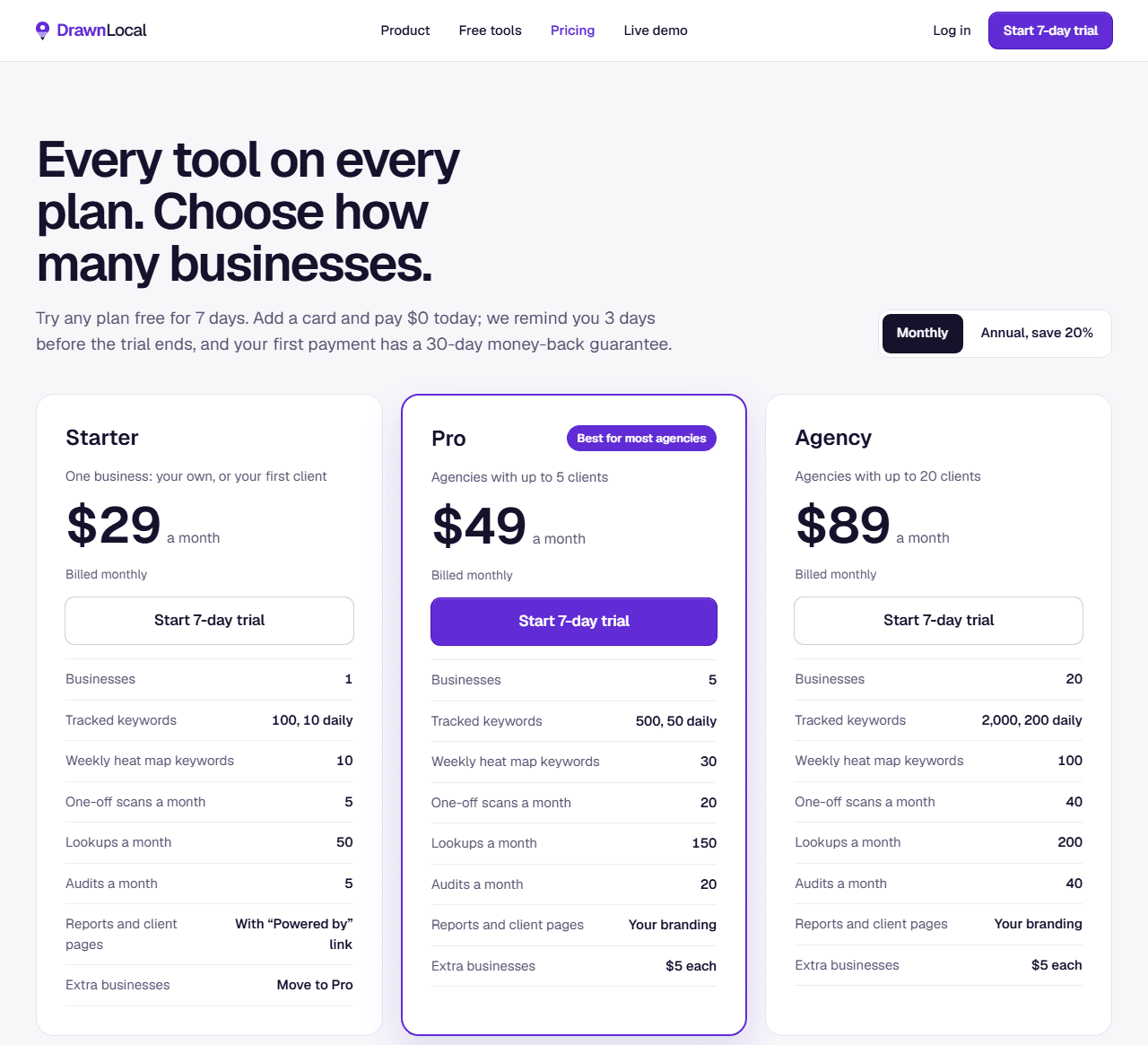
| Plan | Billed monthly | Billed yearly | Businesses | Per business, billed monthly | Weekly heat map keywords |
|---|---|---|---|---|---|
| Starter | $29 | $23 | 1 | $29 | 10 |
| Pro | $49 | $39 | 5 | $9.80 | 30 across 5 businesses |
| Agency | $89 | $71 | 20 | $4.45 | 100 across 20 businesses |
Every plan tracks 100 keywords per business and checks the top 10 daily. Each also includes AI visibility, review tracking, audits and client reports. Your logo and colors on reports start on Pro.
The best paid local rank tracker for agencies
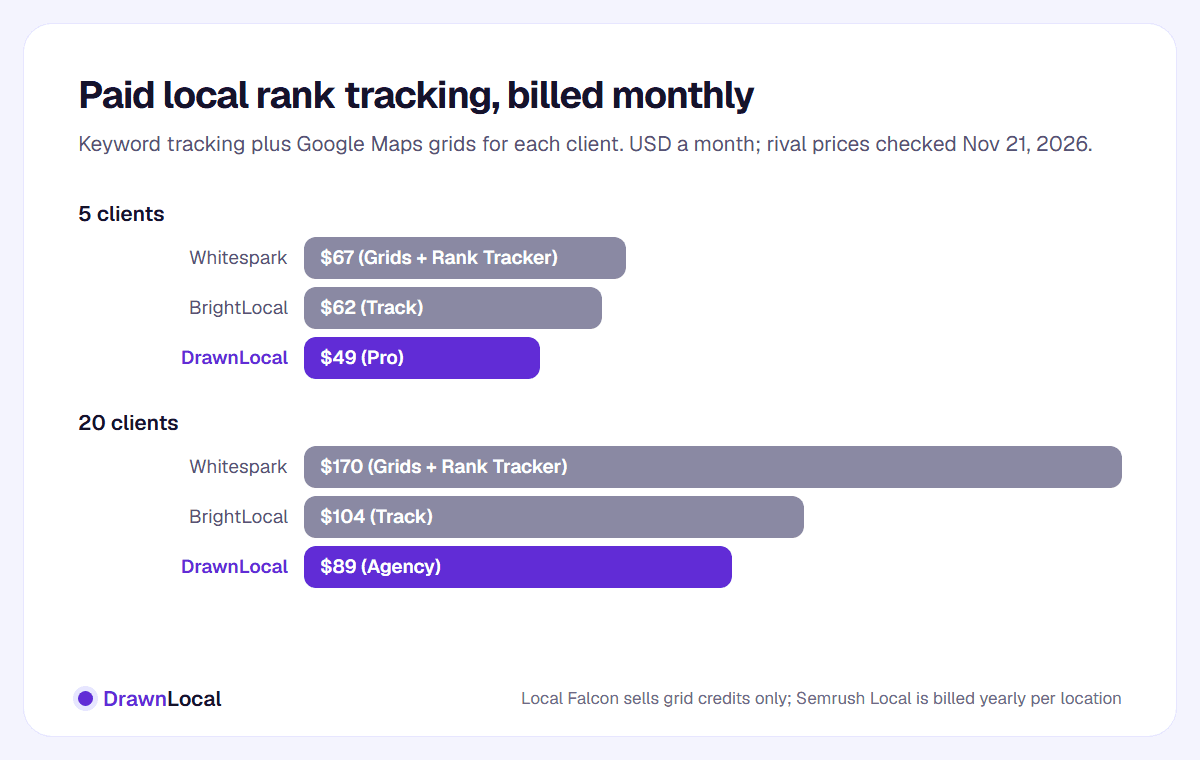
Once you move from free checks to weekly tracking, the price per client decides your margin. Here are the paid versions of the tools in this post, at 5 and 20 clients.
| Tracker | 5 clients | 20 clients | What the price covers |
|---|---|---|---|
| DrawnLocalOur pick | $49 (Pro) | $89 (Agency) | Weekly heat maps, 100 keywords per client with the top 10 daily, AI visibility, reviews, audits and branded reports |
| BrightLocal Track | $62 | $104 | Rank tracking and grid maps for 5 keywords per location; review monitoring needs Grow |
| Whitespark | $67 | $170 | Local Ranking Grids plus Local Rank Tracker, weekly; daily checks cost extra |
| Local Falcon | $24.99 (Starter) | $99.99 (Pro) | Weekly 7×7 grid scans for 5 keywords per client, paid in credits; branded reports need Premium at $199.99 |
| Semrush Local | $150 (Base) | $600 (Base) | Billed yearly, per location; about seven 7×7 map scans per location a month, plus profile management |
DrawnLocal costs the least at 20 clients. At 5 clients it’s the cheapest option that also includes keyword tracking, reviews and branded reports. Local Falcon’s Starter plan is cheaper at 5 clients if grid scans are all you need.
Our full comparison of seven tools, with the same workload priced for each, is in best local rank trackers for agencies.
What to look for in a paid local rank tracker
When free isn’t enough, test any paid tracker against this list before you move clients to it:
- Places you control. Search from a ZIP code, a city or map points, and keep that place fixed between checks.
- Device on record. Every result should say whether it came from a phone or a computer.
- Grid scans included. Heat maps on the main keywords, scanned on a schedule, without a separate tool.
- Daily checks where they count. The keywords that bring calls deserve a daily look; the rest can be weekly.
- Proof behind each point. Click a point on the map and see what Google showed there, with the date.
- A report the client reads. One page that compares this month with the month you started, with your branding.
- A price per client you can live with at 5, 20 and 50 clients, not just at one.
- No allowance that quietly runs out. Credits that expire turn every extra scan into a decision.
DrawnLocal ticks each of these, with plain allowances on its pricing page instead of credits.
A free rank check log you can copy
If you check prospects or clients by hand, record every result the same way. Then a check from March can be compared with one from June. Copy these columns into a spreadsheet:
- Date and time of the check.
- Business and website.
- Keyword, in the customer’s words.
- Place: the city or ZIP code, or the grid size for a heat map.
- Device: phone or computer. DrawnLocal’s free tools check on mobile.
- Google search position, or “not on page 1”.
- Maps position, and whether it’s in the top 3.
- Who holds the Maps top 3 at that place.
- AI answer: named or not, on ChatGPT and on Google AI Mode.
- Next step: the one change you’ll make before the next check.
Once the sheet covers several clients, a tracker that fills it in on a schedule gives those hours back. That’s the job DrawnLocal’s plans do.
Questions
Is there a free local rank tracker?
Yes, with limits. DrawnLocal’s free heat map and rank checker need no account, Semrush has a free Map Rank Tracker tier with one keyword, and Local Falcon gives 100 free credits on sign-up.
How can I check my Google Maps ranking for free?
Run a free heat map: it checks Google Maps from a grid of points around the business rather than from one spot. DrawnLocal’s shows a 3×3 grid instantly and emails the full 7×7 grid with competitor names.
How do I check local rankings from another city?
Use a rank checker that searches from a chosen city or ZIP code, such as DrawnLocal’s free rank checker. Searching from your own device only shows results for where you are.
What is the best free local rank tracker?
For one-off checks, DrawnLocal’s free tools give the most without an account. You get a 3×3 Google Maps heat map, the 7×7 grid by email, a rank checker by city or ZIP code and an AI visibility checker.
Can I track local rankings by ZIP code?
Yes. DrawnLocal’s free rank checker searches from any city or ZIP code you enter. Its paid plans track each keyword from a set ZIP code or city, and check each business’s top 10 keywords daily.
Sources
Facts about other companies come from their own websites, checked on Nov 21, 2026.
- Semrush Knowledge Base: Map Rank Tracker
- Local Falcon: pricing
- BrightLocal: pricing
- BrightLocal: free local AI visibility checker
- Whitespark: pricing
- Google Business Profile Help: tips to improve your local ranking
- Semrush: Local pricing