Review gating: what Google and the FTC actually say, and what to do instead
Some review tools still offer a “How did we do?” screen that sends happy customers to Google and unhappy ones to a private form. Here’s what that is, why it breaks Google’s rules, where the FTC stands, and a review routine that’s allowed and still works.
By the DrawnLocal team · · Updated · 14 minute read
What review gating is
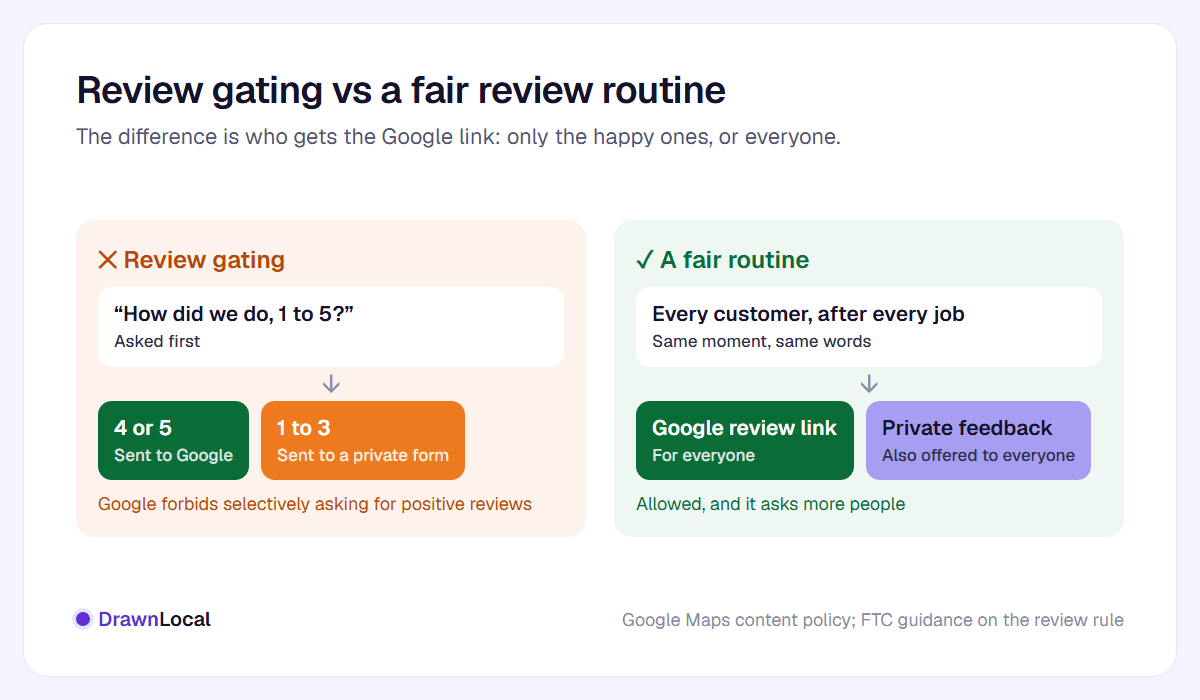
A typical gate is a text after the job: “How did we do, 1 to 5?” A 4 or 5 opens the Google review page. A 1 to 3 opens a private feedback form. Other versions are quieter: technicians hand review cards only to customers who seemed pleased, or the office sends review requests only for jobs that went smoothly.
Asking for private feedback isn’t the problem. The problem is using the answer, or a guess, to decide who gets asked for a public review.
Gating setups to look for in a client’s tools
Gating can be built into review software, under friendlier names. When you onboard a client, check their review tool and their staff habits for any of these:
- A star or score question first, with only high scores sent on to Google.
- “Smart routing” or “sentiment filtering” that sends unhappy answers to a private form instead of the review link.
- Requests sent only to “promoters”, customers who gave a high score on an earlier survey.
- Technicians choosing who gets a review card, or asking only on jobs that went well.
- Follow-up reminders only for happy customers, while the rest get none.
- Office staff skipping customers who complained during the job.
Any one of these turns an honest request into a selective one. The fix is the same each time: everyone gets the same link, the same way.
What Google’s policy says
Google’s prohibited and restricted content policy for Maps lists what merchants may not do under rating manipulation. Merchants may not:
- Offer incentives, “such as payment, discounts, free goods and/or services”, in exchange for posting a review or for revising or removing a negative one.
- “Discourage or prohibit negative reviews, or selectively solicit positive reviews from customers.”
- Require or pressure customers to leave ratings or reviews while on the premises, or ask for specific content in the review.
- Ask staff to collect a certain number of reviews, or reviews that name a staff member.
Google does allow asking for reviews of a genuine experience, “without offering incentives to do so or attempting to influence the rating or the contents of the review.” Its tips for getting reviews suggest sharing a link or a QR code, and note that a mix of positive and negative feedback often feels more trustworthy.
Google removes content that breaks its policies, so reviews gathered through a gate are at risk of disappearing, along with the rating they built.
What the FTC rule says
The FTC’s Consumer Reviews and Testimonials Rule (16 CFR Part 465) took effect on October 21, 2024, and lets courts impose civil penalties for knowing violations. How it treats the practices around gating, from the FTC’s own questions and answers:
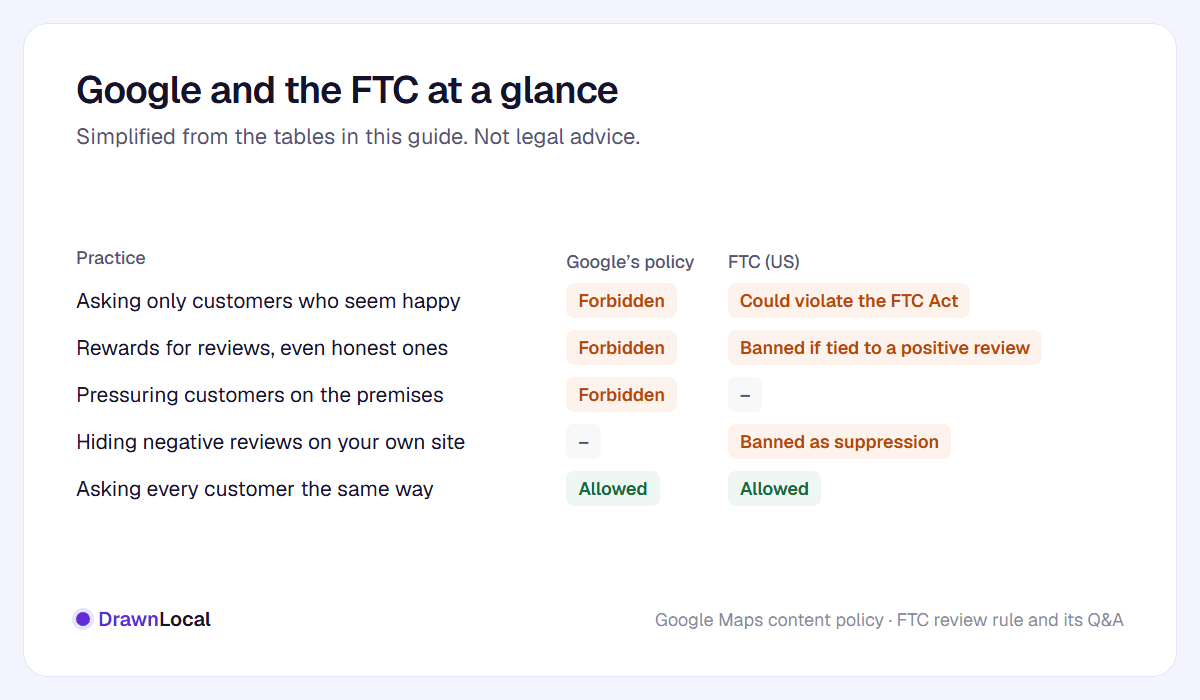
| Practice | Under the rule | What the FTC adds |
|---|---|---|
| Asking only customers you think are happy | No specific ban | “This practice could violate the FTC Act” |
| A reward that depends, openly or by implication, on a positive review | Banned | Rewards for honest reviews of any kind aren’t banned by the rule, though Google forbids them |
| Paying customers to change or remove truthful negative reviews | Not covered | It “may violate the FTC Act” |
| Threats, intimidation or knowingly false accusations to get a review removed | Banned | Includes “unfounded or groundless” legal threats |
| Hiding negative reviews in your own website’s review section | Banned as review suppression | Organizing reviews is fine if negative ones stay easy to find |
| Asking every customer for a review | Allowed | The rule exempts general requests to all purchasers |
These are US rules. Australia, the UK and the EU have their own consumer laws on fake and selected reviews, so check before running a review program for a client elsewhere.
Why gating backfires even when nobody catches it
- It hides the warning signs. The complaints that should change how the business works go into a form nobody reads.
- Unhappy customers can still post. They just do it unprompted, and the owner hears about it last.
- It caps the volume. Asking a fraction of customers produces a fraction of the reviews, and the count and recency of reviews are part of what customers and Google see.
- A perfect score looks staged. Google’s own tips point out that mixed feedback feels more trustworthy to customers.
Worked example: what gating costs in reviews
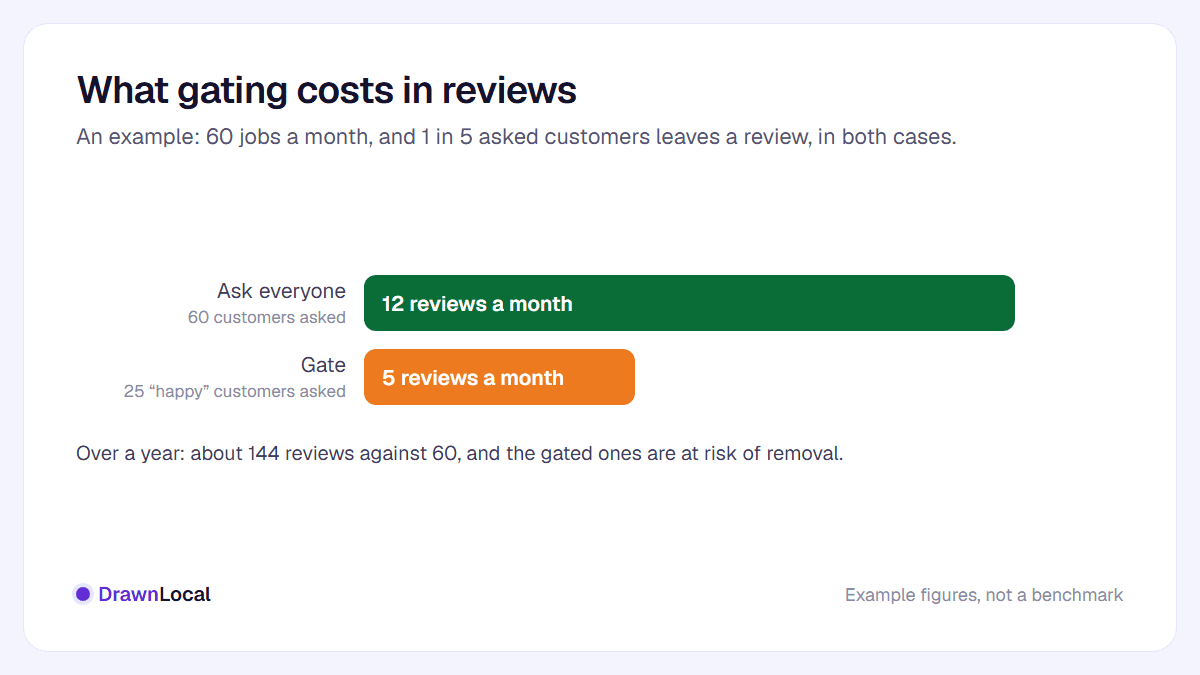
Gating looks like a way to get better reviews. In practice it asks fewer people, so it gets fewer. An example with round numbers, not a benchmark: a plumber does 60 jobs a month, and 1 in 5 customers asked leaves a review.
| Ask everyone | Gate | |
|---|---|---|
| Customers asked each month | 60 | 25 |
| Reviews each month at 1 in 5 | 12 | 5 |
| Reviews over a year | About 144 | About 60 |
| At risk of removal by Google | No | Yes |
The fair routine also catches problems. The unhappy customers who would have been filtered out get a direct way to say so, and the owner hears about it while there’s still time to put it right.
Why reviews matter for Google Maps and AI answers
Google says prominence, one of its three local ranking factors, is based partly on how many reviews a business has, and that more reviews and positive ratings can help its local ranking. Reviews are also among the first things a searcher sees in the local pack and in AI answers.
Here’s a live example of a business with plenty of them: a Boise plumbing company with a 4.9 rating from 651 reviews, checked on Nov 21, 2026. It ranks first at its own address and in the top 3 at 7 of 9 points around it.
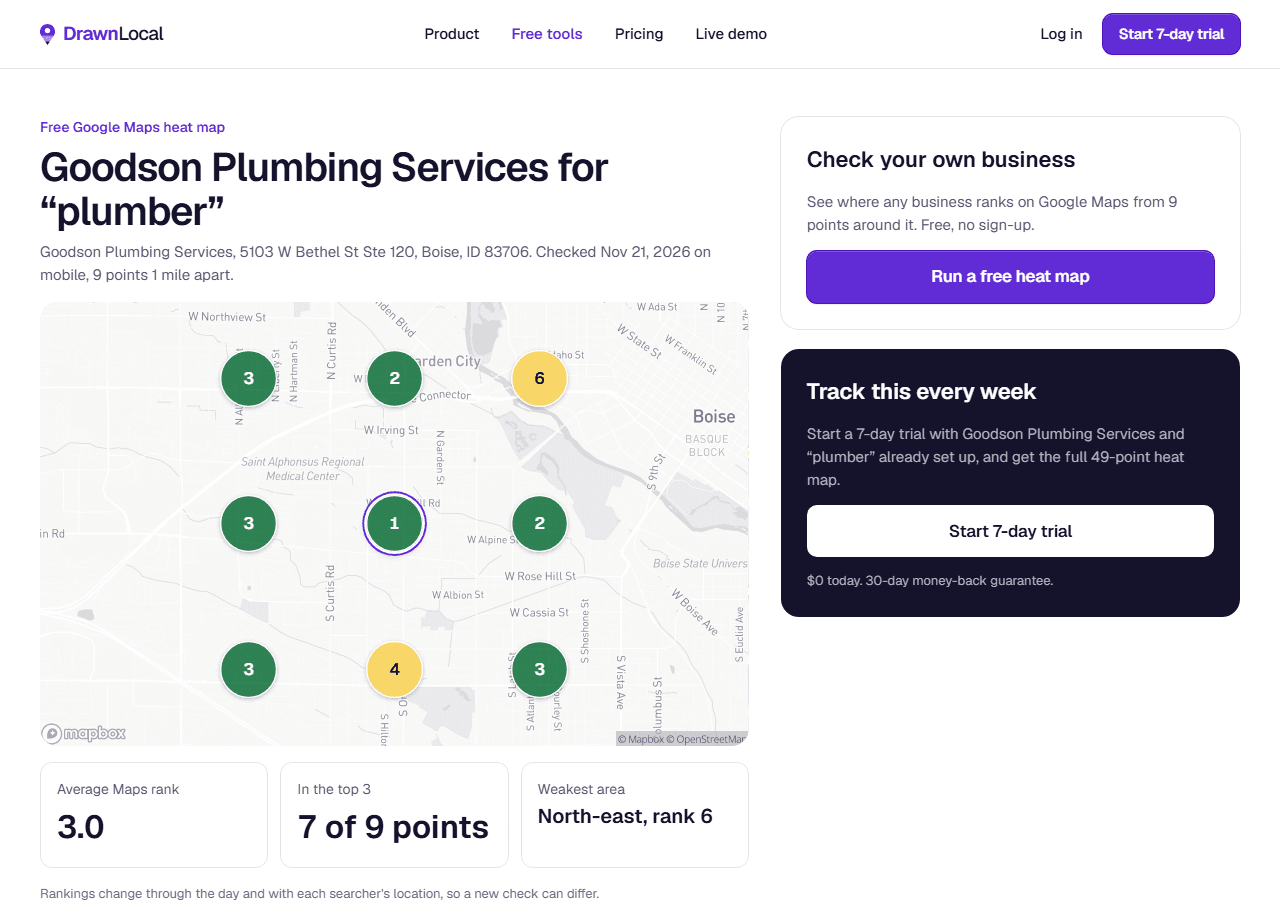
A strong review count doesn’t guarantee a position, but a routine that asks everyone builds it steadily. Do Google reviews help SEO? covers what the evidence says.
A review routine that’s allowed and still works
Give clients a routine they can run every day without thinking about rules:
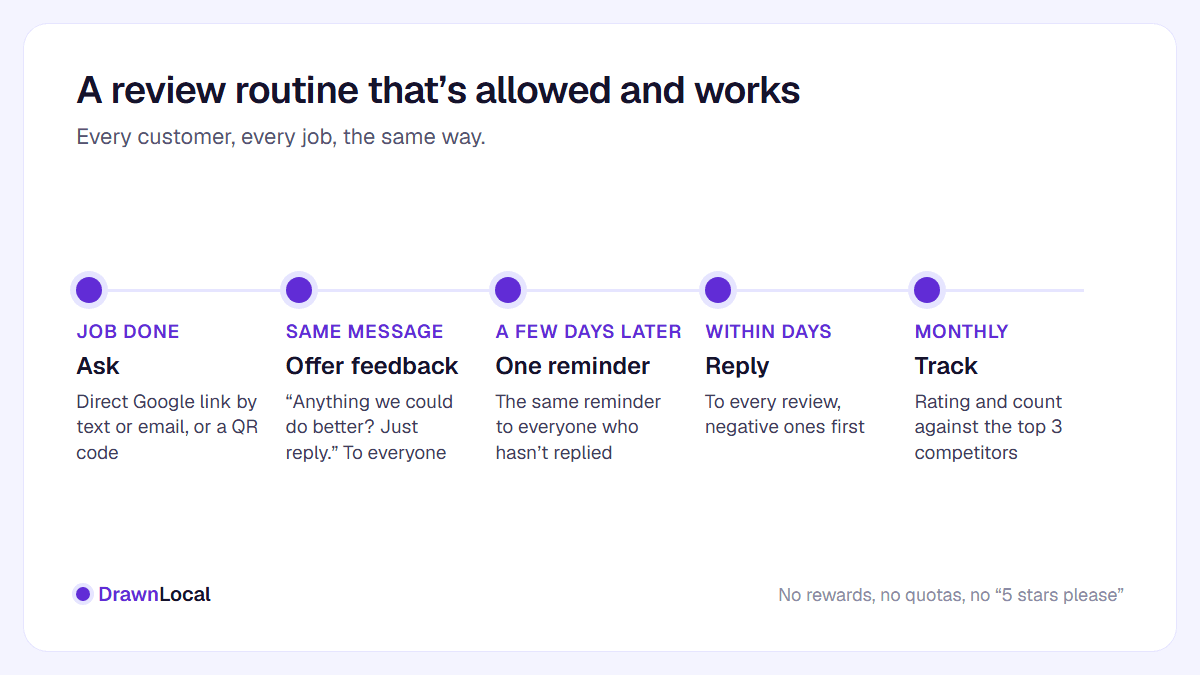
- Ask every customer, at the same moment: when the job is done and paid for.
- Send the direct review link from the Google profile by text or email, or show the QR code, so it’s one tap.
- Keep the wording neutral: “Would you share how we did on Google?” Never “leave us 5 stars”.
- Offer private feedback to everyone as well, never instead: “Anything we could have done better? Just reply.”
- Give no reward for reviews, not even a prize draw. Google forbids incentives even for honest reviews.
- Don’t set staff review quotas or ask customers to mention a technician by name.
- Reply to every review within a few days, negative ones first, calmly and without accusing the customer.
- Track the rating and review count every month against the top 3 competitors.
DrawnLocal’s review tracking shows each client’s rating and review count over time, next to the competitors you choose. A monthly summary shows what customers praise and complain about at the client and its rivals, so you can show the routine working without filtering anyone.
Scripts for asking every customer
Neutral wording keeps the request honest. Copy these and swap in the business name:
| Where | Script |
|---|---|
| Text, after payment | “Thanks for choosing [business] today. Would you share how we did on Google? [link]. Anything we could have done better? Just reply to this text.” |
| Email, same day | “Thanks again for having us out. If you have a minute, we’d value a review on Google: [link]. And if anything wasn’t right, reply and tell us.” |
| In person, at the end of the job | “If you have a moment later, we’d appreciate a Google review. The link’s on your invoice.” |
| Invoice footer | “Tell others how we did: [QR code]. Problems? Call [number] and ask for [name].” |
What to leave out: “5 stars”, “positive review”, any mention of a reward, and any suggestion of what to write. Google forbids asking for specific content, and “5 stars” steers the rating.
When to ask
Ask at the same moment for every customer, so timing can’t become a filter. For most trades that’s right after the job is finished and paid for, while it’s fresh.
A fixed moment also makes the routine easy to check. If requests go out at the same step in the job, a quick look at the sent messages shows whether anyone was skipped, and why.
Don’t ask only after jobs that went well, and don’t wait for the customer to say something nice. If the moment is the same for everyone, the request is the same for everyone. One reminder a few days later is fine, as long as everyone who hasn’t replied gets it.
Avoid standing over the customer while they write. Google’s policy forbids requiring or pressuring reviews on the premises, so a link or QR code they can use later is the safer choice.
Replying to reviews: short templates
Reply to every review within a few days. Short, specific and calm works for both kinds:
- Positive: “Thanks, [name]. Glad the water heater install went smoothly, and thanks for mentioning [technician]. We’re here if you need us again.”
- Mixed: “Thanks for the honest review, [name]. We’re glad the repair worked, and sorry about the wait. We’ve changed how we schedule afternoon calls.”
- Negative: “We’re sorry this didn’t go as it should, [name]. We’d like to put it right. Please call [name] on [number] so we can talk it through.”
Never offer anything in exchange for changing or removing a review. How to respond to negative reviews has more templates and what to avoid.
Track the routine and report it
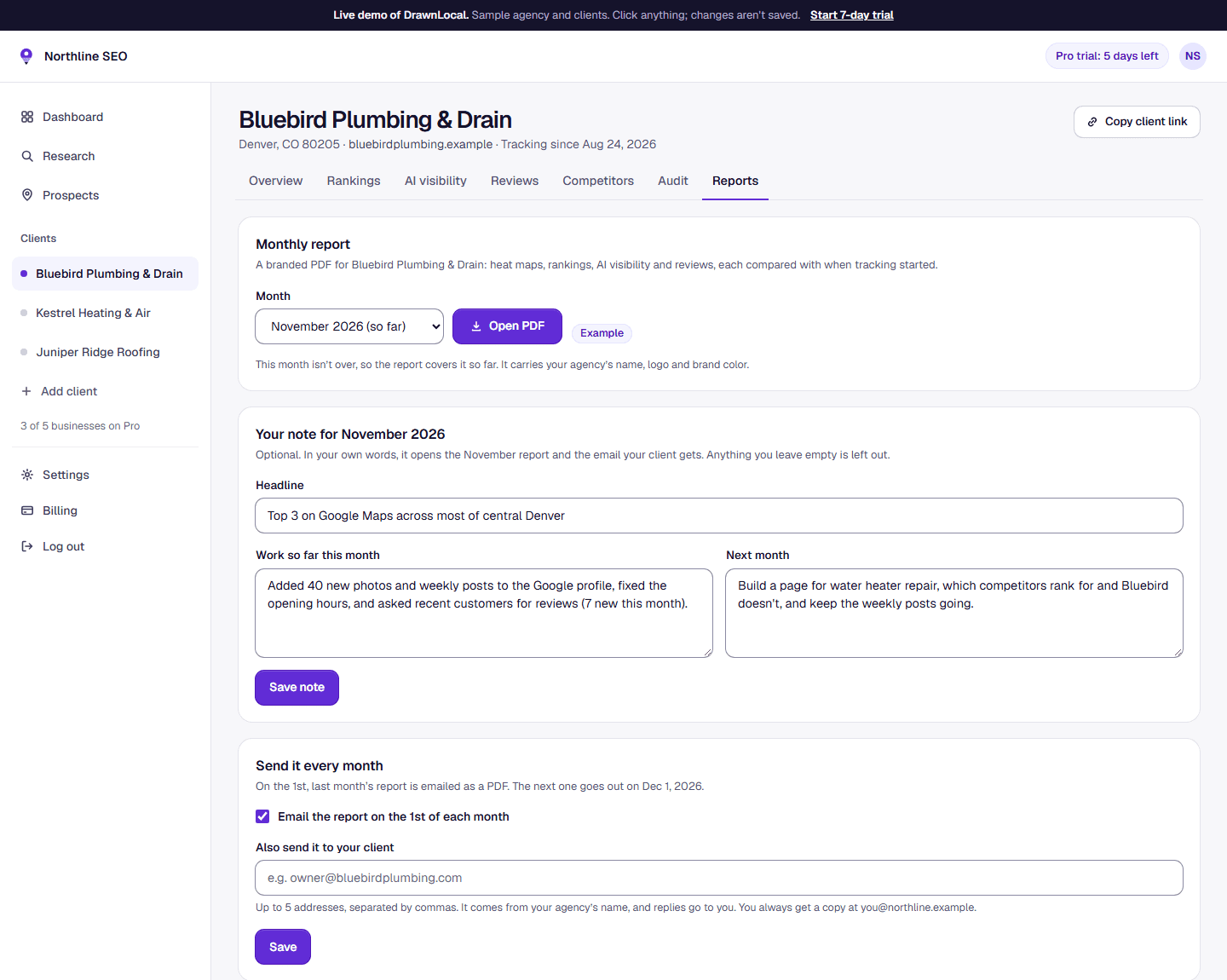
Show the client the routine working without filtering anyone: the review count rising, the rating holding, and what customers say, next to the competitors. In DrawnLocal it looks like this:
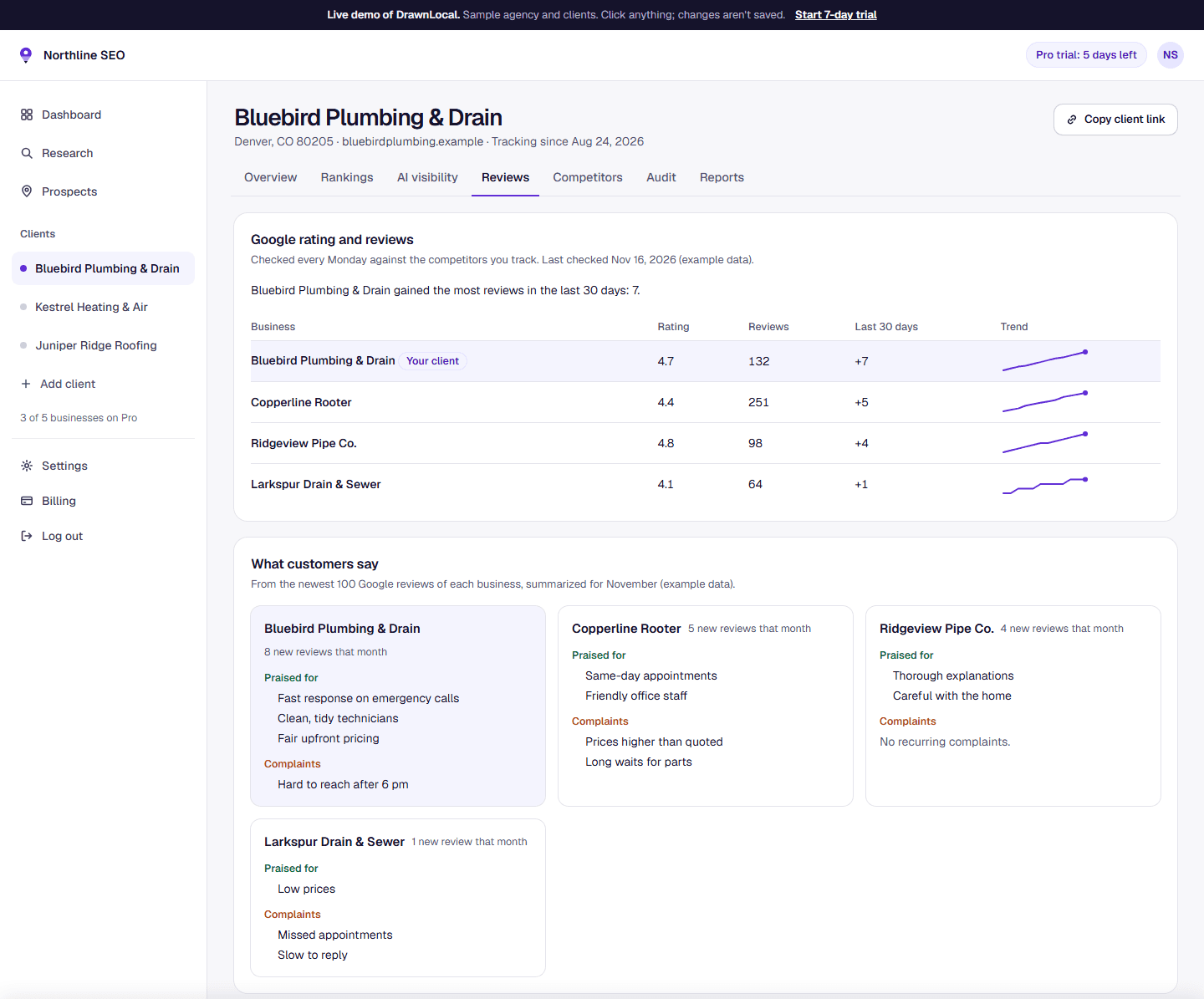
Report the count against the month the routine started. A steady rise is the clearest sign the routine is running.
Add the share of customers asked, if the client can share job numbers. Asked 58 of 60 is a routine; asked 25 of 60 is a filter, whatever the reason.
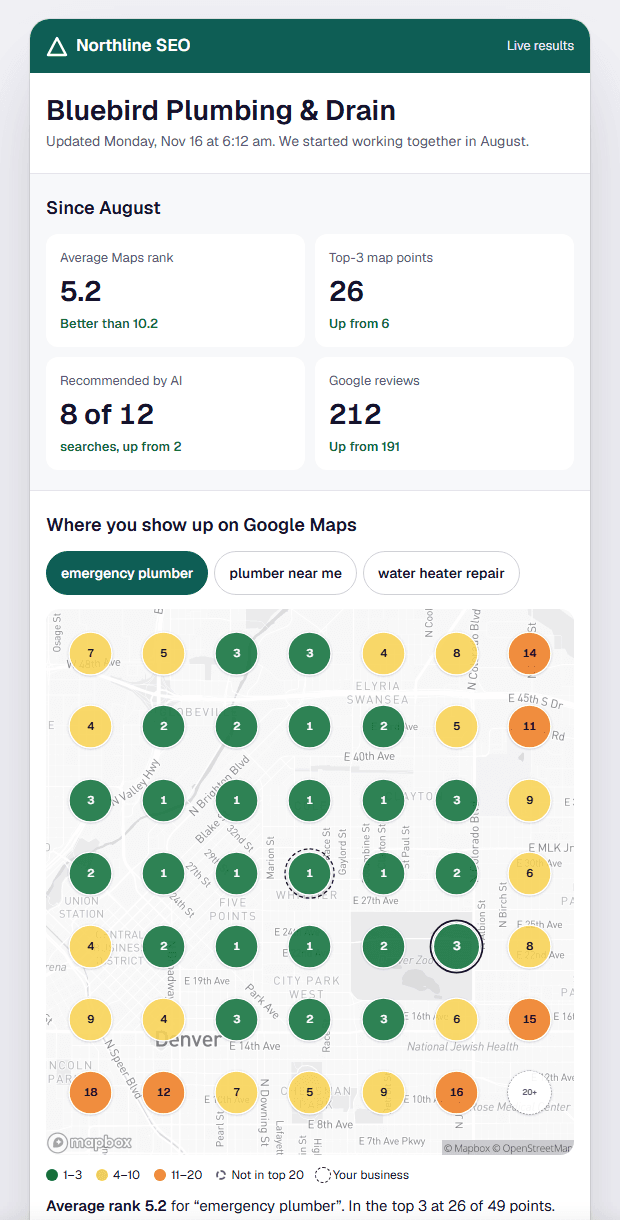
Show the owner progress, not filtered praise
A live client page with the review count next to its starting point makes the routine visible between reports. It keeps the conversation on volume and honesty, not on hiding bad news.
A 10-point review routine audit
Run this for every new client, and again once a year:
- Every customer is asked, after every job.
- The same words are used for everyone.
- No star or score question decides who gets the Google link.
- Private feedback is offered to everyone, as an extra.
- No rewards, discounts or prize draws for reviews.
- No staff quotas, and no requests to name a technician.
- No “5 stars” or suggested content in any message.
- Reminders go to everyone who hasn’t replied, or to no one.
- Every review gets a reply within a few days.
- The count and rating are tracked monthly against the top 3.
Any “no” is a fix for the first week. Put the result in the client’s onboarding notes, and check it again in the monthly report.
Private feedback, done the right way
Private feedback is useful. It catches problems early and gives unhappy customers a direct line to the owner. It only becomes gating when it replaces the public review link for some customers.
The safe pattern is simple: every customer gets both, in the same message. The Google link comes first, and a line underneath invites any other feedback by reply. Nobody’s answer decides what they’re shown.
- Read every private reply within a day, and answer it.
- Fix what you can, then log the issue so patterns show up.
- Never ask a customer who complained privately not to post publicly.
Review requests by trade
The rule stays the same for every trade, but the right moment to ask differs a little:
| Trade | When to ask everyone | Watch out for |
|---|---|---|
| Plumbing, electrical, HVAC repairs | When the job is done and paid for | Asking only after quick, easy jobs |
| Roofing and remodeling | At project completion, after the final walk-through | Asking only clients who praised the work on site |
| Cleaning and lawn care | After the first visit, then on a fixed schedule for every client | Asking only long-standing, happy clients |
| Locksmiths and towing | By text, shortly after the job | Skipping customers who disputed the price |
| Pest control | After the first treatment, then once a year | Asking only after visits with no call-backs |
Write the chosen moment into the client’s process, so it doesn’t depend on who’s on shift.
Reviews from staff, family and friends
Owners sometimes ask staff, family or friends to “get the reviews going”. Google’s content policy forbids reviews with a conflict of interest, such as an owner or employee reviewing their own business. Reviews like that are at risk of removal, just like gated ones.
The fix is the same routine: real customers, every one of them, asked the same way. Staff can help by mentioning the link at the end of each job, but they shouldn’t review the business themselves or be set a quota.
What to do about a sudden drop in rating
A run of negative reviews can tempt an owner back toward gating. Resist it, and work through the cause instead:
- Read the new reviews together and look for one shared cause: a new technician, a scheduling problem, a price change.
- Reply to each one calmly, and invite the customer to call.
- Fix the cause, and tell the client what changed.
- Keep asking every customer. A steady flow of honest reviews is what lifts a rating back over time.
- If a review breaks Google’s rules, such as spam or a conflict of interest, report it. How to remove a Google review covers what qualifies.
Set up the review link and QR code once
The routine is only as easy as the link. Google’s tips for getting reviews suggest sharing a link or a QR code that opens the review form directly. Set both up once and put them everywhere the business already talks to customers:
- The text or email sent after each job.
- The invoice and the receipt.
- A small card or sticker technicians leave behind.
- The email signature of the office team.
Test the link on a phone before you roll it out. One tap should open the review form, with no searching.
An example: switching off a gate
A made-up example of what can follow when a gate is removed. A roofer’s review tool sent only 4- and 5-star answers to Google, and the owner agreed to switch to asking everyone.
- Month 1: the tool now sends the Google link to every customer, with private feedback offered underneath. Review requests roughly double.
- Month 2: more reviews arrive, including two mixed ones about scheduling. The office changes how it confirms start dates.
- Month 3: the review count is well above its old pace. The rating dips slightly, then steadies.
- Month 6: the profile shows a larger, more recent set of reviews that reads as real, and none of it is at risk of removal.
The numbers will differ for every business. The pattern to expect is more reviews, a rating that may move a little, and fewer surprises.
Who runs the routine: the business or the agency?
The business sends the requests, because it has the customer list and the relationship. The agency sets the routine up, writes the wording, checks it follows the rules and reports the results.
Agree this in writing during onboarding: who sends the messages, from which tool, and who replies to reviews. If the agency replies on the owner’s behalf, agree the tone and which replies need the owner’s approval first, such as anything about a refund or a dispute.
Multi-location businesses
Each location has its own profile and its own reviews, so each one needs its own review link. Use the same wording and timing everywhere, so no location becomes a quiet exception.
Track each location separately. A rating that falls at one branch can point to something local, such as a team or a schedule, that the business can fix there. Multi-location local SEO covers the rest.
What to do if a client’s tool already gates reviews
- Switch the flow so every customer gets the same review link, whatever they answer to any first question.
- Keep private feedback, but as an extra option for everyone.
- Don’t ask customers to change or remove past reviews, and never offer anything in return.
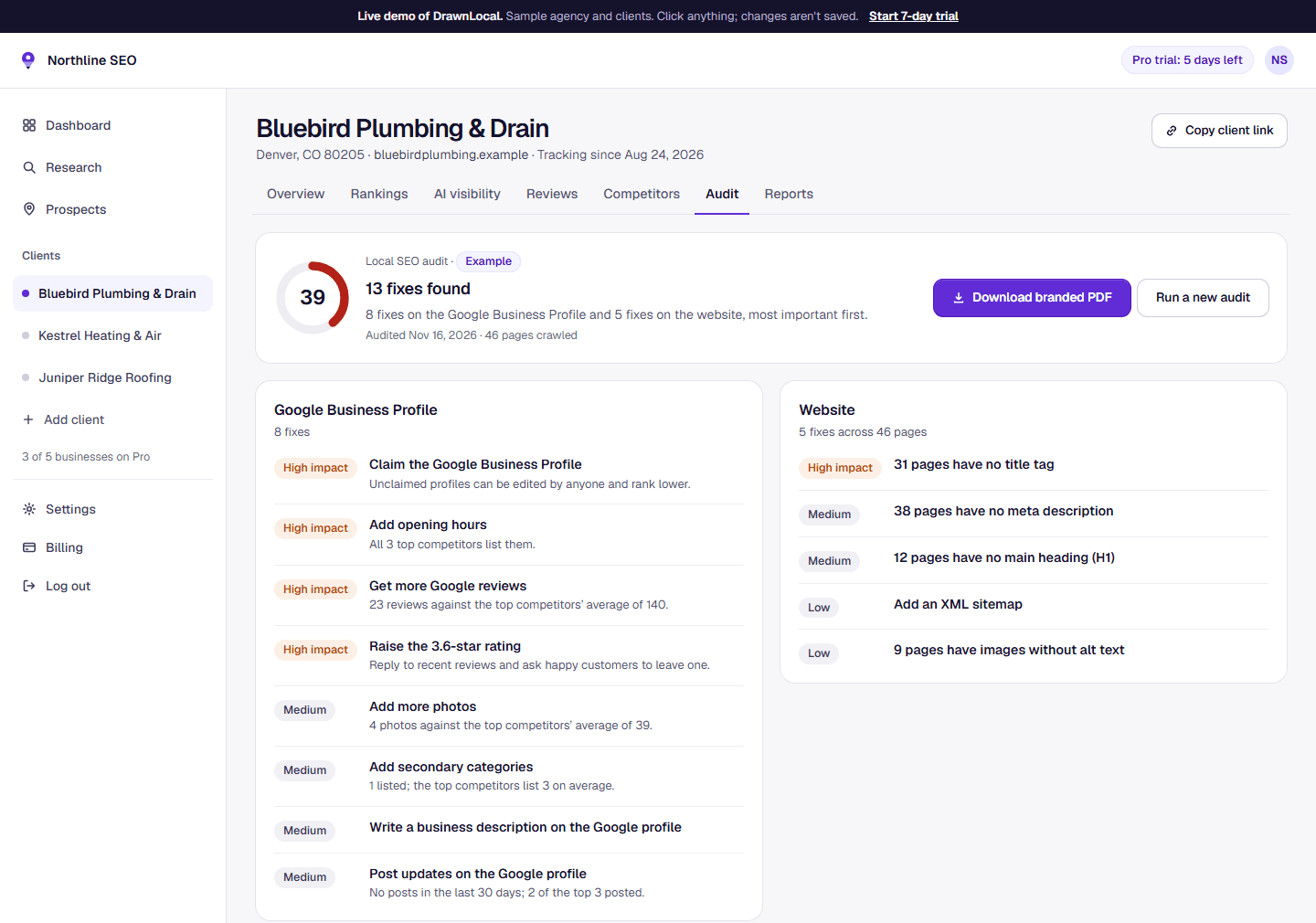
- Note the date of the change, so you can show the client how the review count and rating moved afterwards.
- Explain it to the owner in one line: Google forbids it, and the FTC warns it could break the law.
Add the review routine to your local SEO client onboarding checklist, and check it in every local SEO audit.
Explaining it to the owner
Some owners gate because a review tool offered it, not to cheat. A short explanation lands better than a lecture:
“Google doesn’t allow asking only happy customers, and reviews collected that way can be removed. The FTC also warns it could break the law. If we ask everyone, you’ll get more reviews, and you’ll hear about problems before they turn into a one-star review.”
Then show the first month’s numbers in the report. A rise in the review count can make the argument for you.
Questions
Is review gating illegal?
In the US, the FTC’s review rule doesn’t specifically ban asking only happy customers, but the FTC says the practice could violate the FTC Act. It breaks Google’s Maps content policy either way, so reviews gathered that way are at risk of removal.
Can I send unhappy customers to a private feedback form?
You can offer every customer a private feedback option. What you can’t do is use their answer to decide who gets asked for a public Google review.
Can I offer a discount for a Google review?
No. Google’s policy forbids incentives such as payment, discounts or free goods in exchange for reviews, even honest ones. The FTC rule separately bans rewards that depend on the review being positive.
Is it review gating to ask happy customers in person and email the rest?
It can be, if the happy ones get a more personal or more frequent ask. Keep the request the same for everyone: same moment, same wording, same link, and reminders to all or none.
Is it review gating to ask only customers who completed a job?
No, as long as every customer who completed a job is asked the same way. Gating means choosing who to ask based on whether they seem happy.
Sources
- Google Maps: prohibited and restricted content policy
- Google Business Profile Help: tips to get more reviews
- FTC: Consumer Reviews and Testimonials Rule, questions and answers
- Google: how local results are ranked