How to report a fake business on Google Maps: 4 routes that work
A fake locksmith with a keyword-stuffed name can sit in the top 3 for years, taking calls from real businesses. Here’s how to spot listings that break Google’s rules, which route to report each one by, and how to show the client what changed.
By the DrawnLocal team · · Updated · 14 minute read
What counts as spam under Google’s rules
Google’s guidelines for representing a business set the lines. A listing breaks them when:
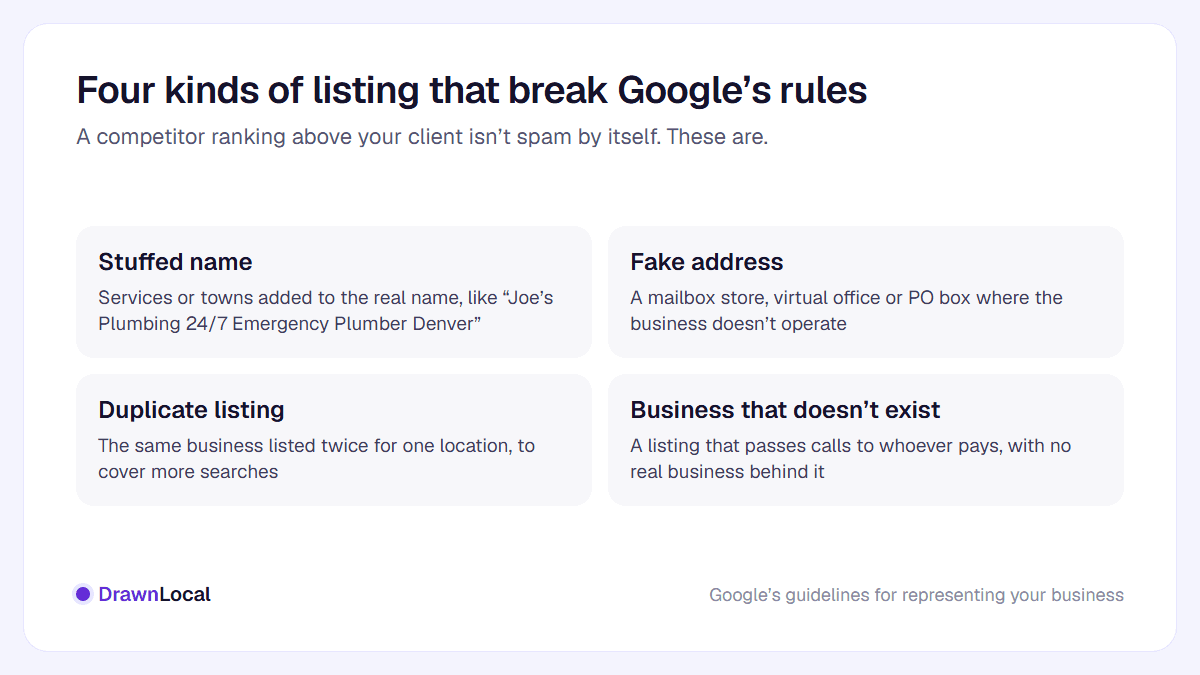
- The name isn’t the real-world name. Google says the name “should reflect your business’s real-world name, as used consistently on your storefront, website, stationery, and as known to customers.” Extra information such as services, locations, taglines or phone numbers isn’t permitted, and can get a profile suspended.
- The address isn’t a real place of business. PO boxes and remote mailboxes aren’t acceptable, and a virtual office, an address rented for mail where the business doesn’t operate, isn’t eligible. Co-working spaces count only with signage, staff and customers received during business hours.
- It’s a duplicate. Google allows one profile per location; service-area businesses get one per central office.
- The business doesn’t exist at all. Lead-generation listings that pass calls to whoever pays are one example in home services.
A competitor ranking above your client isn’t spam by itself. Report breaches of the guidelines, never businesses you’d simply rather see gone.
How to check a suspicious listing
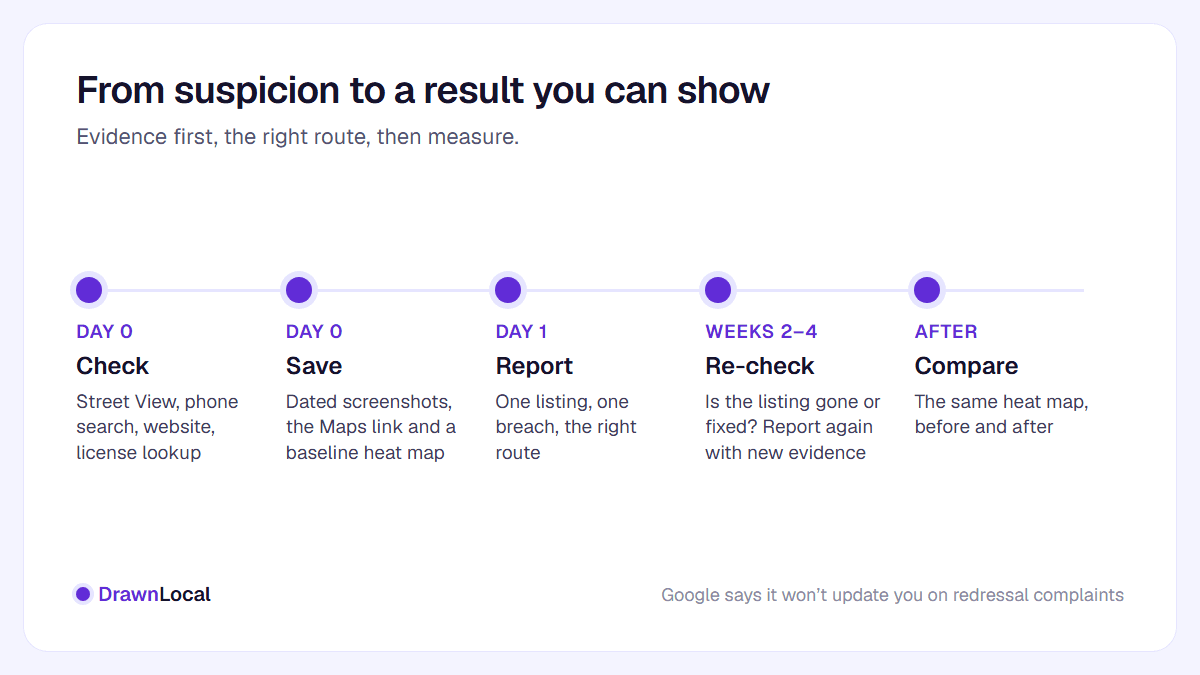
- Look at the address on Street View. A real storefront has signage; a mailbox store, a shared office block with no sign or a house in another trade’s name is a warning sign.
- Search the phone number. The same number behind several “different” businesses often points to a lead-generation network.
- Check the website. Does it exist, show the same name and address, and describe a real business?
- Check your state’s contractor license or business registration lookup for the name.
- Screenshot everything, with the date, and copy the listing’s Google Maps link.
Keep an evidence log
Reports work better with evidence, and evidence is easier to keep than to find again later. One row per listing is enough:
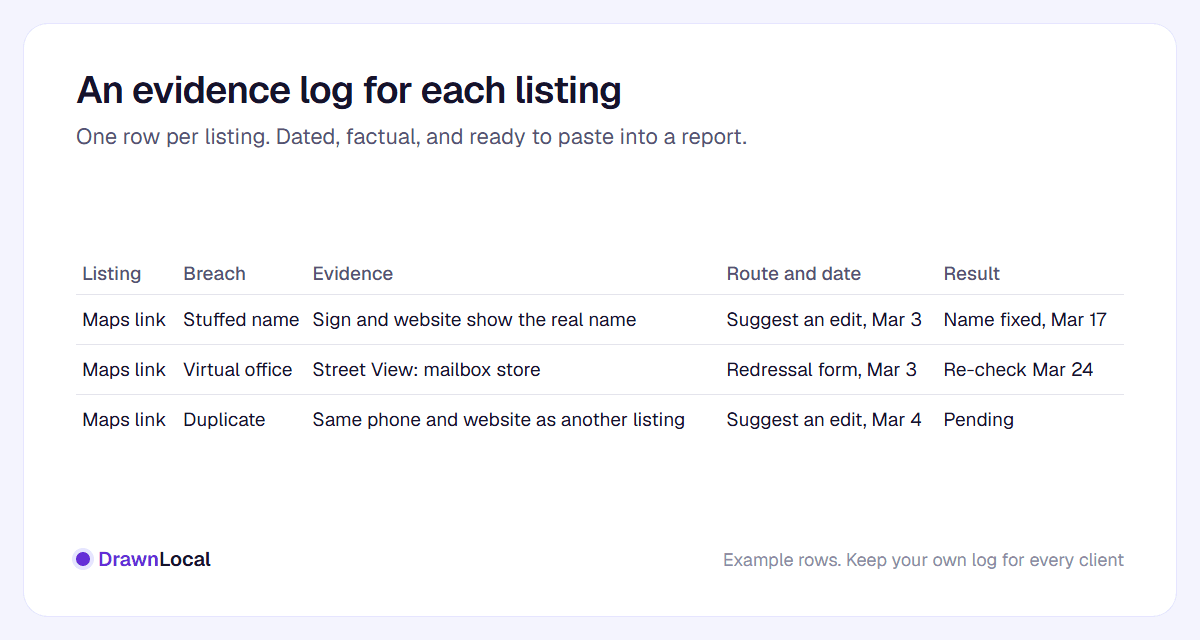
Note the date of every report and every re-check. When a listing reappears, as some do, the log shows it’s the same one and what you sent before.
Wording you can adapt for each route
Stick to facts you can show. Short examples, with the details in brackets to fill in:
| Route | Example wording |
|---|---|
| Suggest an edit: name | Change the name to “[name on sign and website]”. The listing adds “[extra words]”, which don’t appear on the business’s sign, website or registration. |
| Place is closed or not here | No business operates at this address. Street View shows [a mailbox store], and the phone number reaches [a call center for several trades]. |
| Redressal form | These [number] listings share one phone number and website but show different names and addresses. Each address is [a mailbox store or empty lot]. Links and screenshots attached. |
Keep the tone neutral. The reviewer needs to see the breach quickly, not why it matters to your client.
How to spot a lead-generation listing
Some listings aren’t a business at all. They collect calls and pass them to whoever pays. No single sign proves it, but several together are worth checking:
- A generic name built from the service and the city, with no owner or brand behind it.
- An address that turns out to be a mailbox store, an empty lot or a house with no sign.
- A phone number that also appears on listings for other trades or other cities.
- A website that’s a template with no team, no license number and no photos of real jobs.
- Reviews that are short, similar, and arrived in a burst.
- No record in the state’s contractor license or business registration lookup.
Collect what you find in the evidence log. If several listings share a phone number or website, the redressal form is the route, because it handles networks.
What to look for, by trade
The rules are the same everywhere, but the patterns differ by trade. Things worth checking in the trades agencies often serve:
| Trade | Worth checking |
|---|---|
| Locksmith | Several listings with different names but one phone number; addresses with no storefront |
| Garage door | Names stuffed with “repair”, “24/7” and town names; duplicate listings across nearby towns |
| Plumbing and HVAC | Emergency keywords in the name; addresses at mailbox stores |
| Towing | Listings in every town with the same call center number |
| Roofing | Storm-season listings that appear suddenly with new addresses |
| Pest control | Names that add the service and city to a franchise brand |
Our trade guides cover each market: locksmith SEO, garage door SEO and pest control SEO.
Checking a service-area listing
Service-area businesses can hide their address, so Street View won’t help. Check the other signals instead: the license lookup, the website’s details, the phone number and the reviews.
A real service-area business still has one profile per central office, under Google’s rules. Several hidden-address listings with the same phone number or website are the pattern to look for.
Who should report: the agency or the client?
Anyone can suggest an edit on Google Maps. For the redressal form, read Google’s instructions on the form itself and fill it in honestly as yourself. What matters most is that the report is accurate and the evidence is kept.
In practice the agency often does it, because it has the time and the evidence log. Tell the client before you report a competitor in their area, so they’re not surprised if the subject comes up locally.
An example: a stuffed name fixed
A made-up example of how one report can play out:
- Week 0: a garage door company appears as “Ace Garage Door Repair 24/7 Emergency Springs [Town]”. Its sign and website say “Ace Garage Doors”. The agency saves screenshots and a baseline heat map.
- Week 0: a suggested edit changes the name to “Ace Garage Doors”, with a link to the website as evidence.
- Week 2: the name on Maps now matches the sign. The agency logs the result.
- Week 4: the same heat map shows the client up a place at several points where the stuffed name used to sit above them.
Results vary. Some edits are rejected, some names come back, and rankings may not move. The evidence log and the same heat map make whatever happens easy to show.
Fake listings and AI answers
Google’s AI Mode builds local answers partly from Business Profiles, so a fake or stuffed listing can turn up there too. Cleaning up the map can help the client in AI answers as well as in Maps.
Check the client’s main prompts before and after, as you do with the heat map. Google AI Mode and local SEO covers how to track them.
Route 1: suggest an edit
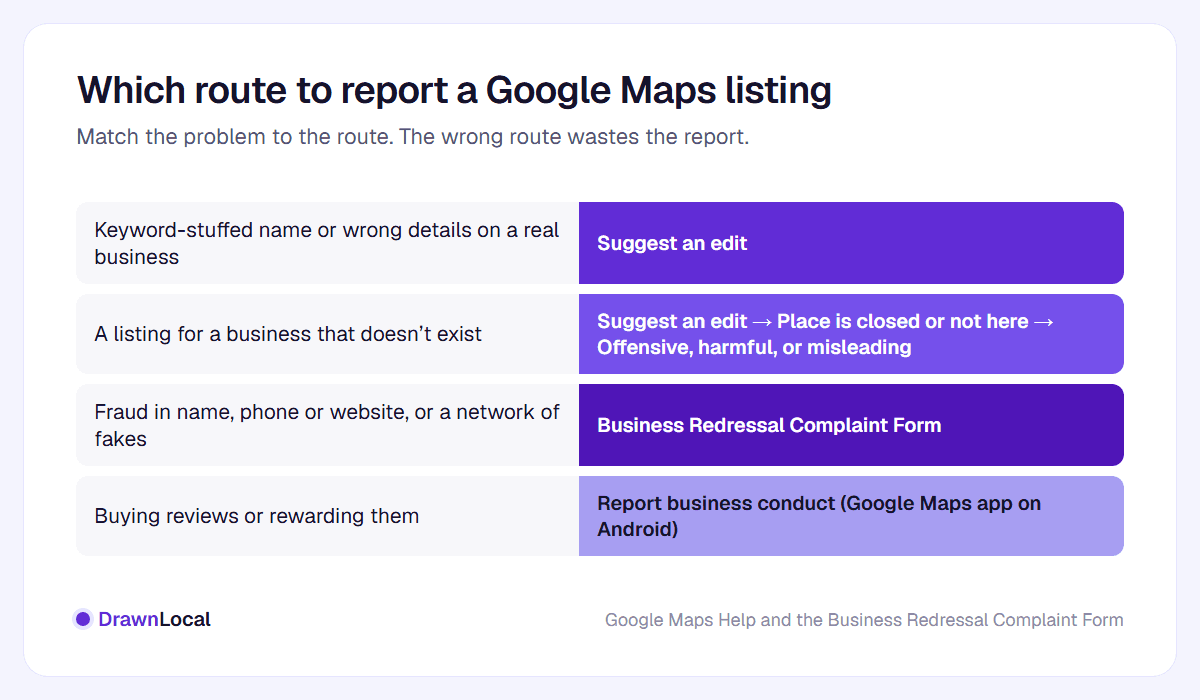
Use this for a keyword-stuffed name or wrong details on a real business. Open the listing in Google Maps, select Suggest an edit and choose the field: Place name, Category, Hours and so on. Enter the correct information, such as the name on the business’s own sign and website.
Google warns that edits that try to change a business significantly may be rejected, so change one thing at a time and make it match public evidence.
Route 2: report a fake business on Google Maps
For a listing that shouldn’t exist at all, Google’s Maps help gives this route on desktop:
- Open Google Maps and select the business.
- Select Suggest an edit.
- Choose Place is closed or not here.
- Choose Offensive, harmful, or misleading, then Submit.
Route 3: the Business Redressal Complaint Form
Google’s Business Redressal Complaint Form is for misleading information or fraud on Google Maps in a business’s name, phone number or website. Choose what’s wrong under malicious content: title, address, phone number, website, or “This business doesn’t exist”. Add each listing’s Google Maps link, quote the exact content that breaks the rules and explain the harm.
It suits networks of fake listings: Google suggests submitting 10 to 100 at a time. It isn’t for simple corrections, and complaints outside those fields won’t be reviewed. Google also says it can’t guarantee any action and won’t update you on the status, so check the listings again yourself after a few weeks.
Route 4: report business conduct
If a business is buying reviews or offering rewards for them, Google’s help describes a route in the Google Maps app on Android. Open the listing, select Suggest an edit, scroll to the bottom and choose Report business conduct. Incentives for reviews break Google’s content policy; review gating covers what is and isn’t allowed.
Before you submit: a quick checklist
Run through this for every report. It takes a minute and makes each one stronger:
- The listing breaks a specific Google guideline, and you can name it.
- You have at least one piece of evidence a reviewer can check.
- Screenshots are saved with the date.
- The Google Maps link is copied.
- You’ve chosen the route that matches the problem.
- The wording states facts, not opinions.
- A baseline heat map is saved for the main keyword.
- The report is logged, with a date to re-check.
How long to wait, and when to report again
Google doesn’t publish a timescale, and it won’t update you on redressal complaints. Re-check each listing after two to four weeks.
If nothing has changed, report again only with something new: a fresh screenshot, a license lookup, another listing sharing the same phone number. Repeating the same report adds nothing. For a network of listings, move to the redressal form if you haven’t used it yet.
Protect the client from being reported
Competitors can report your client too. Make sure there’s nothing to find, and keep proof ready in case a report triggers a review:
- The name on the profile matches the sign, website and registration exactly.
- The address is a real place of business, or hidden if the business serves customers at their location.
- There’s one profile per location, and no forgotten duplicates.
- Photos of the storefront, signage and vehicles are saved, along with the business license.
If the profile is ever suspended, that file makes the appeal quicker. Google Business Profile suspended? covers the steps.
Spam work in a monthly package
Spam checks fit naturally into a monthly retainer: a short routine every month, and a report when something breaks the rules. Put it in the scope as monitoring and reporting, never as guaranteed removals.
Budget the time. A monthly check takes minutes per client; a network of fake listings can take a few hours to document. How much to charge for local SEO shows how to price work like this into a package.
Spam in a sales conversation
Spotting a fake listing above a prospect can be a useful finding on a sales call: it shows you know the market, and it’s a concrete first task. Show it as something you’d check and report once you’re working together.
Don’t file reports as a free sample before the business has hired you, and never promise the listing will go. The finding is enough to show you know what you’re looking at; the result belongs in the plan. How to sell SEO services covers how to present findings on the call.
Fake reviews are a separate report
Reviews have their own route. Some reviews break Google’s content policy, such as one from a competitor, an employee or someone who was never a customer. Those are flagged on the review itself, not through the listing routes above.
Keep the two apart in your log, because they’re reviewed separately. How to remove a Google review covers what qualifies and how to report it.
Questions owners ask about competitor spam
Short answers that keep expectations right:
- “Why hasn’t Google removed it yet?” Google doesn’t publish a timescale and doesn’t report back on every route. We re-check and report again with new evidence when there is some.
- “Can you get them suspended?” We can report clear breaches with evidence. Google decides what happens next.
- “Is it worth the time?” When a listing breaking the rules sits above you at several points on the map, yes. We measure the result on the same map.
- “Could they report us?” They could, which is why your own listing has to follow the same rules.
Clients with several locations
Each location has its own competitors and its own map, so run the monthly check per location. Spam can cluster in some areas and not others, and the heat map for each location shows where to look first.
Log reports per location too. When the same network shows up near several branches, one redressal report with every listing is stronger than several separate ones.
What not to do
Fighting spam the wrong way can hurt the client more than the spammer:
- Never report a business just because it outranks your client. A false report wastes the reviewer’s time and weakens your next real one.
- Never post reviews about competitors. Google’s content policy forbids reviews with a conflict of interest, and fake reviews can break consumer law.
- Never threaten a competitor. Report the listing, not the people.
- Never copy the tactic. A stuffed name or a second address might lift a client briefly, and then risk a suspension.
- Never promise a client a removal. Google says it can’t guarantee any action.
When the client’s own listing is the problem
Check the client first. If their name carries extra keywords, or their address is a virtual office, fix that before reporting anyone else. A client breaking the same rule has the most to lose if Google looks closely at the area.
Explain it plainly: the fix protects the profile, and it makes any report about competitors credible. Keywords in the business name and Google Business Profile suspended? cover the details.
Measure before you report
Save a heat map for the main keyword before you send anything. Here’s a live baseline of the kind to keep, checked with DrawnLocal’s free heat map on Nov 21, 2026. A Boise plumbing company, for “plumber”, is first at its address and in the top 3 at 7 of 9 points.
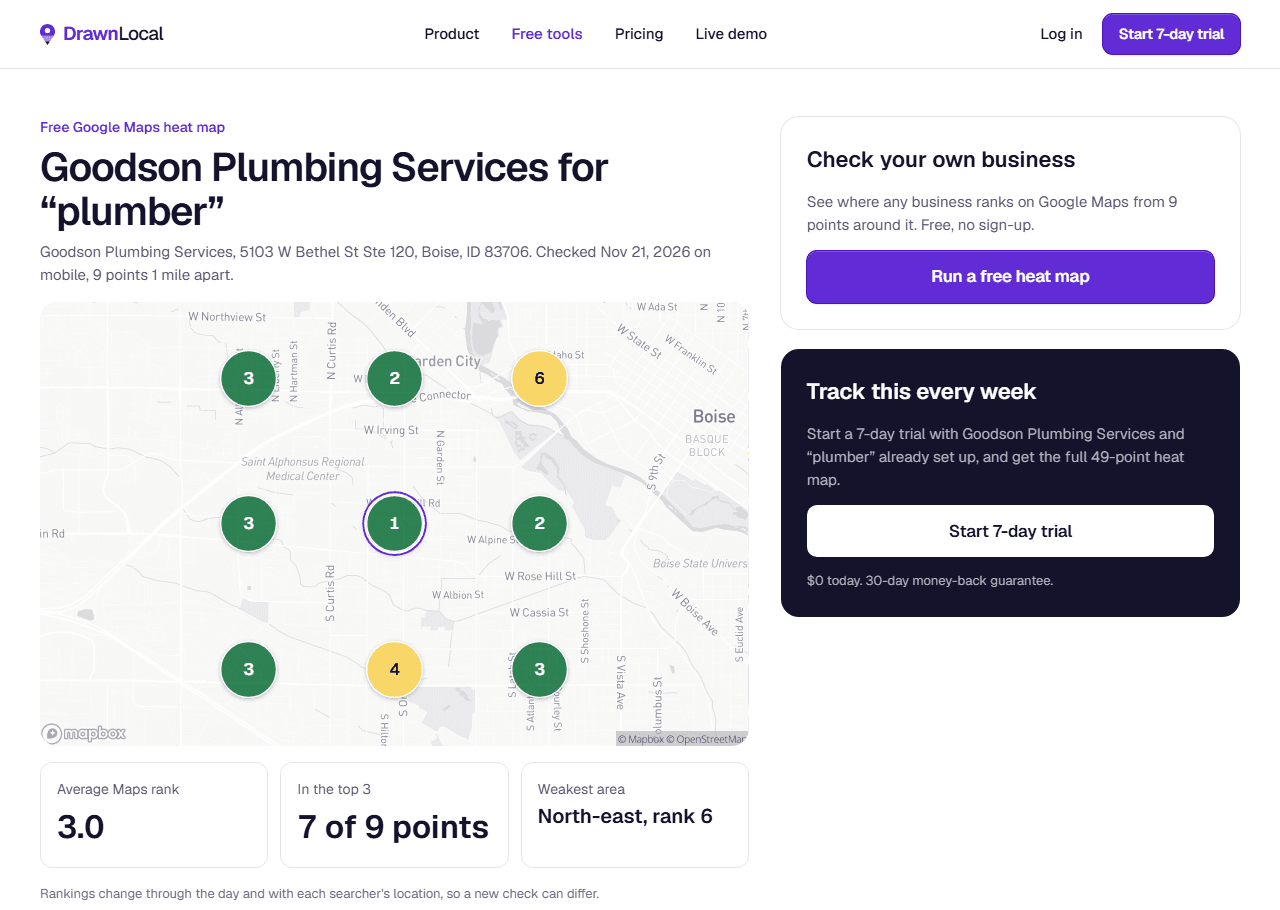
Run the same keyword, center and grid after the listing is gone or fixed. The points where your client moves up are the result to show, and the same grid makes the comparison fair.
Keep the baseline even if the report fails. It still shows where the client stood that month, and it’s the starting point if you report again later with stronger evidence.
And measure the keywords the spam listing targets, not just the client’s favorite one. A stuffed name often carries the exact phrases it wants to rank for, which tells you which maps to save.
See who holds each point
A heat map that names the top 3 at each point shows exactly where a spam listing is taking calls. In DrawnLocal, selecting a point lists the businesses ranking there:
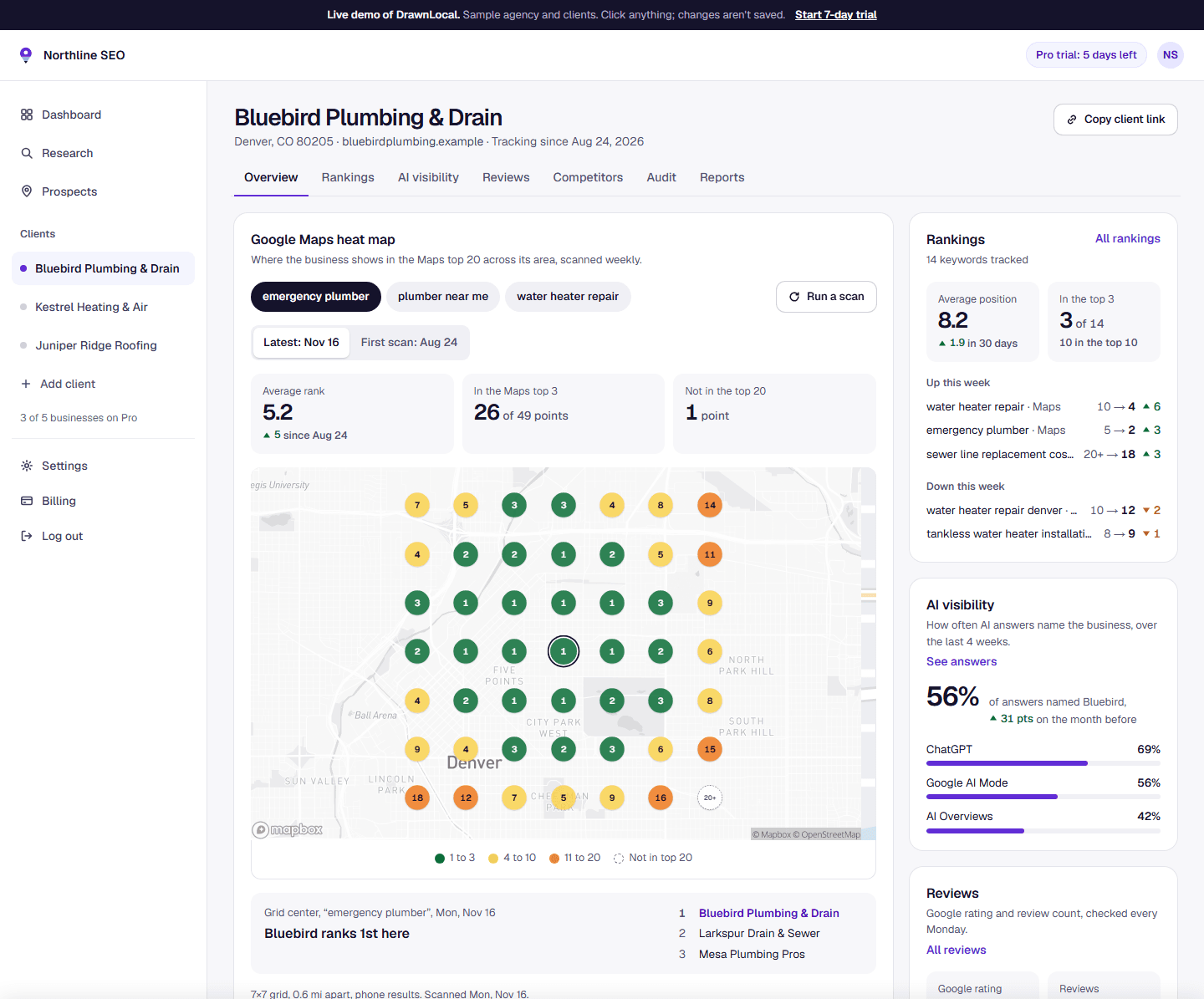
If the same suspicious name appears at point after point, that’s where to start checking.
How to make reports stick
- One listing, one clear breach, quoted exactly: “The name adds ‘24/7 Emergency Locksmith Denver’ to the registered name shown on its website.”
- Evidence over opinion: Street View, the license lookup, the shared phone number, dated screenshots.
- The right route: edits for wrong details, the flag for a fake listing, the form for fraud and networks.
- Patience, then a second report with new evidence if nothing changes. Google does act at scale. In a 2019 post it said it had taken down more than 3 million fake business profiles the year before, over 90% of them before anyone saw them.
Show the client what changed
A spam removal can be one of the quickest wins to show a client, and a heat map makes it visible. Save a heat map for the main keyword before you report, with who holds the top 3 at each point. Compare it once the fake listing is gone: the points where your client moves up are the result to show. How to read a local SEO heat map explains the patterns, and why a business drops out of the Maps top 3 covers the other causes to rule out.
DrawnLocal’s weekly heat maps name the businesses ranking at each point, so a new spam listing shows up in the report the week it appears.
A monthly spam check
Spam comes back, and new listings appear. A short monthly check keeps the client’s area clean:
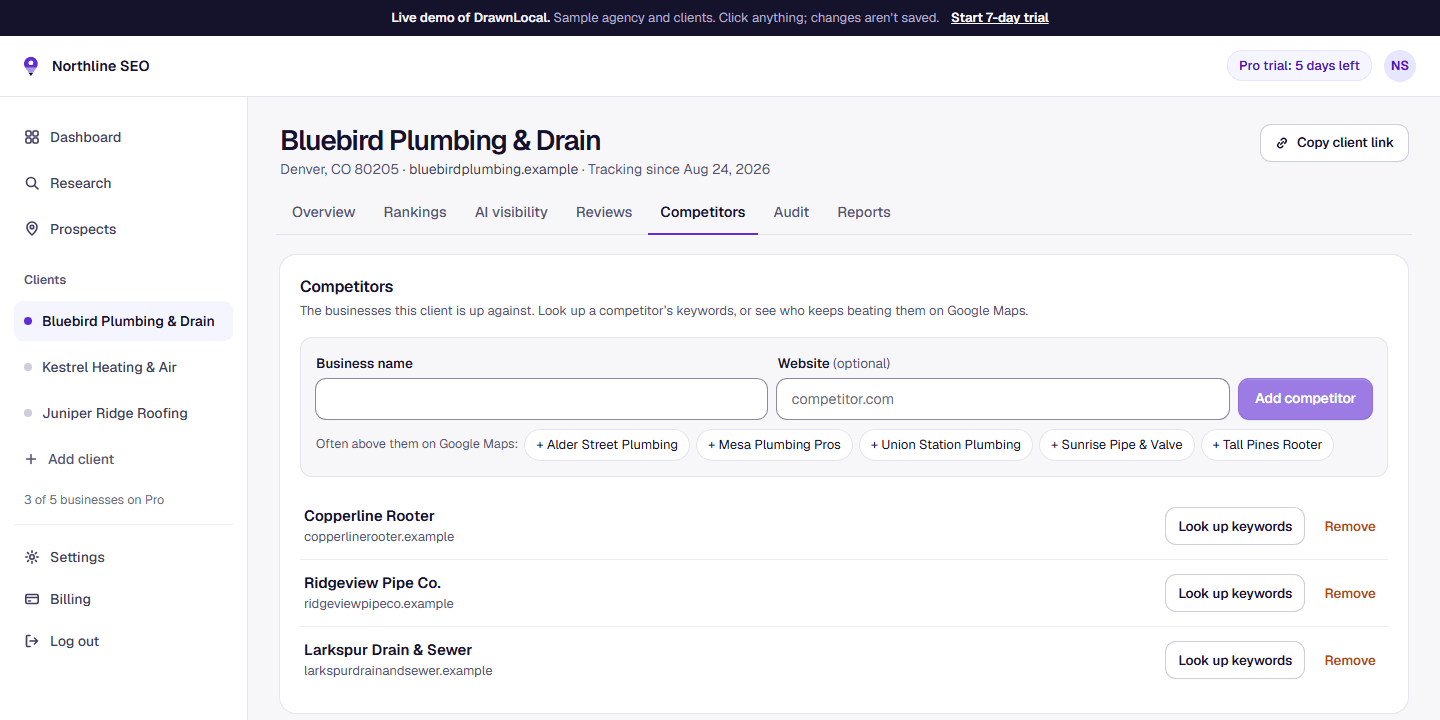
- Look at the top 3 names on the latest heat map for each main keyword.
- Flag any name you don’t recognize, or any name that has grown longer.
- Run the five checks above on each flagged listing.
- Report what breaks the rules, using the right route, and log it.
- Re-check last month’s reports, and report again with new evidence if nothing changed.
Once the routine is set up, it can take as little as fifteen minutes a month per client.
Track the keyword over time
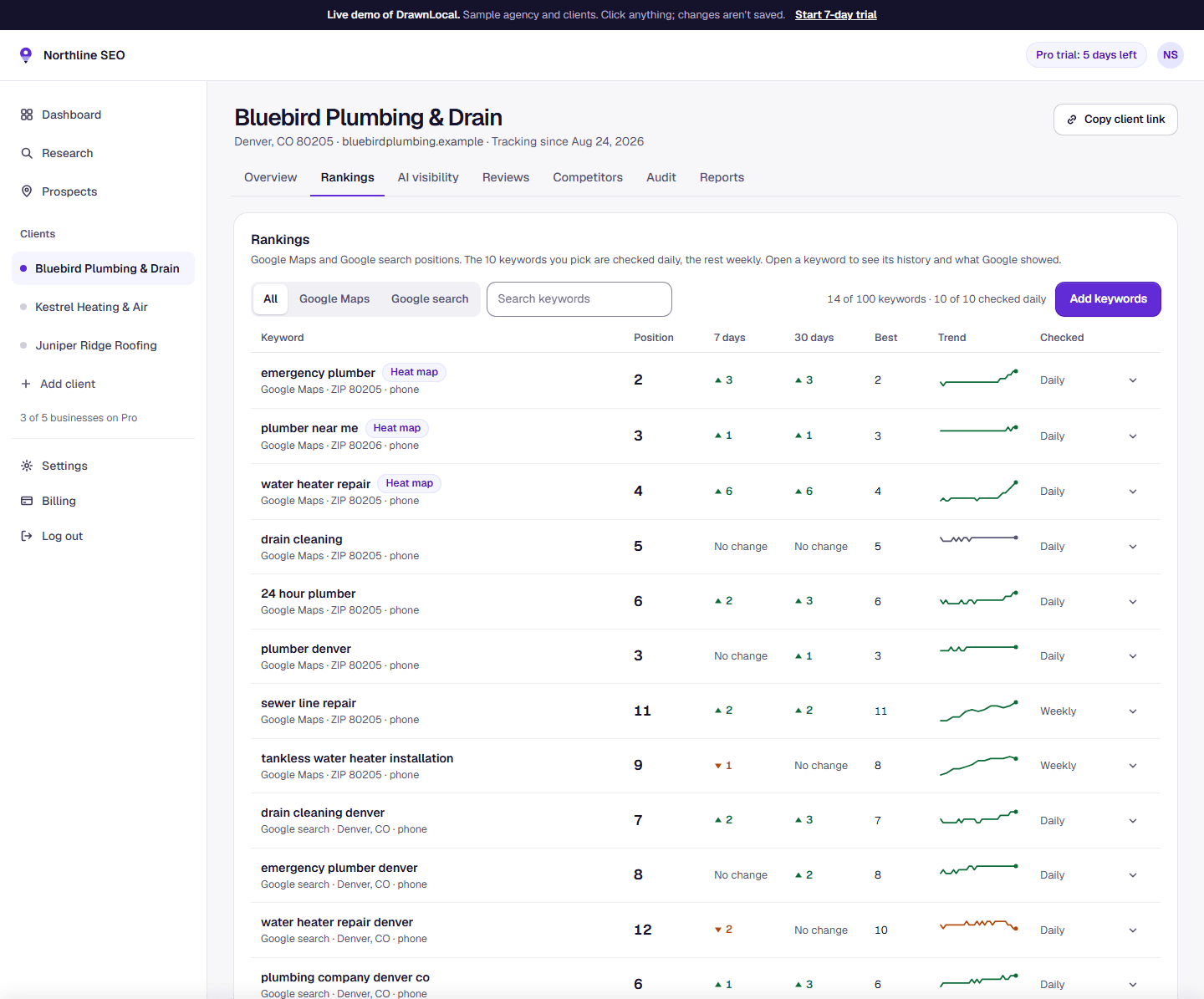
Removals don’t always move rankings at once, and some spam returns under a new name. Daily rank checks for the main keyword show when the change lands, and whether it holds:
Telling the client about spam work
Owners notice when a competitor with a suspicious name sits above them. Tell them what you’ve found and what you’ve reported, and be clear that Google decides. Then show the effect on the map when it comes.
A live client page helps, because the owner can see the map between reports:
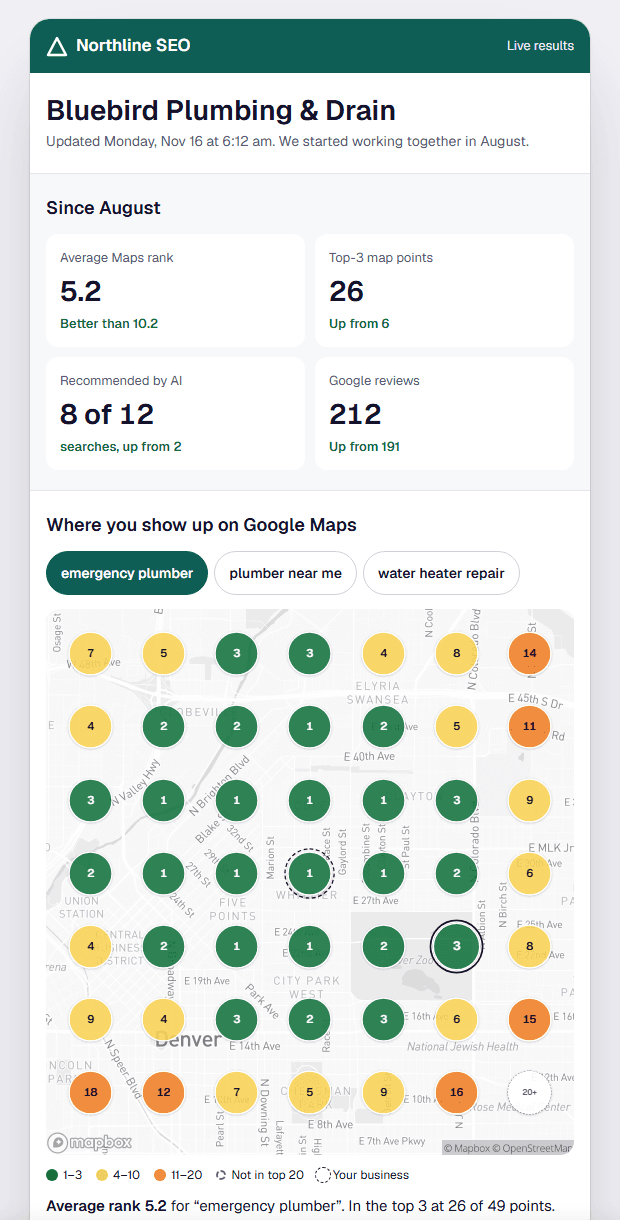
Report it as one item among the month’s work, with the before-and-after map. It’s a result the owner can see, but not one you can promise.
Questions
How long does Google take to remove a fake listing?
Google doesn’t publish a timescale, and it doesn’t send status updates for redressal form complaints. Check the listing again after a few weeks and report again with new evidence if nothing has changed.
Can I report a competitor for keyword stuffing?
Yes, if its name breaks Google’s guidelines. Use Suggest an edit with the business’s real-world name, as shown on its sign and website, and keep the evidence in case you need the redressal form.
Is a virtual office allowed on Google Business Profile?
No. Google’s guidelines say a rented mailing address where the business doesn’t operate isn’t eligible, and PO boxes aren’t acceptable. Co-working spaces qualify only with signage, staff and customers received during business hours.
Can reporting a competitor backfire?
It can if the report is false, or if your client breaks the same rule. Report only clear breaches with evidence, and fix your client’s own listing first.
Will Google tell me if my report worked?
Not for the redressal form: Google says you won’t be updated on its status. Check the listing yourself, and track the keyword with a heat map so you see the change in rankings.
Sources
- Google: guidelines for representing your business
- Google: business redressal complaint form
- Google Maps Help: report a business on Google Maps
- Google Maps Help: edit place information
- Google: how we fight fake business profiles on Google Maps (Jun 20, 2019)