Google AI Mode and local SEO: how it picks businesses, and what agencies can do
Google’s AI answers now name plumbers and roofers directly. Here’s what Google says about them, what a study of about 200,000 local AI searches found and what our own live checks showed. Then the work that makes a client more likely to be named.
By the DrawnLocal team · · Updated · 14 minute read
What AI Mode and AI Overviews are
AI Overviews are AI-written summaries at the top of normal Google results. Google shows them only when it judges they add something, so they often don’t appear. AI Mode is a separate, conversational search where people ask follow-up questions.
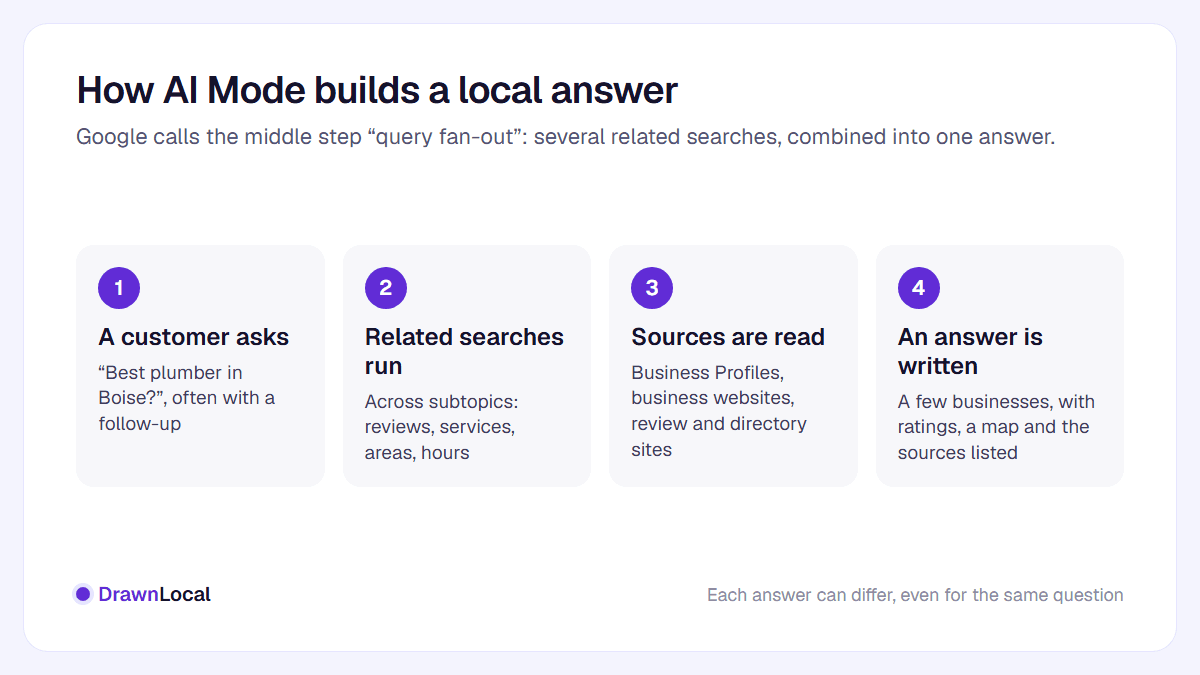
Both can use what Google calls “query fan-out”: running several related searches across subtopics and sources, then combining them. For a local search, AI Mode writes short summaries of businesses, with ratings, review counts and hours drawn from Business Profiles and other sources. The sources are listed beside the answer, with suggested follow-up questions. For a named business it can show a small map and a profile card with call, directions and website buttons, as Whitespark’s guide to AI Mode (Apr 30, 2026) describes.
What Google says about appearing in them
Nothing special, according to Google. Its Search Central guidance says: “There are no additional requirements to appear in AI Overviews or AI Mode, nor other special optimizations necessary.” You don’t need new files, AI text files or special structured data. A page has to be indexed and eligible to appear in Search with a snippet.
What Google does recommend is ordinary good practice. Let Google crawl the site, link pages internally and put important content in text. Keep structured data matching what’s visible on the page, and keep the Business Profile up to date. Clicks from AI features are counted in Search Console’s Performance report under the Web search type, not shown separately.
What a study of 200,000 local AI searches shows
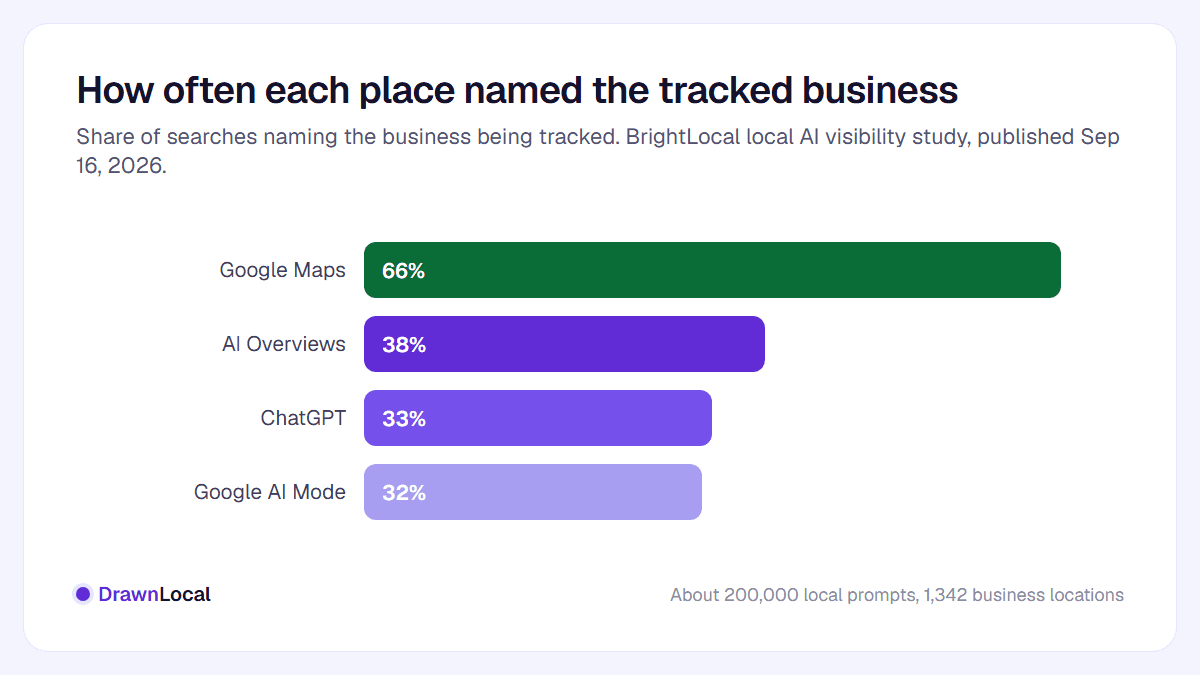
BrightLocal ran non-branded local prompts for 1,342 business locations over 60 days, from nine points around each business, about 200,000 prompts in all. BrightLocal sells an AI visibility tracker, and its own report gives slightly different totals in places, so read the figures as a guide:
| Measure | Google Maps | AI Mode | AI Overviews | ChatGPT |
|---|---|---|---|---|
| Named the tracked business | 66% of searches | 32% | 38% | 33% |
| Businesses named per answer, on average | – | 3.5 | 2.5 | 4.1 |
| Same businesses on a repeat search | – | 21% | 33% | 23% |
| Picks within 5 km (about 3 miles) | – | 53% | 59% | – |
Two more findings matter for agencies. AI Mode and AI Overviews shared only 29% of the businesses they named, so ranking in one says little about the other. And the Google Business Profile was the most cited single source (about 29% of citations, and cited for 94% of businesses), while business websites made up 42% of all citations.
The practical lesson: check AI answers several times and from several points, and report a share over time, never a single answer. The same logic is behind why a client sees a different rank in Maps.
We checked six local searches ourselves
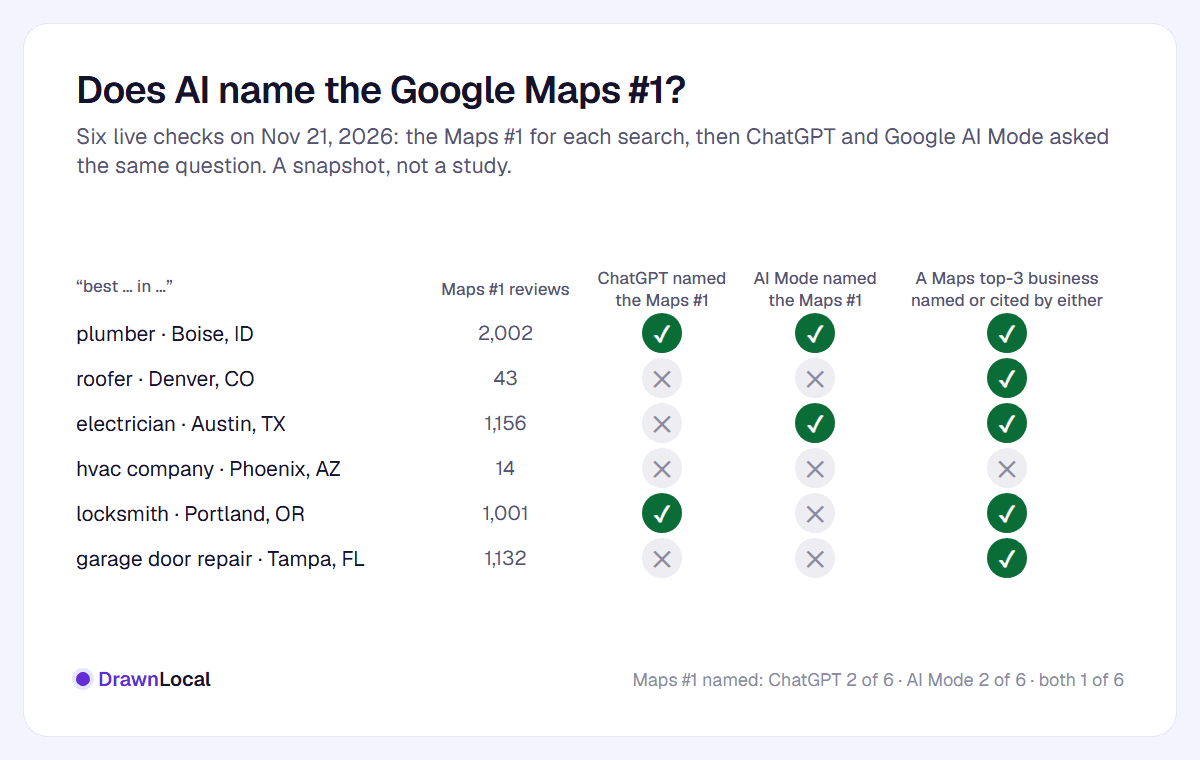
To see the pattern first-hand, we ran six live checks on Nov 21, 2026 with DrawnLocal’s free AI visibility checker. For each trade and city, we took the business Google Maps listed first. Then we asked ChatGPT and Google AI Mode for the “best” business of that trade in that city.
Six searches prove nothing on their own, so read this as a snapshot. It still lines up with the larger study: a top Maps position didn’t guarantee an AI mention.
How we judged a mention: ChatGPT counts if it named the business in its answer. AI Mode counts if its answer named the business; where it only listed the business’s website as a source, the table says “cited”. We checked every row by hand, because AI answers often shorten a business’s full Google name.
| Search | Maps #1 reviews | ChatGPT named the Maps #1 | AI Mode named the Maps #1 | What else stood out |
|---|---|---|---|---|
| best plumber in Boise, ID | 2,002 | Yes | Yes | Both named the same business |
| best roofer in Denver, CO | 43 | No | No | AI Mode cited the Maps #2 and #3 |
| best electrician in Austin, TX | 1,156 | No | Yes | ChatGPT named five other electricians |
| best hvac company in Phoenix, AZ | 14 | No | No | AI Mode cited only Yelp and Thumbtack |
| best locksmith in Portland, OR | 1,001 | Yes | No | The two named different businesses |
| best garage door repair in Tampa, FL | 1,132 | No | No | Both picked the Maps #2 |
Three things stood out. The Maps #1 was named by ChatGPT in two searches, by AI Mode in two, and by both in only one. A business from the Maps top 3 was named or cited by at least one AI in five of six searches. And ChatGPT and AI Mode shared at least one business in only three of the six.
The Phoenix result is worth a second look. The Maps #1 had 14 reviews, and AI Mode cited only directory sites. One search can’t show why, but it fits the study’s advice: reviews and other sites that describe the business matter here too.
One live result up close
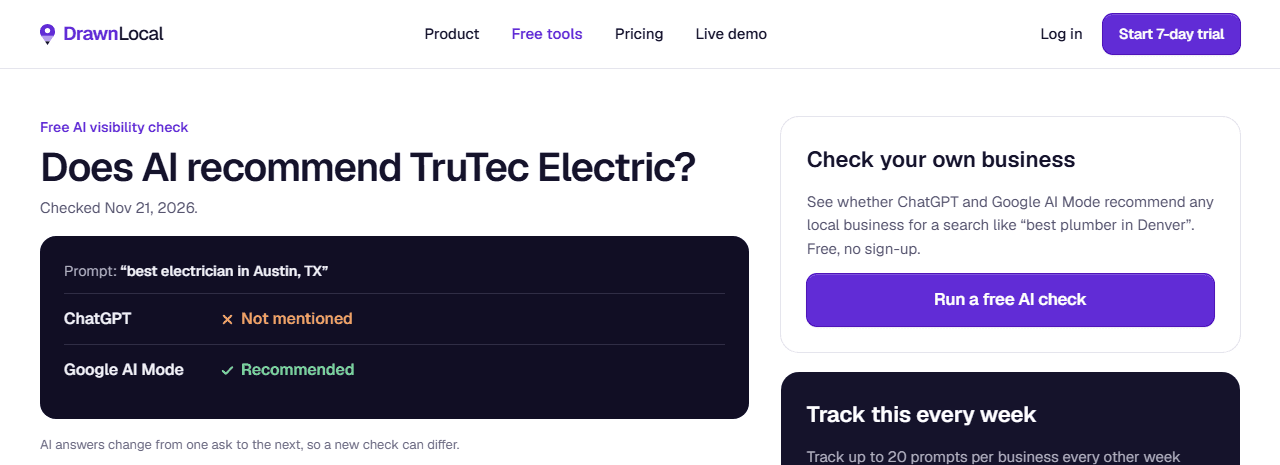
Here’s the Austin check as the free tool shows it. Google AI Mode recommended the electrician that Google Maps listed first. ChatGPT, asked the same question, named five other electricians instead.
For an agency, a split like this is useful. It shows the client that AI answers aren’t one ranking. It also tells you where to look: what ChatGPT’s sources say about the business, and whether it appears on them at all.
Ask the same question twice
We asked ChatGPT “best plumber in Boise, ID” a second time, minutes after the first. Three of the five plumbers it named were the same; two were new. AI Mode changed more: of the plumbing companies whose websites it cited, only one appeared both times.
That’s the study’s finding in miniature. A repeat AI Mode search named the same businesses only about 21% of the time in BrightLocal’s data. One answer is a sample, not a position.
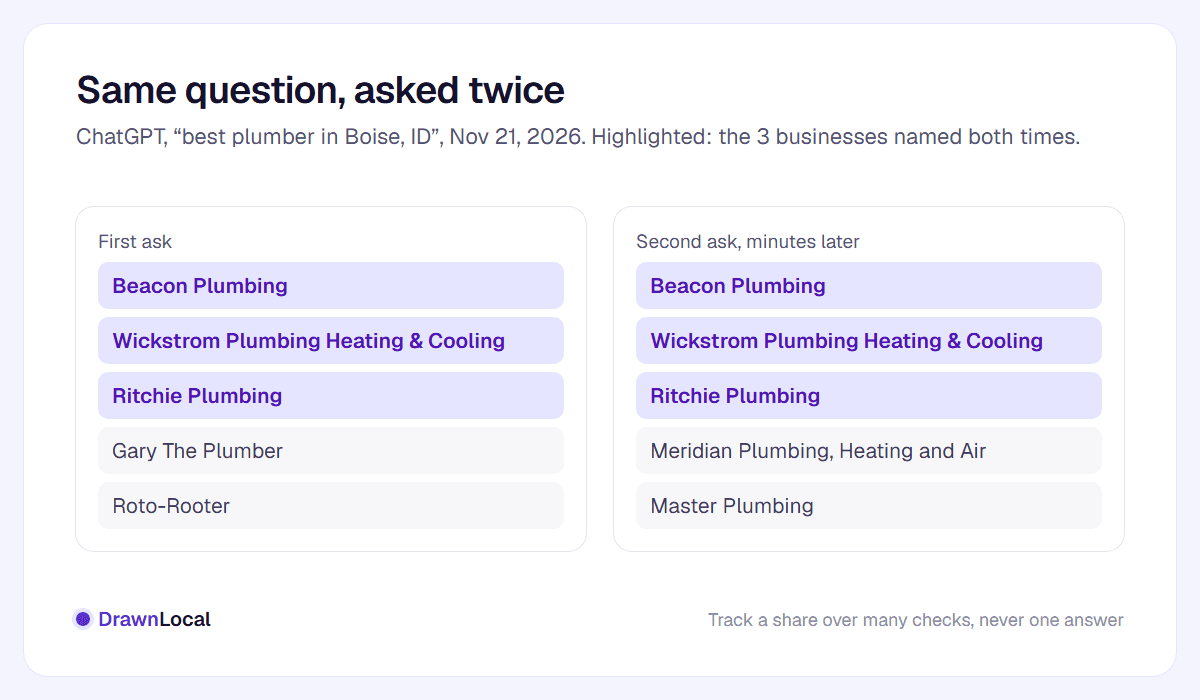
So check each prompt more than once, and from more than one place, before you tell a client anything. Report the share of checks that name them, and how it moves over months.
AI Overviews and AI Mode pick differently
It’s tempting to treat Google’s two AI features as one. The study suggests otherwise: they shared only 29% of the businesses they named. AI Overviews named fewer businesses per answer, 2.5 against 3.5, and repeated itself more often, 33% against 21%.
Both leaned local. AI Overviews picked businesses within about 3 miles (5 km) in 59% of cases, and AI Mode in 53%. So distance still matters, as it does in Maps.
For reporting, track the two separately. A client named in AI Overviews but missing from AI Mode isn’t “in Google’s AI”; they’re in one of two shelves, and the other needs its own attention.
AI Mode, AI Overviews, ChatGPT and Google Maps compared
The four places a customer might meet your client work differently. A side-by-side view, using Google’s descriptions and BrightLocal’s 2026 figures:
| Where it appears | Named the tracked business | Businesses per answer | Same businesses on a repeat | |
|---|---|---|---|---|
| Google Maps | The Maps app and website | 66% of searches | A full list | – |
| AI Overviews | Top of normal Google results, only when Google judges it helps | 38% | 2.5 | 33% |
| Google AI Mode | A separate, conversational Google search | 32% | 3.5 | 21% |
| ChatGPT | OpenAI’s own app and website | 33% | 4.1 | 23% |
The gap between Maps and the AI answers is the main point. In the study, Maps was the most reliable place to be found, and the AI answers added a second, less predictable shelf on top.
What makes a business more likely to be named
Nothing guarantees a mention, but the evidence points to the same work that wins Maps:
- A complete, accurate Business Profile. Categories, services, hours, service area, attributes and photos. It’s the most cited single source in AI answers.
- Reviews that describe the work. AI summaries show ratings and review counts, and quote what customers say. Run a routine that asks every customer; see review gating for what’s allowed.
- A website that answers customers’ questions in text. A page for each service and area that says what’s done, where, how fast and roughly what it costs. Websites were 42% of citations in the study.
- The same name, address, phone and hours everywhere the business is listed.
- Mentions on other sites customers trust, such as local news, trade associations and curated “best” lists, which Whitespark recommends building.
- Strong Google Maps rankings. Maps named tracked businesses about twice as often as AI answers did in the study. How Google Maps rankings work covers what moves them.
Where AI answers get their facts about a business
An AI answer can only describe a business from what it finds. In the study and in our own checks, the sources fell into a few groups, and each one is work an agency can do:
| Source | What it tells the AI | What to do |
|---|---|---|
| Google Business Profile | Category, services, hours, area, rating, reviews | Complete it and keep it current; see the checklist below |
| The business’s website | Services, areas, prices, proof | One clear page per service and area, written in text |
| Review and directory sites | Ratings and what customers say | Claim the main listings; keep details identical |
| Booking and quote sites | That the business takes jobs online | Keep any booking links working and up to date |
| Local news, associations, “best” lists | That others vouch for the business | Earn mentions with real local activity |
In the Phoenix check, AI Mode cited only Yelp and Thumbtack pages. For a client in a market like that, an accurate listing on the directories customers use is part of being described at all.
An AI-ready Business Profile: a checklist
The Business Profile was the most cited single source in the study, so start there. Check each item against the top three competitors for the client’s main search:
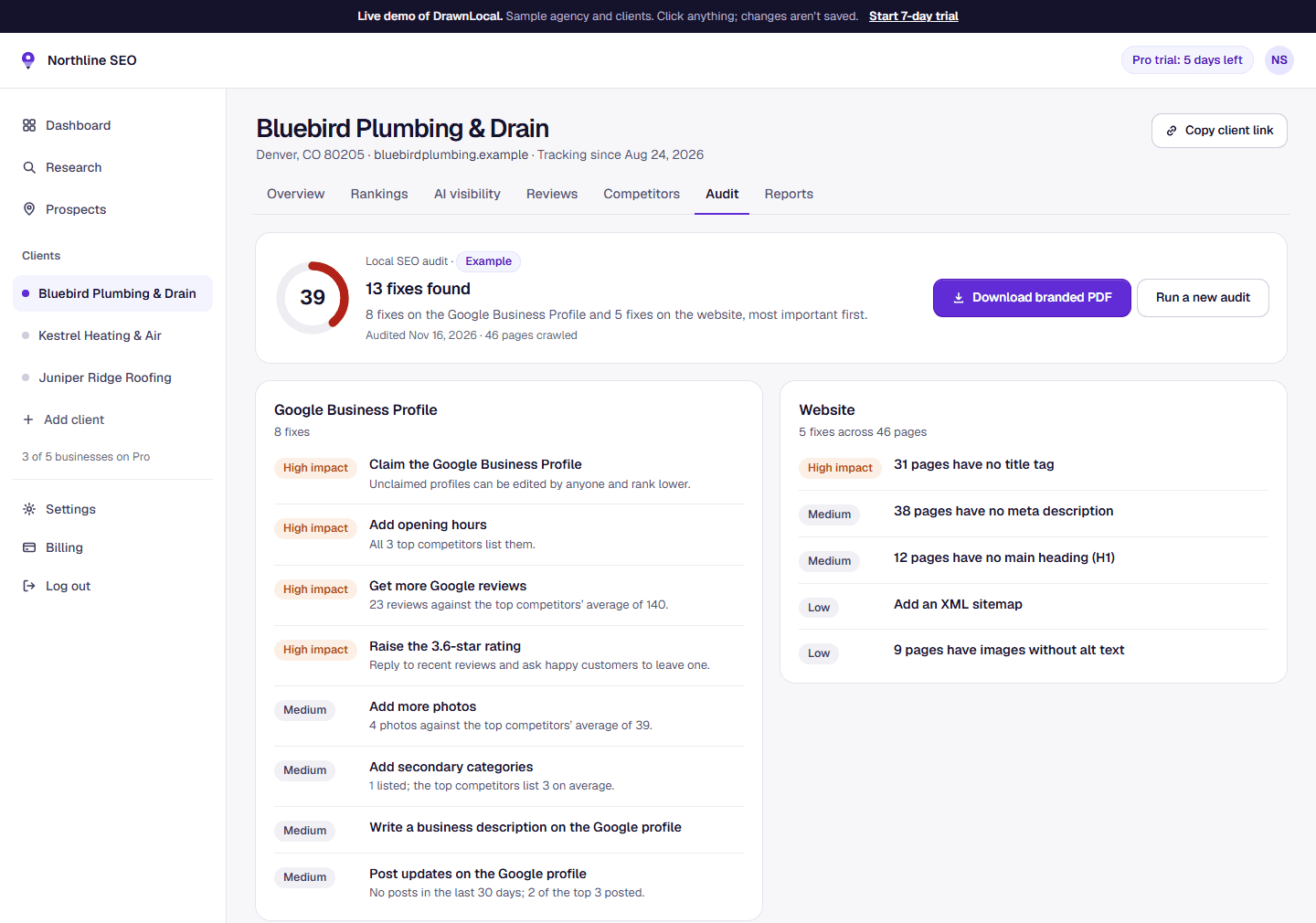
- Primary category as specific as the main service, such as “Roofing contractor” rather than “Contractor”.
- Additional categories for other real services, and nothing the business doesn’t do.
- Services listed one by one, in the words customers use.
- Hours, including holiday hours, and service area if the business visits customers.
- Attributes that apply, such as online estimates.
- A description that says what the business does, where and for whom, in plain words.
- Recent photos of real jobs, the team and the vehicles.
- Reviews coming in every month, with a reply to each one.
Each item is ordinary Business Profile work, which is the point: Google says there’s no special optimization for AI features. How to rank higher on Google Maps covers the profile in more depth.
Write service pages AI answers can use
Business websites made up 42% of citations in the study, and Google asks for important content in text. A service page that answers customers’ questions directly gives an AI answer something to quote. A simple structure for each one:
- What the service is, in one sentence, using the words customers search for.
- Where it’s offered: the towns and neighborhoods, by name.
- How fast: same-day, 24-hour or by appointment, and when the phone is answered.
- Roughly what it costs, or what the price depends on.
- Proof: licenses, years in business, and a few short reviews about this service.
- Common questions, each answered in two or three sentences.
Keep the facts the same as the Business Profile: hours, service area and phone. A page that contradicts the profile gives an AI answer two versions to choose from.
How to track Google AI Mode for a local SEO client
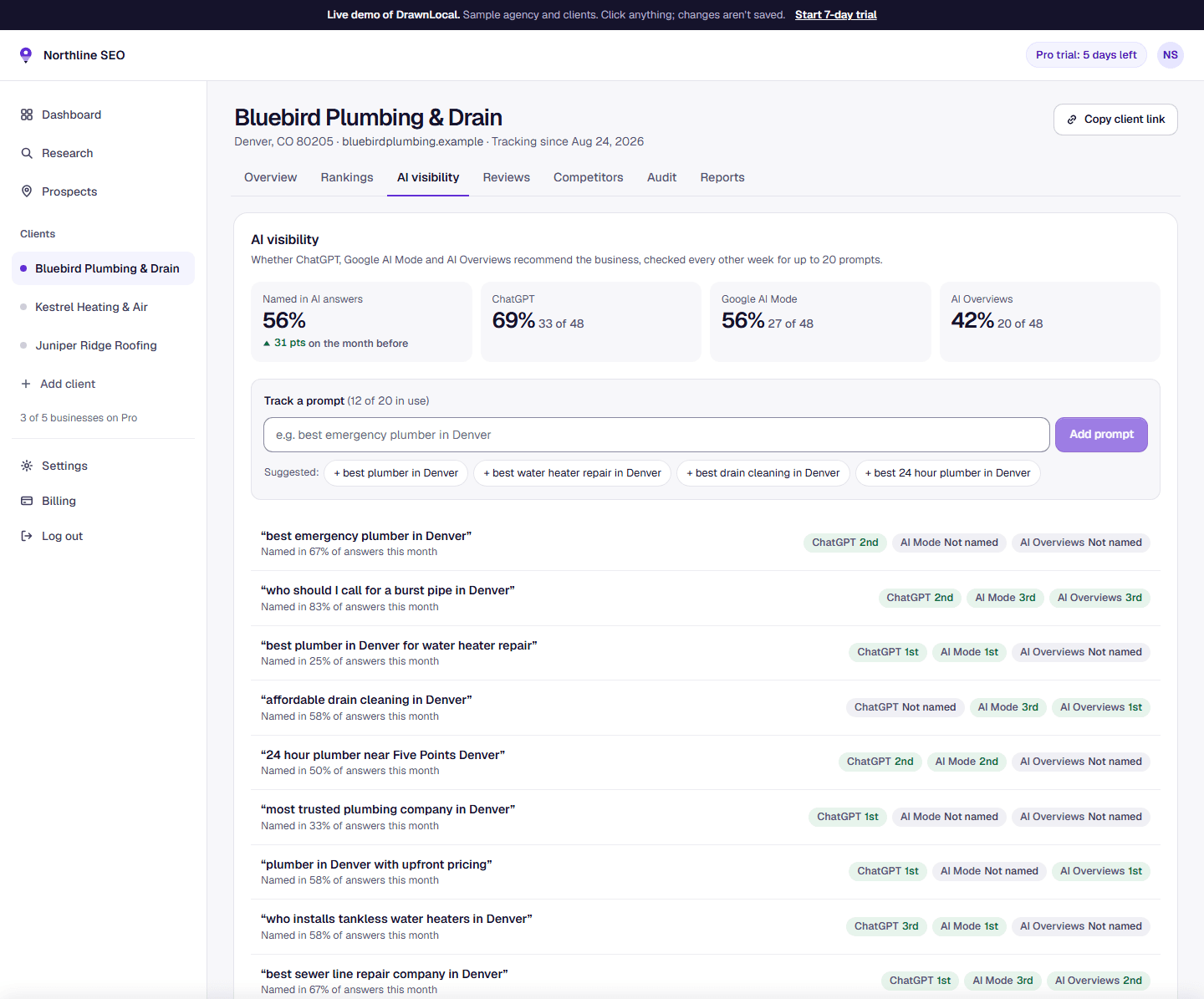
Pick a fixed set of prompts customers would really type, such as “best plumber in Aurora” or “emergency plumber near Aurora”. Check them on a schedule, record whether the client is named and who is named instead, and note which sources the answer cites. Over a few months the share of checks naming the client is the number to report.
DrawnLocal checks ChatGPT, Google AI Mode and AI Overviews every other week for up to 20 prompts per business and names the competitors recommended instead. To check one prompt now, use the free AI visibility checker; does ChatGPT recommend your business covers ChatGPT in more depth.
Prompts to track, by trade
Track the questions customers really ask, without the business name in them. Mix “best” prompts with urgent and specific ones. Starting sets you can copy, with the city or neighborhood filled in:
| Trade | Example prompts |
|---|---|
| Plumber | best plumber in [city] · emergency plumber near [neighborhood] · who fixes water heaters in [city] |
| HVAC | best hvac company in [city] · ac repair same day [city] · furnace replacement cost [city] |
| Roofer | best roofer in [city] · roof leak repair near [neighborhood] · who replaces roofs after hail in [city] |
| Electrician | best electrician in [city] · panel upgrade [city] · emergency electrician near [neighborhood] |
| Locksmith | best locksmith in [city] · locked out of my car [neighborhood] · 24 hour locksmith [city] |
| Garage door | best garage door repair in [city] · garage door spring replacement [city] · garage door won’t open [city] |
Keep the list fixed once you start. Changing prompts every month breaks the trend, and the trend is what you report.
Add neighborhood prompts for clients who serve a wide area. AI answers, like Maps, tend to pick businesses close to the place in the question, so a client can be named downtown and missing in the suburbs. Two or three prompts naming outlying areas show whether that’s happening.
A 90-day plan to raise a client’s AI visibility
Nothing guarantees a mention, but you can work in an order that’s easy to explain. Each step is work that also helps Google Maps and normal search:
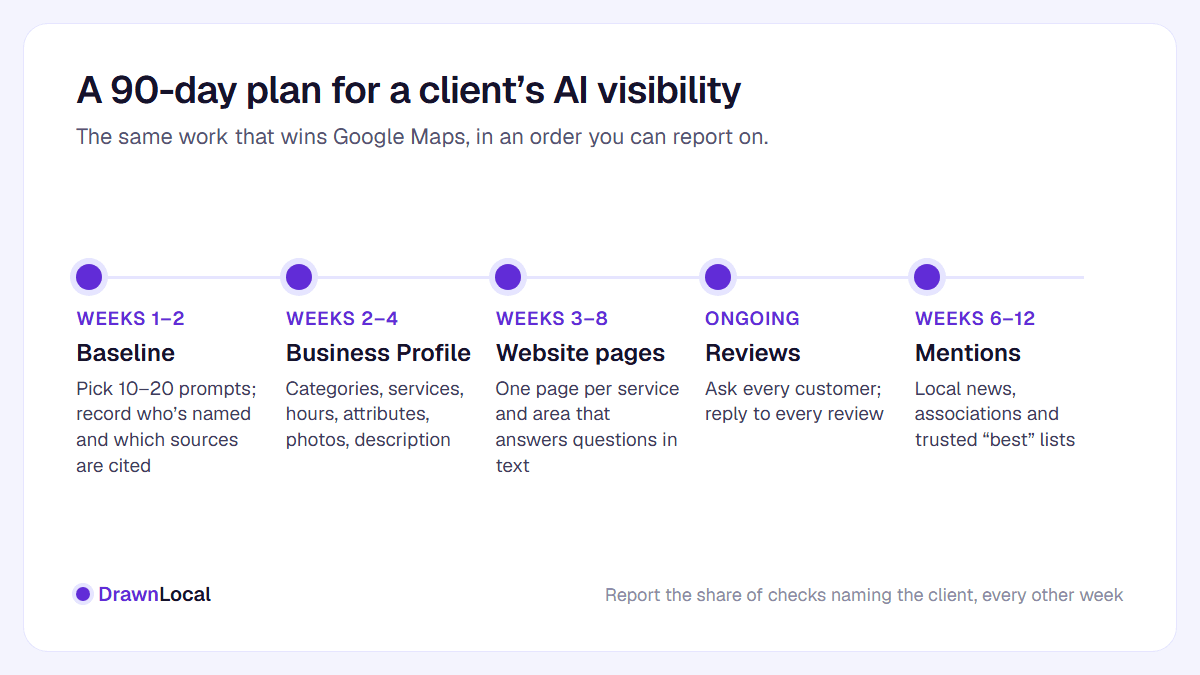
| Weeks | Work | Done when |
|---|---|---|
| 1–2 | Pick 10 to 20 prompts and record a baseline | You know who’s named now, and which sources are cited |
| 2–4 | Complete the Business Profile | Every item in the checklist above matches or beats the top 3 |
| 3–8 | Write or rewrite service and area pages | Each main service has a page that answers questions in text |
| Ongoing | Review routine and replies | New reviews every month, each one answered |
| 6–12 | Mentions on trusted local sites | The business appears on associations, local news or curated lists |
Then compare the share of checks naming the client with the baseline. AI visibility trackers for local SEO compares the tools that automate the checking.
Report AI visibility to clients
One number like “recommended by AI in 8 of 12 searches, up from 2” is easier for an owner to follow than a pile of screenshots. Put one number in the monthly report, with its starting point, and one line on what you did.
A live client page helps too, because the owner can check progress between reports. Here’s how one looks in DrawnLocal, with sample data from the live demo:
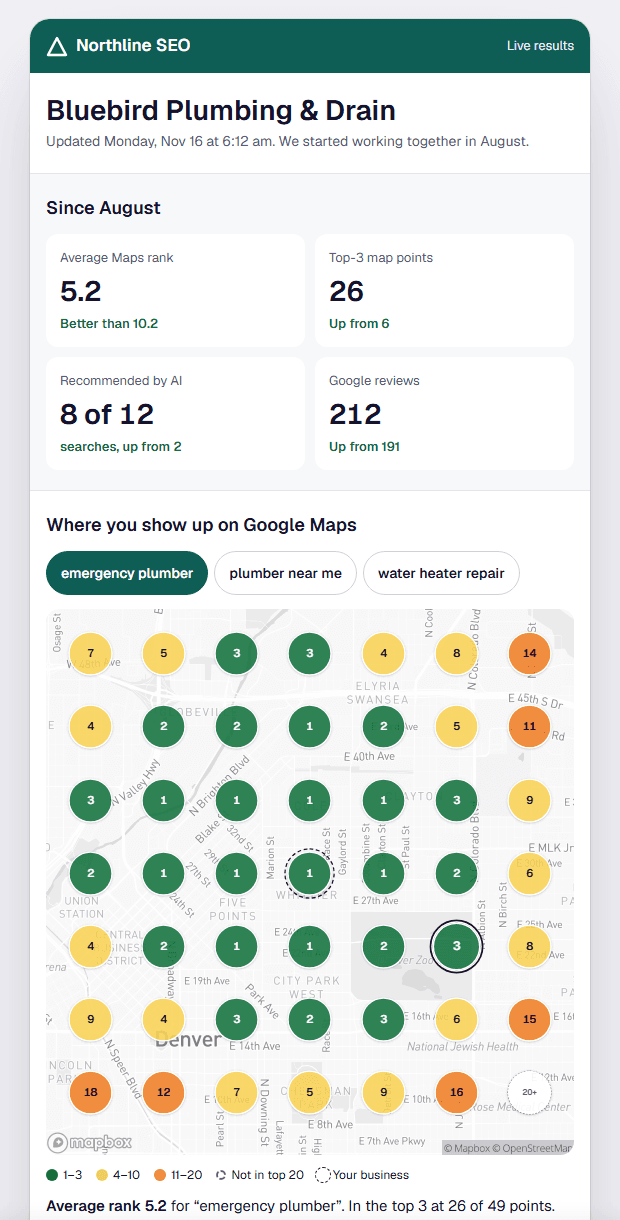
Keep the wording honest: the share is from your own checks, on the prompts you chose, on the dates you ran them.
Check a client’s AI visibility in 10 minutes
Before a sales call or a first report, a quick manual check gives you a baseline. In order:
- Write three prompts a customer would type, such as “best plumber in [city]”, without the business name.
- Run each one in the free AI visibility checker, which asks ChatGPT and Google AI Mode at once.
- Note whether the business is named, and who is named instead.
- Run the main prompt a second time, so you can see how much the answer moves.
- Search the main prompt on Google and look at the Maps results, so you can compare the two.
- Write the result down with the date. That’s the baseline your report starts from.
Ten minutes won’t give you a share you can trust, but it shows where the client stands and which competitors to watch.
Where AI visibility fits in a local SEO package
Sell it as part of the monthly work, not as a separate promise. The work that helps (profile, reviews, pages and mentions) is already in a good local SEO package; what changes is that you check and report AI answers too.
That keeps the offer honest. You can’t sell a guaranteed AI mention, but you can sell the work and a clear monthly measure of it. How to sell SEO services shows how to raise it on a sales call, and how much to charge for local SEO covers pricing the package.
Mistakes to avoid with AI visibility
- Reporting a single answer. One screenshot can change on the next ask.
- Tracking only branded prompts. “[Business name] reviews” says little about whether new customers find them.
- Paying for special AI files or markup. Google says none are needed for AI Overviews or AI Mode.
- Neglecting Google Maps. It named tracked businesses about twice as often as AI answers in the study.
- Changing the prompt list often, which hides the trend you’re trying to show.
- Promising a mention. No one can guarantee a place in AI answers.
What to tell clients
Set expectations early, in plain words. The free checker is a quick way to show an owner what a single answer looks like:
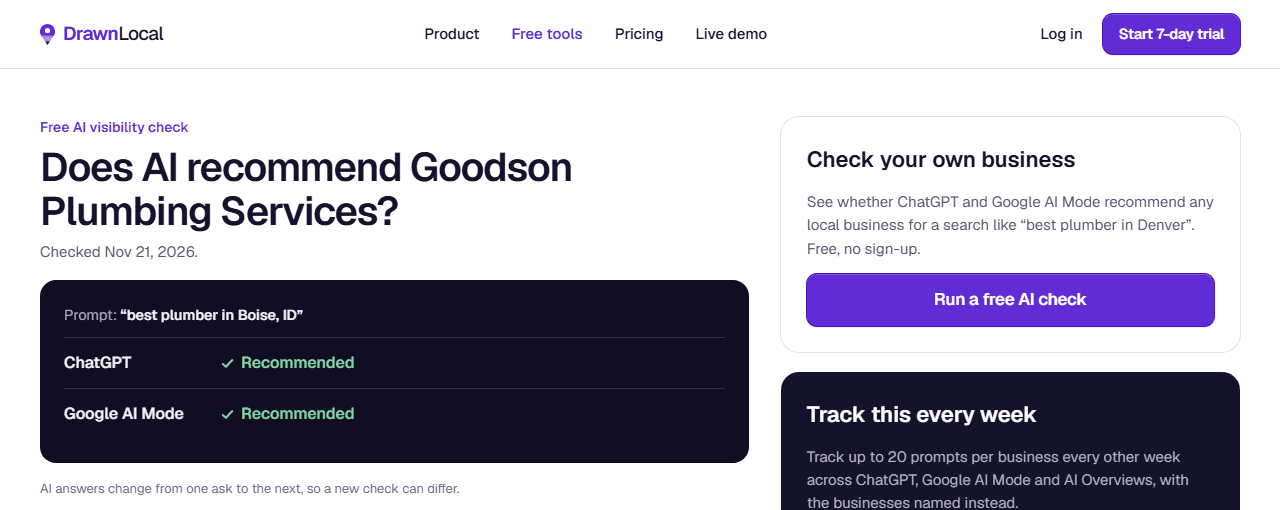
- AI answers differ from person to person and from one search to the next, so a screenshot from the owner’s phone isn’t a ranking.
- Progress shows as the share of checks that name them, rising over months.
- No one can guarantee a place in AI answers, any more than in Maps.
- The work that helps (profile, reviews, website, Maps rankings) pays off in normal search too.
A line that works on a call: “AI answers change every time someone asks, so we check the same questions every other week and tell you how often you’re named. The work that raises it is the same work that wins Google Maps.”
Questions
Does Google AI Mode use Google Business Profile data?
Yes. AI Mode’s business summaries show details such as ratings, review counts and hours drawn from Business Profiles and other sources. In BrightLocal’s 2026 study, the Business Profile was the most cited single source for local answers.
Do I need special schema for AI Overviews or AI Mode?
No. Google says there are no additional requirements or special optimizations, and no special structured data, for AI features. A page needs to be indexed and eligible to show in Search with a snippet.
Why does AI Mode show different businesses each time?
AI Mode builds each answer from several related searches and sources, and the results vary. In BrightLocal’s study, a repeat AI Mode search named the same businesses only about 21% of the time on average.
If a business ranks first on Google Maps, will AI Mode recommend it?
Not necessarily. In our six live checks on Nov 21, 2026, AI Mode named the Maps #1 business in two of six searches. Strong Maps rankings help, but AI answers draw on other sources too.
Can I see AI Mode traffic in Search Console?
Clicks and impressions from AI features are included in Search Console’s Performance report under the Web search type. Google doesn’t report them separately.
Sources
- Google Search Central: AI features and your website
- BrightLocal: local AI visibility study (published Sep 16, 2026)
- Whitespark: guide to Google’s AI Mode for local businesses (Apr 30, 2026)
- DrawnLocal: six live checks with the free AI visibility checker (Nov 21, 2026)