Local SEO client onboarding checklist: the first two weeks, step by step
The first two weeks shape whether a client stays for a year. This local SEO client onboarding checklist covers what to ask, what access to collect, what to measure before you touch anything, and what to agree, in order.
By the DrawnLocal team · · Updated · 14 minute read
The local SEO onboarding checklist at a glance
Copy this into your project tool, then use the sections below for the detail of each step.
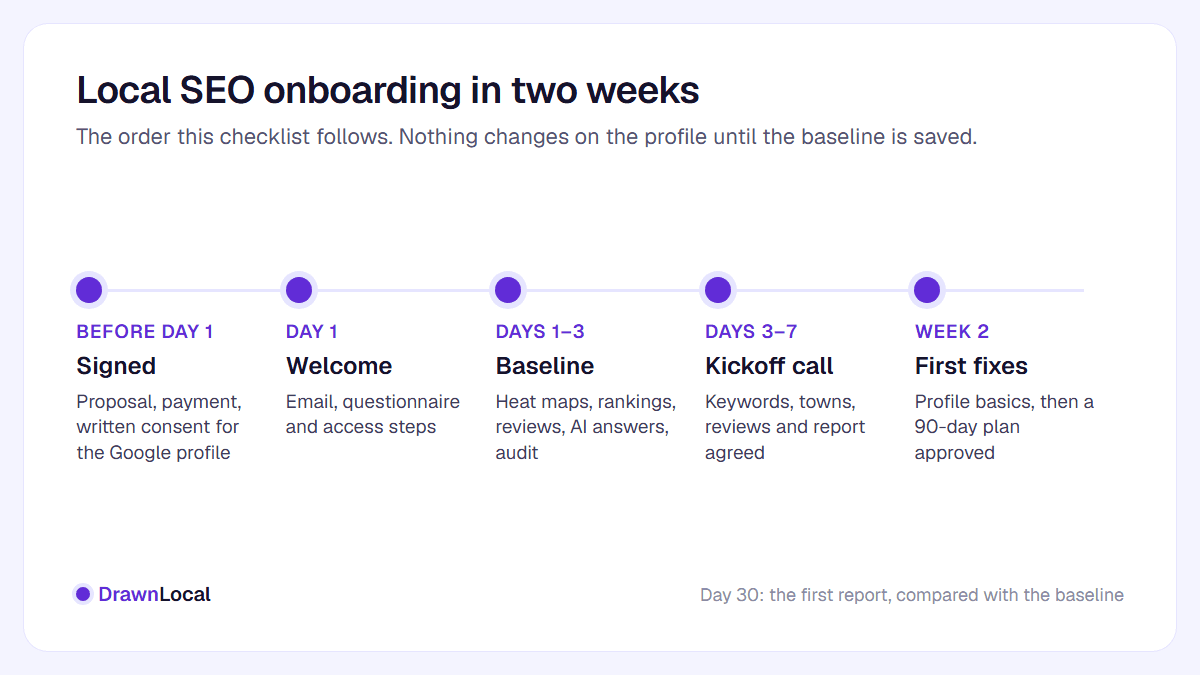
| When | Task | Done when |
|---|---|---|
| Before day 1 | Contract, payment and written consent to manage the Google profile | Signed and on file |
| Day 1 | Welcome email, questionnaire and access steps | Sent |
| Days 1–2 | Access: Google Business Profile (manager), website, Search Console, Analytics | Every invite accepted |
| Days 1–3 | Baseline: heat maps, rankings, reviews, AI answers, audit, profile calls and clicks | Saved and dated |
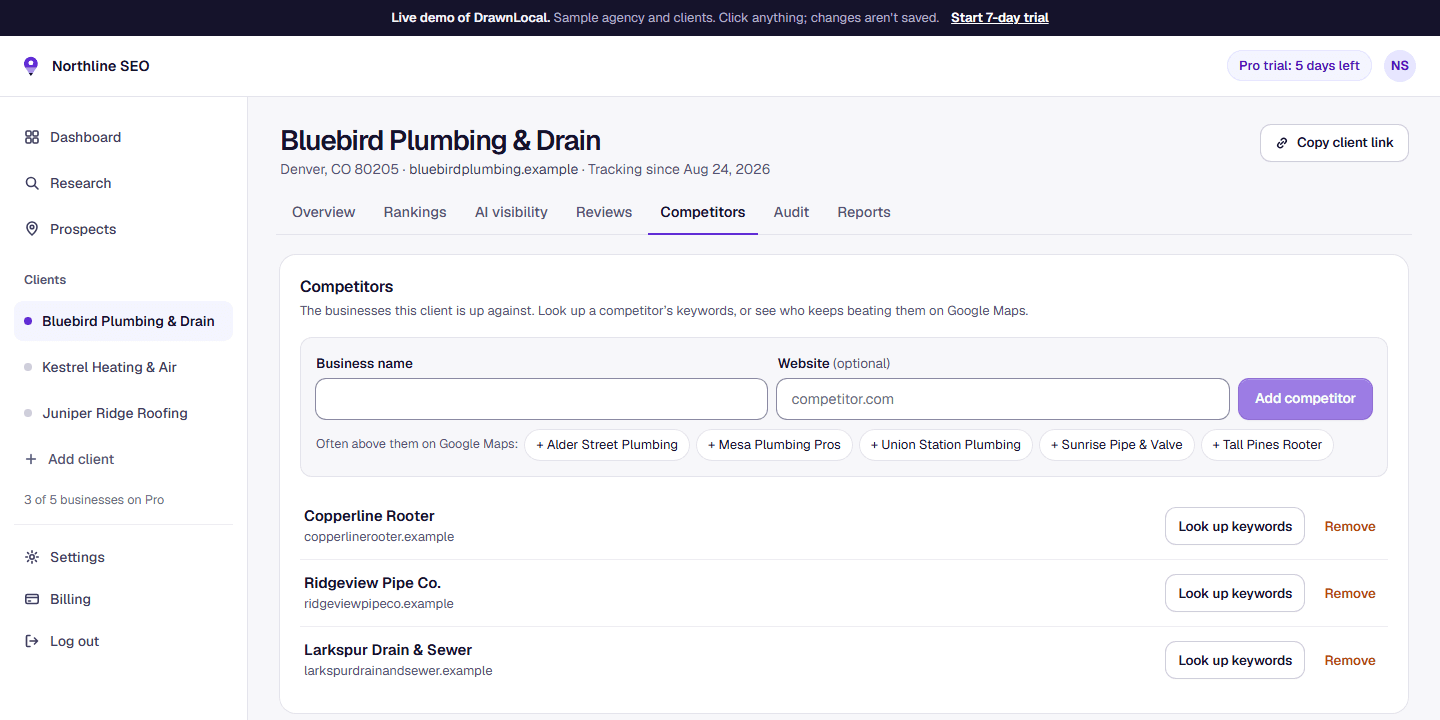
| Days 3–7 | Kickoff call | Keywords, towns, report and review routine agreed |
| Week 2 | Profile basics fixed | Category, name, hours, services and service area checked |
| Week 2 | 90-day plan | Approved by the client |
| Day 30 | First monthly report | Compared with the baseline |
Before day 1: what must be signed
- The proposal the client accepted, with scope, price, term and notice period. Our local SEO proposal template has the sections.
- Payment set up for the first month, including any setup fee.
- Written consent to manage the client’s Google Business Profile. Google’s third-party policy requires the owner’s express consent and says verbal consent isn’t enough.
- If you charge for managing the profile, a written note that Google Business Profile itself is free, which Google’s policy also requires.
A welcome email you can copy
Send it within a day of signing. A template, with the parts in brackets to fill in:
Subject: Welcome to [agency]: your first two weeks
“Hi [name], thanks for choosing us. Here’s what happens next. This week we’ll record where [business] stands today on Google Maps, in Google search and in AI answers, before we change anything. Next week we’ll meet for 45 minutes to agree the plan.”
“To get started, could you do two things by [day]? First, answer the short questionnaire below; it takes about 15 minutes. Second, add [your email] as a Manager on your Google Business Profile, using the steps underneath. We never need your password.”
“Any questions, just reply. Talk soon, [your name].”
Paste the questionnaire and the access steps below the sign-off. One email with everything in it is easier to answer than three.
Day 1: the welcome email and questionnaire
Send one email with three things: what happens in the next two weeks, the questionnaire, and the access steps with your address filled in. Keep the questionnaire short enough to answer in 15 minutes:
- Which services make you the most money, and which do you want more of?
- Which towns, ZIP codes or neighborhoods do you serve, and where do you want more work?
- Who do you lose jobs to? Name up to three competitors.
- Do customers visit you, or do you travel to them? (This decides how the profile and the heat maps are set up.)
- Has the business changed its name, address or phone number in the past five years?
- Who can sign in to your Google profile, website, Search Console and Analytics today? Has another agency worked on them?
- How do you ask customers for reviews now?
- What does a good month look like: calls, booked jobs, quote requests?
- Anything we must or mustn’t say: licenses to show, offers, words you avoid?
The answers about towns and competitors set the keywords and the heat map areas; the name and phone history tells you how much listing clean-up is ahead.
A filled-in questionnaire: an example
Answers from a made-up plumbing company, to show what useful replies look like and what each one tells you:
| Question | Example answer | What it tells you |
|---|---|---|
| Most profitable services | Water heater installs and repipes | The first two keywords and service pages |
| Towns to grow in | Aurora and Centennial | Where to center the second heat map |
| Main competitors | Two named plumbers, one franchise | Who to track for reviews and rankings |
| Customers visit, or you travel? | We travel to them | A service-area profile; heat maps centered on ZIP codes |
| Past name or phone changes | New phone number in 2023 | Listings to update across the main directories |
| Who has access now | The owner, and an old web designer | Remove the designer from the profile; check the website login |
| How you ask for reviews | Sometimes, if the job went well | A routine that asks every customer, the same way |
| A good month | 40 booked jobs from calls | Track calls; report booked jobs if they’ll share them |
Days 1 and 2: collect access, never passwords
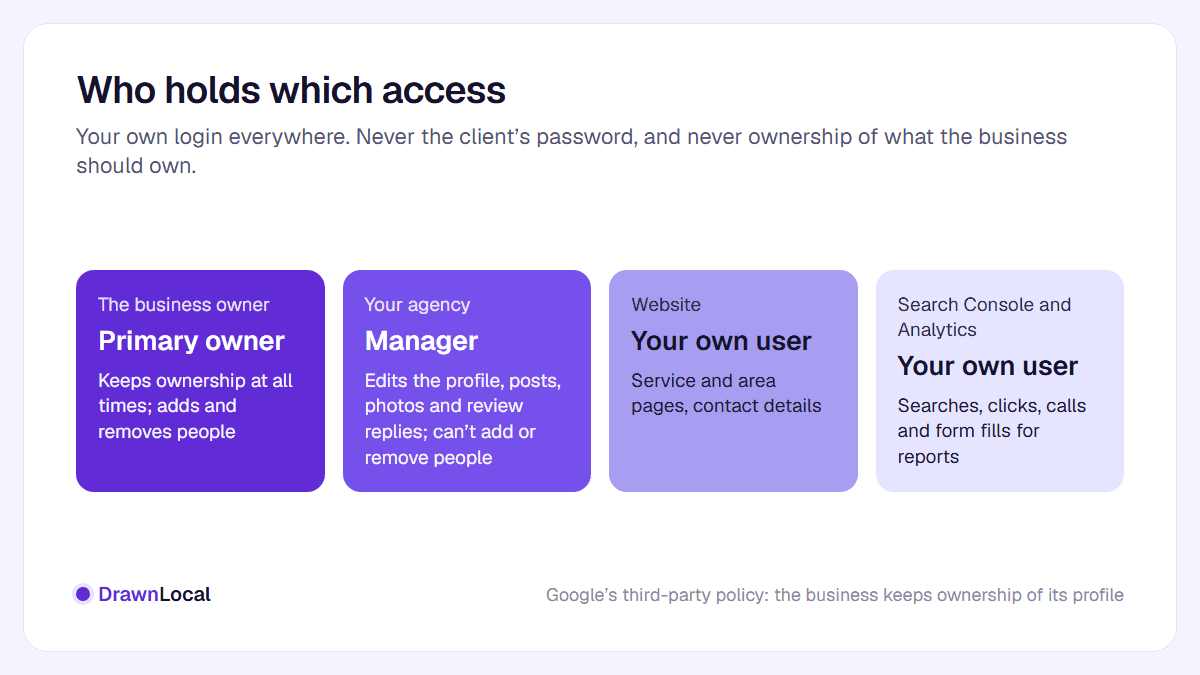
Ask for your own login at each service. Never ask for the client’s password, and never ask to own anything the business should own.
| Service | Ask for | Why |
|---|---|---|
| Google Business Profile | Manager | Edit the profile, add posts and photos, reply to reviews once approved |
| Website | Your own editor or admin user | Service and area pages, contact details, structured data |
| Google Search Console | Full user | Searches and clicks for the monthly report |
| Google Analytics | Viewer, or editor if you’ll set up tracking | Visits, calls and form fills from search |
| Call tracking or booking software | A read-only report | Calls and booked jobs, the results owners care about |
Domain and hosting logins usually aren’t needed; don’t hold keys you won’t use. The full steps for the Google profile, including what to do when nobody knows who owns it, are in how to get access to a client’s Google Business Profile.
Days 1 to 3: record the baseline before you change anything
Every report you send for the next year will compare with this starting point, so take it before your first edit:
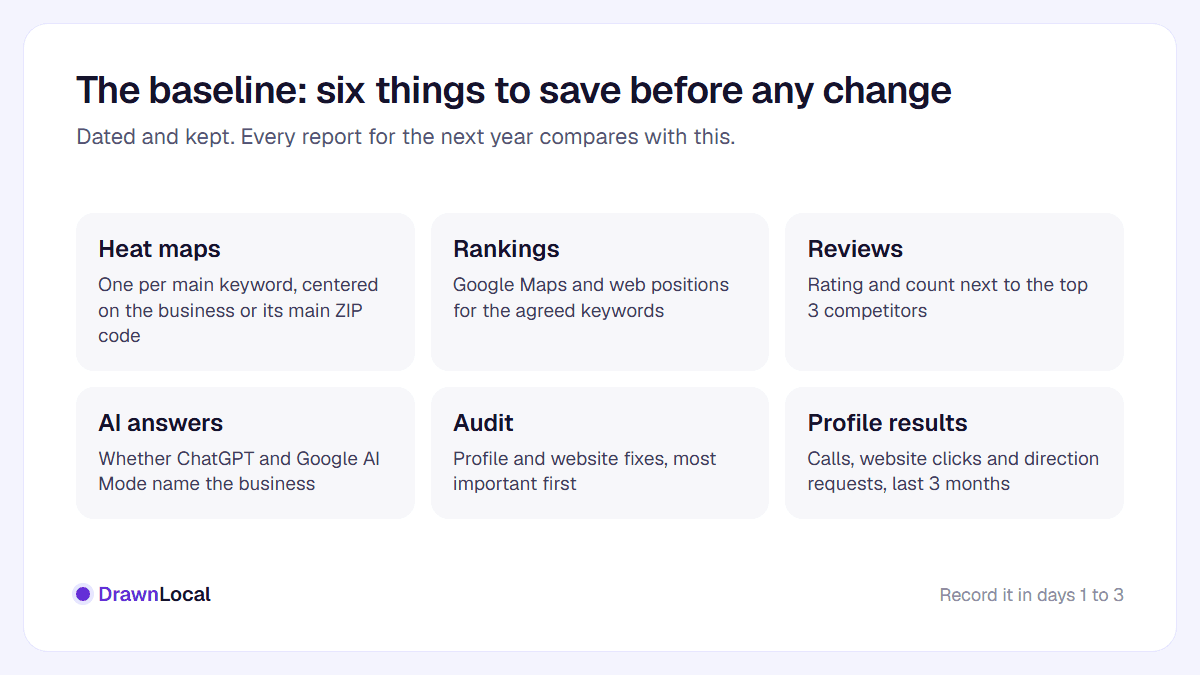
- A heat map for each main keyword, centered on the business, or on its main ZIP code if it travels to customers. See how to run a grid scan.
- Google Maps and organic positions for the keywords you’ll track. Which keywords to track helps you pick them.
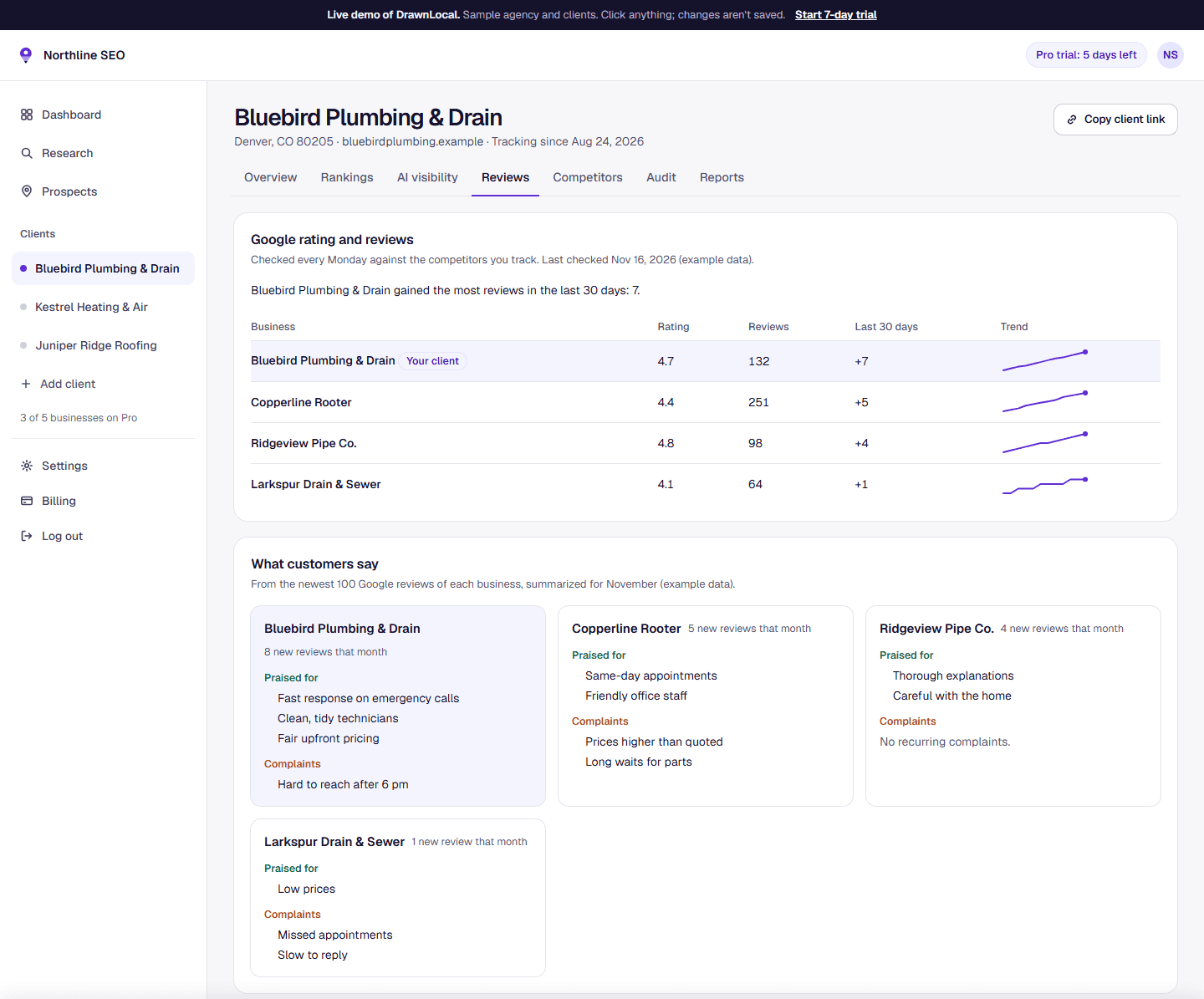
- Rating and review count, next to the top 3 competitors.
- Whether ChatGPT and Google’s AI answers recommend the business, using the free AI visibility checker.
- An audit of the profile and the website, using the local SEO audit checklist.
- Calls, website clicks and direction requests from the profile, and Search Console clicks, for the last 3 months.
In DrawnLocal, adding a client runs the first heat map straight away, and every monthly report compares with the month the client started, so the baseline is kept for you.
The baseline heat map: a live example
Here’s what a first heat map looks like for a real business, checked with DrawnLocal’s free tool on Nov 21, 2026. A Boise plumbing company, for “plumber”, from 9 points 1 mile apart: first at its own address, top 3 at 7 of 9 points, and sixth at the weakest point.
Save it with the date. In month three, a map of the same keyword and grid is the clearest proof of what changed.
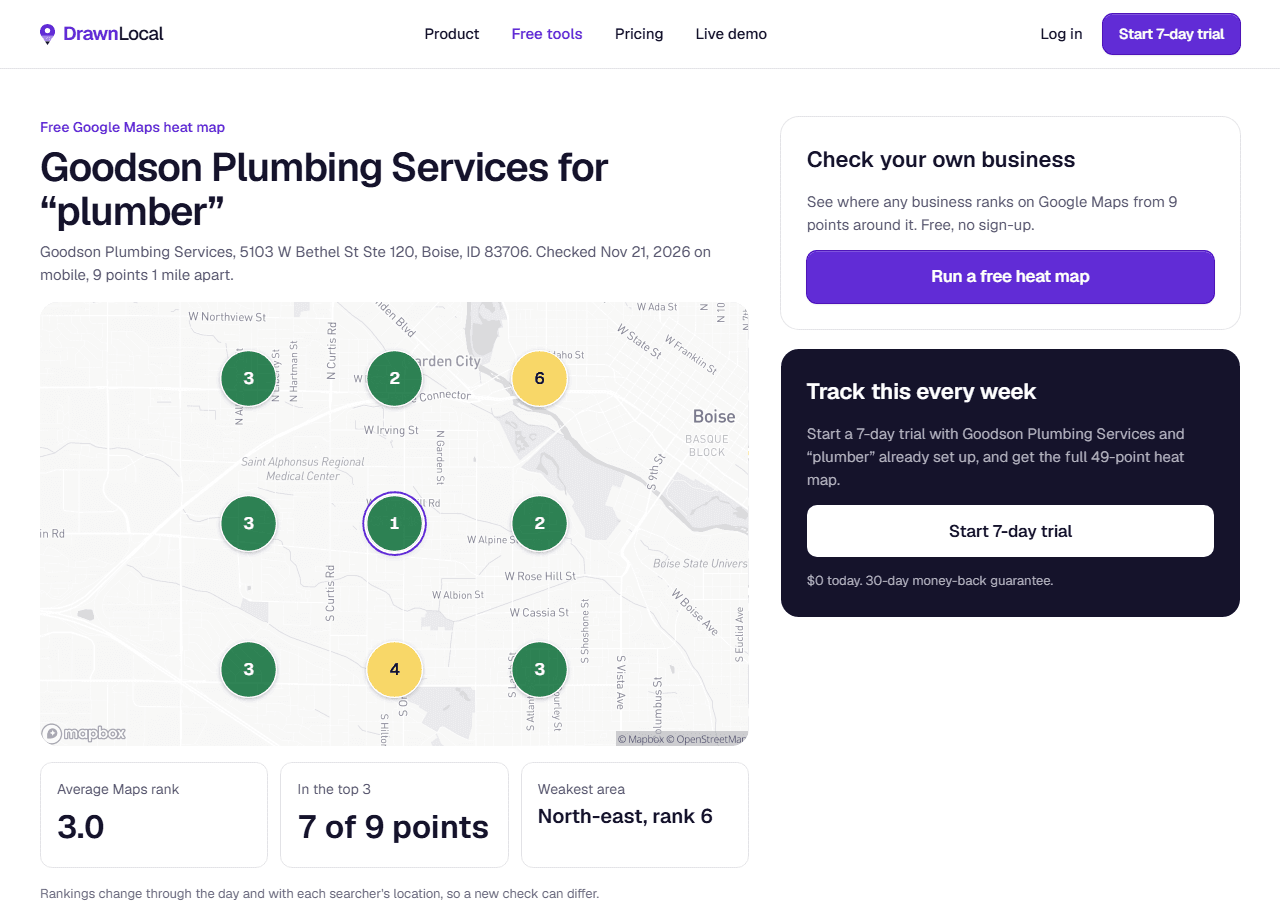
Use the same center point, grid size and keyword every time. A map that moves its center can show progress that isn’t there.
Baseline AI answers and reviews
Check two or three prompts customers would type, such as “best plumber in [city]”, and note whether ChatGPT and Google AI Mode name the client. The same Boise plumber was recommended by both on Nov 21, 2026:
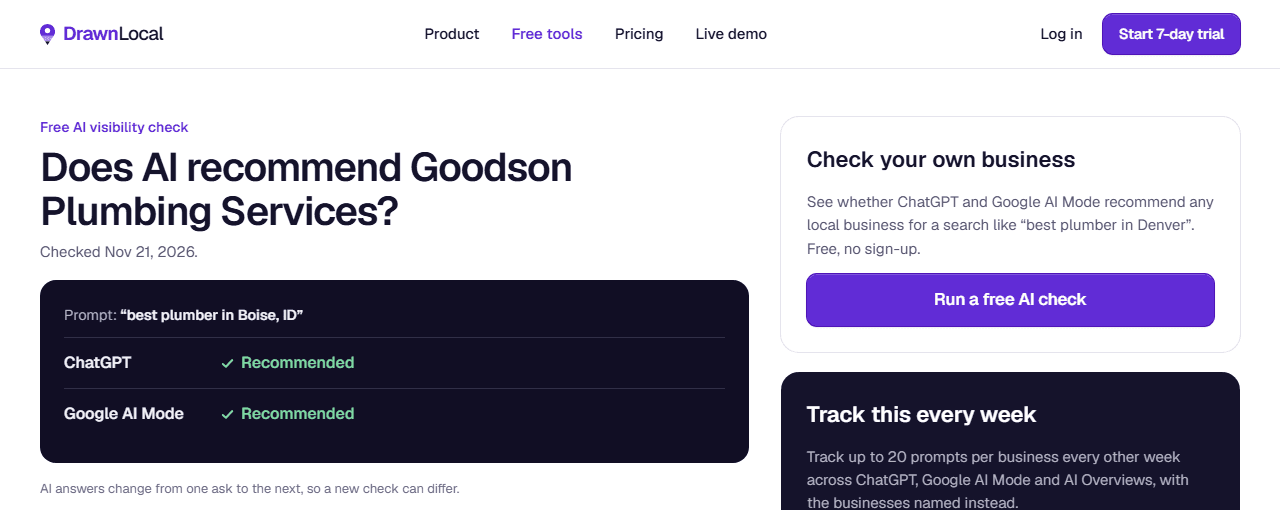
Then record the rating and review count for the client and the top 3 competitors. It sets a realistic target for the review routine, and it often explains a gap the heat map shows. Google AI Mode and local SEO covers what to track over time.
Reviews against competitors, side by side
A table of the client and three competitors, refreshed every week, turns the review routine into something the owner can follow. Here’s how it looks in DrawnLocal:
Days 3 to 7: the kickoff call
Book 45 minutes and run it in this order:
- Walk through the baseline heat map. It shows the client, in one picture, where they win and where competitors take the call.
- Agree the services and towns that matter most, from the questionnaire.
- Agree the keywords: the 10 to check daily and the rest weekly.
- Agree the review routine: every customer asked the same way, with no filtering. Review gating explains why that matters.
- Agree what the monthly report shows, when it arrives, and who approves changes to the profile.
- Agree how you’ll talk: one channel, and a reply time each way.
A kickoff call agenda with timings
Timings keep the call to 45 minutes and leave room for questions:
| Minutes | Topic | Leave with |
|---|---|---|
| 0–5 | What we found | The baseline heat map on screen |
| 5–15 | Services and towns | The jobs and areas that matter most, in order |
| 15–25 | Keywords | 10 to check daily, the rest weekly |
| 25–35 | Reviews and approvals | The review routine, and who approves profile changes |
| 35–45 | Report and contact | Report date, one channel, reply times |
Send a short summary the same day, with the decisions in a list. It becomes the reference if anything is questioned later.
Week 2: first fixes and the 90-day plan
Fix the profile basics first; they’re quick, and the category in particular carries a lot of weight:
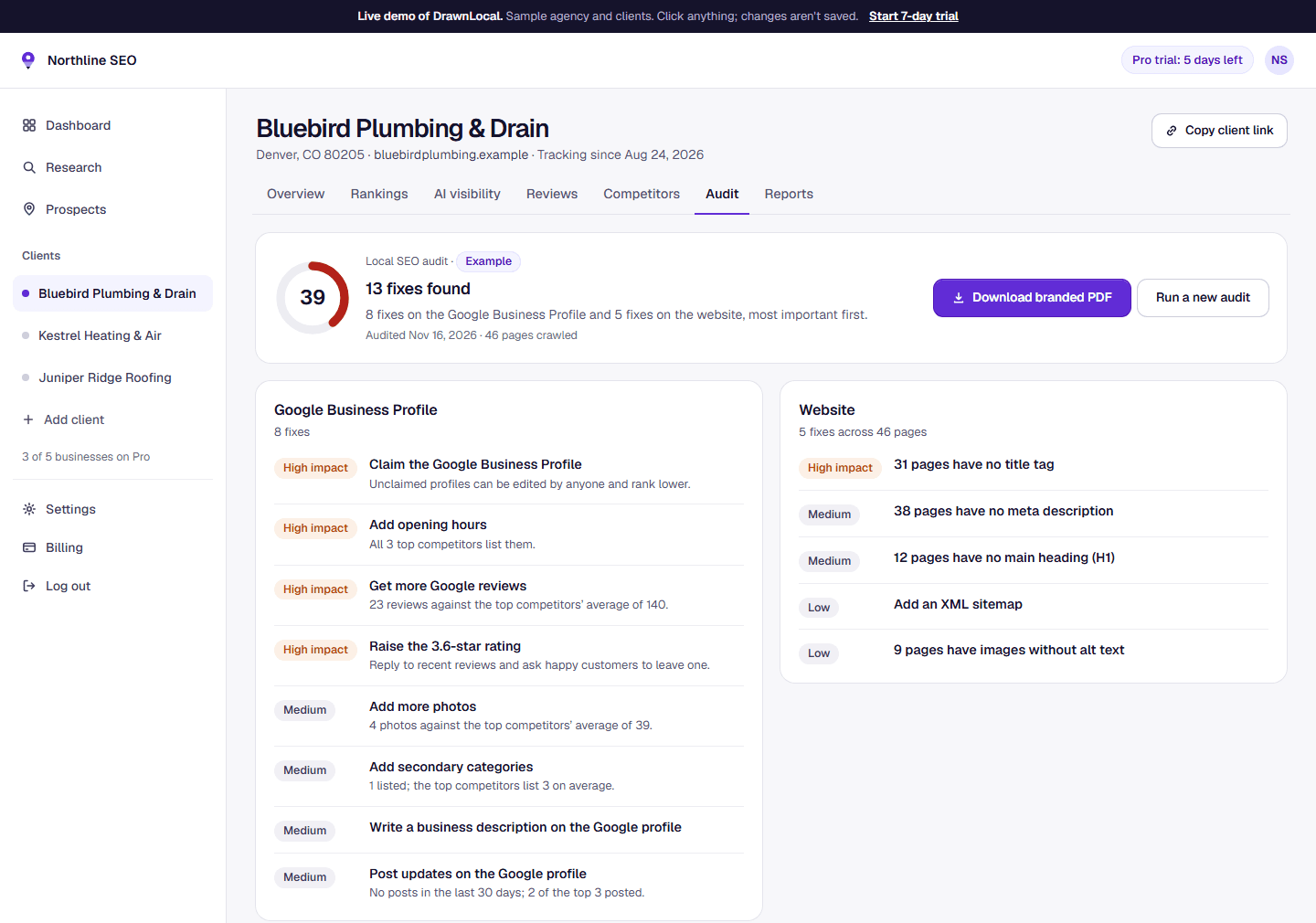
- Primary and additional categories match the services that pay.
- The business name matches the real-world name, with no extra keywords, as Google’s guidelines require.
- Hours, services, service area and contact details are complete and match the website.
- The review request goes to every customer with a direct link.
- Tracking is live: heat maps, rankings, reviews and AI answers on a schedule.
Then send a one-page 90-day plan: month 1, fixes and foundations; month 2, service and area pages and listing clean-up; month 3, local links and the review routine running. Ask the client to approve it in writing, and attach the baseline. Our monthly report template shows how to report against it.
The 90-day plan on one page
Keep the plan to one page the client can approve in a minute. A template:
| Month | Focus | What the client will see |
|---|---|---|
| 1 | Profile fixes, review routine, tracking live | A cleaner profile, more review requests going out, the first report |
| 2 | Service and area pages, listing clean-up | New pages on the website, matching details across listings |
| 3 | Local links and mentions, routine running | Mentions on local sites, the heat map compared with day one |
End with one line on what you won’t promise: no one can guarantee a ranking. A 90-day local SEO plan has the full version.
The end-of-week update email
Silence in the first two weeks is when doubts start. Send a short note every Friday, even if little changed:
“Hi [name], a quick update on week [1 or 2]. Done: [two or three items]. Found: [one useful thing, such as a competitor’s new reviews]. Next week: [one or two items]. Nothing needed from you” (or the one thing you need).
Four lines is enough. The point is that the client never wonders whether anything is happening.
Storefronts vs service-area businesses
Onboarding differs a little depending on whether customers visit the business or the business visits them:
| Step | Storefront (customers visit) | Service-area business (it visits customers) |
|---|---|---|
| Profile address | Shown on the profile | Usually hidden, with service areas listed |
| Heat map center | The business address | The main ZIP code or the area it most wants work from |
| Keywords | The service plus “near me” and the town | The service plus each main town it serves |
| Website pages | A page per service | A page per service, and per main town |
The questionnaire’s “do customers visit you?” question decides which column you’re in. Google Maps rankings for service-area businesses covers the second kind in depth.
Onboarding a client who had another agency
Taking over from another agency adds a few steps to week one:
- Ask the owner to check People and access on the profile and remove anyone they don’t recognize. Only owners can remove people.
- Confirm the business, not the old agency, is the primary owner. If not, the owner needs ownership transferred back first.
- Check the website for pages, tracking codes or call numbers the old agency added, and agree what stays.
- Ask for the old reports, if the client has them, so your baseline can show the longer trend.
- Check for duplicate profiles or listings the old agency created.
Record the baseline anyway. Old reports may use other grids, keywords or tools, so your own starting point is the only fair comparison for your work.
Day 30: the first monthly report
The first report sets the pattern for every one after it. Lead with the baseline comparison, then what you did, then what’s next, with a short note in your own words.
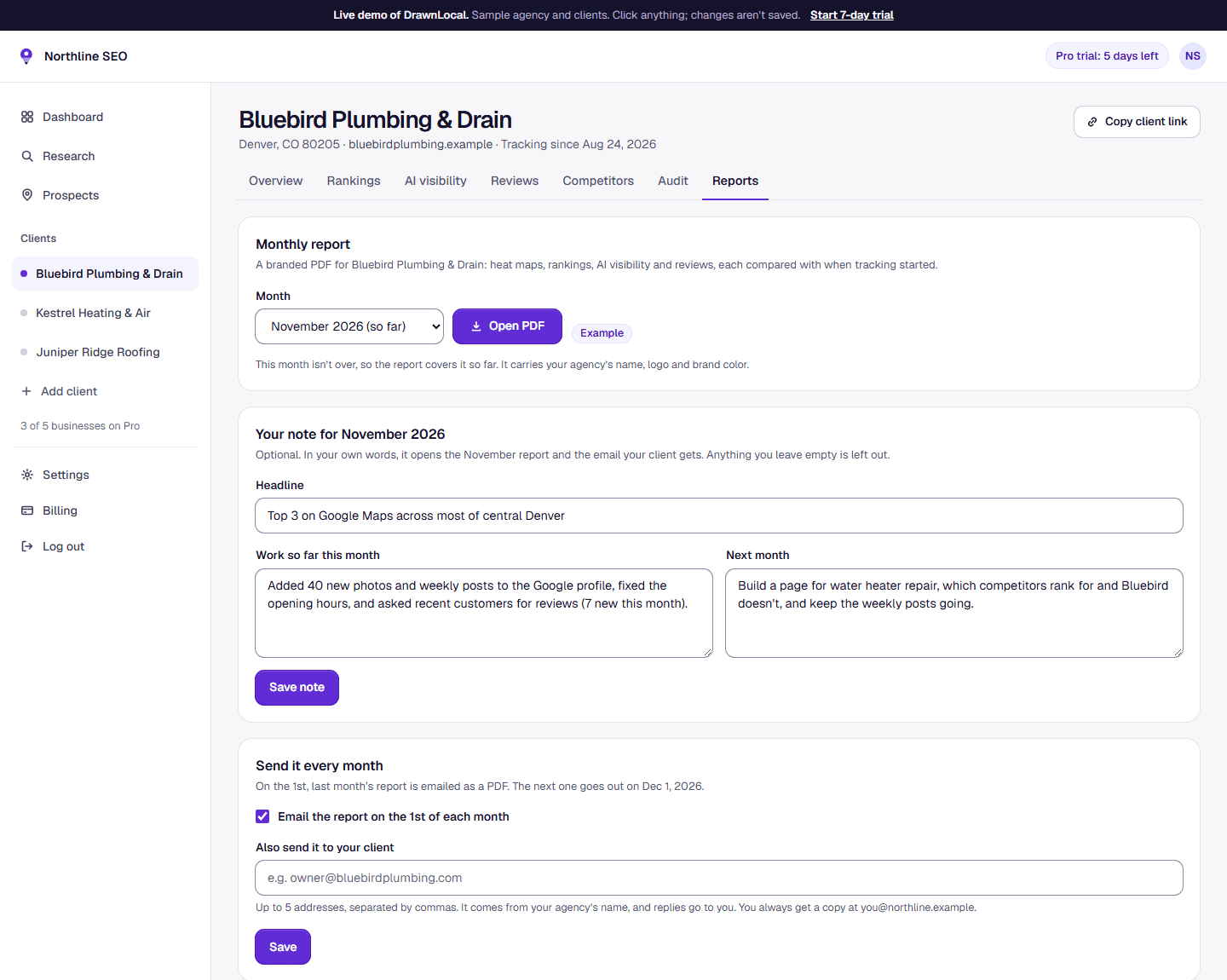
Then share a live page the client can open any time. It answers “how are we doing?” between reports, without an email.
A live page the client can check
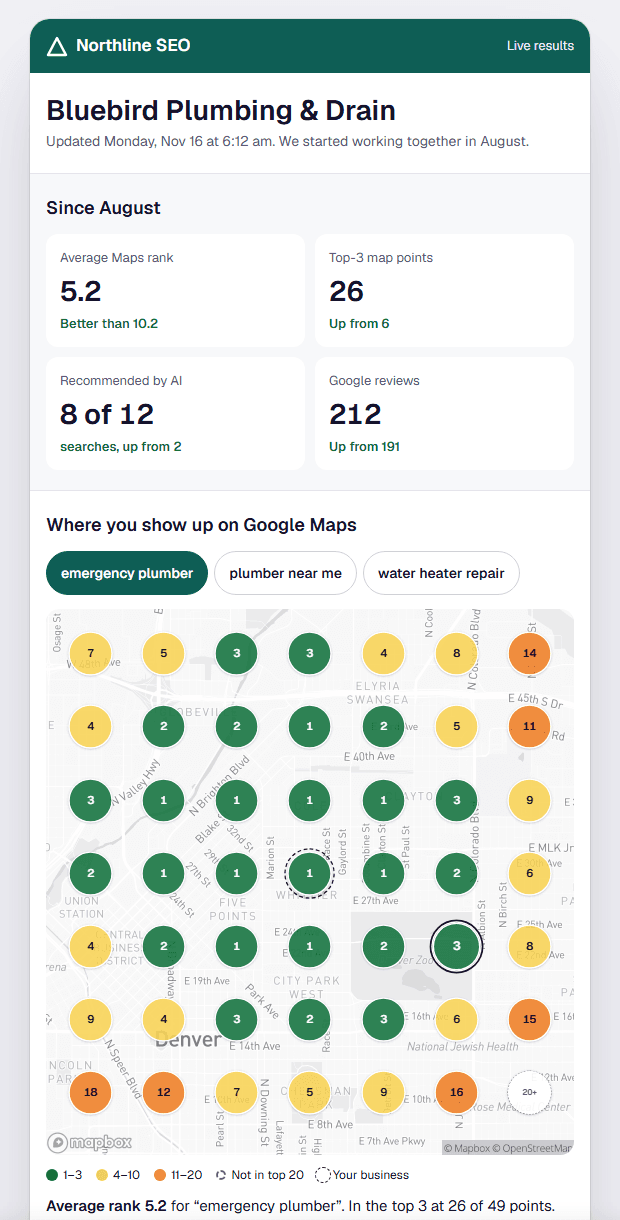
A client page that updates every week, with your branding, keeps the work visible. It also makes the baseline part of every visit: each number sits next to where it started.
Keeping onboarding consistent across clients
Once you have a few clients, the checklist is only useful if every client gets the same steps. Track it in one place, with each client’s progress against the list:
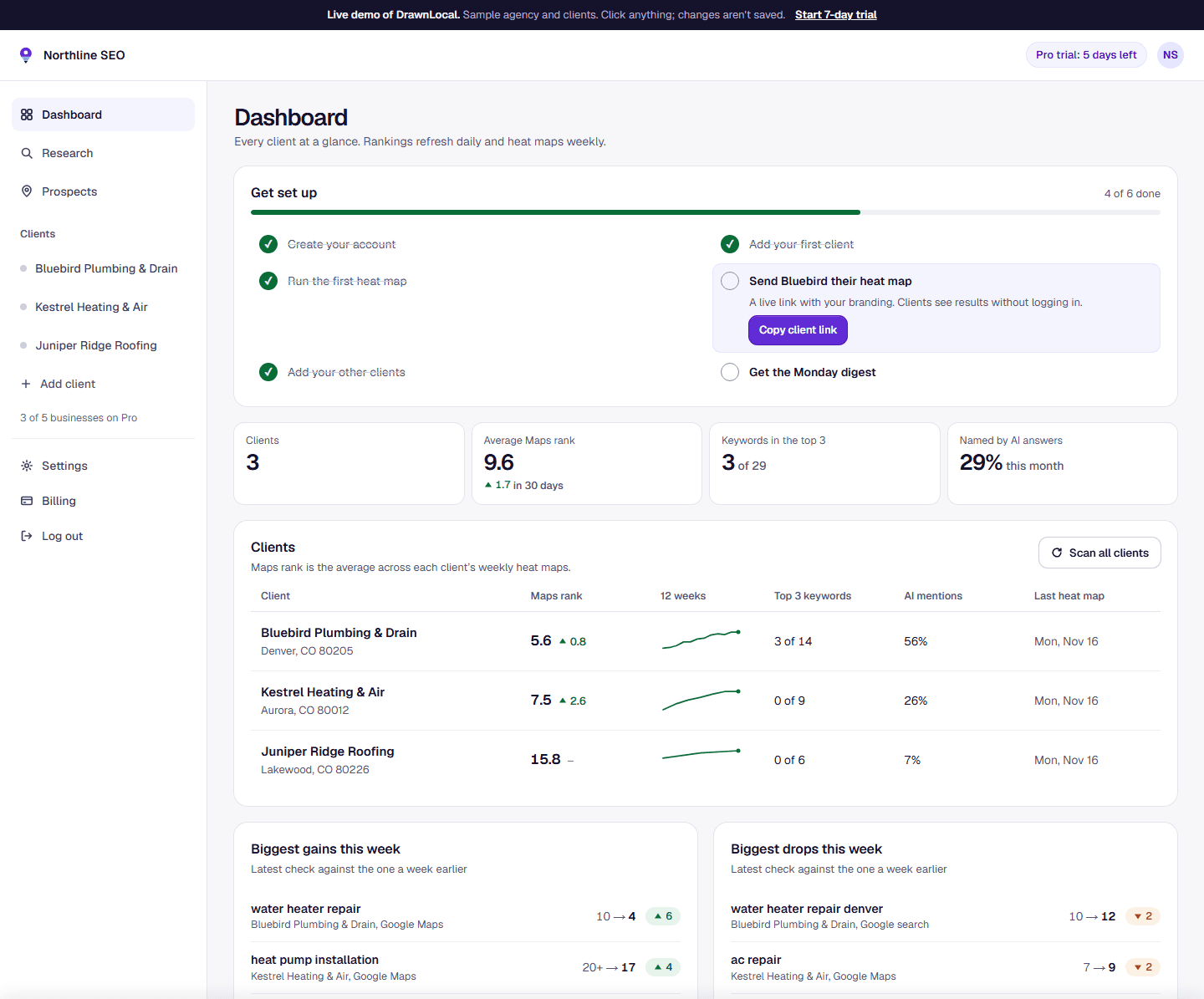
Write the checklist into your project tool as a template, and copy it for every new client. How to scale an SEO agency covers turning steps like these into processes someone else can run.
How long each onboarding step takes
Rough hours for one location, so you can price the setup fee and plan your week. Examples, not benchmarks:
| Step | Example hours |
|---|---|
| Welcome email, questionnaire review, access follow-up | 1 |
| Baseline: heat maps, rankings, reviews, AI answers | 1.5 |
| Audit of the profile and website | 2 |
| Kickoff call and written summary | 1.5 |
| Week-2 profile fixes | 1.5 |
| 90-day plan | 1 |
| Total | About 8.5 |
It’s a good reason to charge a setup fee, or to fold it into the first month. How much to charge for local SEO shows how to price it.
Onboarding a business with several locations
Each location has its own profile, its own map and its own competitors, so most steps repeat per location. A few happen once for the whole business: the contract, the welcome email, the kickoff call and the brand rules.
Record a baseline for every location, not just the busiest. Locations can perform very differently, and the weakest ones can offer the quickest gains. Multi-location local SEO covers the rest.
Red flags during onboarding
A few answers in week one predict trouble. Raise them early, in writing:
- The owner won’t add you as a manager, or wants you to use their password.
- They ask for keywords in the business name, which Google’s guidelines forbid and which can get a profile suspended.
- They want reviews only from happy customers, which Google’s policy doesn’t allow.
- The profile is suspended or has duplicates nobody mentioned. Fix that before ranking work.
- Nobody can say what a good month looks like. Agree a measure before the first report, or it will be judged on feelings.
Most can be solved with a conversation. The ones that can’t are worth knowing about in week one, not month three.
What to say about timing
Some owners expect results in weeks. Set the timeline on the kickoff call: quick fixes like the category can show sooner, while most local SEO work builds over several months. Google’s own guidance for businesses hiring an SEO says it usually takes four months to a year to make improvements and see potential benefit.
Then point to the baseline and the weekly heat maps. The client won’t need to take progress on trust; they’ll see it point by point.
When access takes longer than a week
Access is a step that often stalls. Owners are busy, logins are lost, and an old web designer may hold the keys. Don’t let it stop everything:
- Record the parts of the baseline that need no access: heat maps, rankings, reviews and AI answers all come from public results.
- Send the access steps again, as a short numbered list, and offer a 10-minute call to do it together on screen.
- If nobody can find the profile login, start Google’s request-access route the same day; it has a waiting period.
- Agree a date in writing. If access isn’t in place by then, the plan’s first month moves back by the same time.
Questions new clients ask in week one
Have short answers ready. They come up often:
- “Will you change my website?” Only what’s agreed: usually new service and area pages, and the contact details. Anything else is asked first.
- “Can I still post on my profile?” Yes. Tell us first, so two people don’t edit the same thing.
- “When will I see results?” Small fixes can show early; most of the work builds over months. The weekly heat map shows each step.
- “What do you need from me?” The questionnaire, manager access, and a quick yes or no when we ask to change something.
Mistakes that sour a new client
- Making changes before recording the baseline, which leaves you nothing to prove progress against.
- Asking for passwords or ownership instead of your own manager access.
- Tracking hundreds of keywords nobody agreed, and reporting the noise.
- No agreed definition of a good month, so the first report lands on different expectations.
- Silence in the first two weeks. Send a short update at the end of each week, even if it’s only what you checked.
Questions
What should a local SEO onboarding questionnaire ask?
The services that pay best, the towns served, the main competitors, and whether customers visit or the business travels to them. Then past name or address changes, who has access to the Google profile and website, how reviews are requested, and what a good month looks like.
How long does local SEO onboarding take?
About two weeks: access and the baseline in the first few days, the kickoff call in week one, and the first profile fixes and the 90-day plan in week two. Ranking changes take longer, which is why the baseline matters.
What access does a local SEO agency need?
Manager access to the Google Business Profile, your own user on the website, full user access to Search Console and viewer access to Analytics. Add reports from call tracking or booking software if the client uses them. Never the client’s passwords.
What if the client doesn’t know who owns their Google Business Profile?
Use Request access from Google’s add-a-business page. The current owner has 3 days to reply, and if they don’t, Google may let the business claim it. Never create a second profile instead.
Should I audit a client before or after onboarding?
Both. A short audit wins the client during the pitch; a full audit during onboarding becomes the dated baseline every report compares with.
Sources
- Google Business Profile Help: third-party policies
- Google: guidelines for representing your business
- Google Business Profile Help: manage owners and managers
- Google: do you need an SEO?