Local SEO competitor analysis: a 7-step method agencies can repeat
The competitors an owner names often aren’t the ones taking their calls. This local SEO competitor analysis finds the real ones from the map and compares them on the factors that matter most. It ends with a ranked list of fixes you can put in front of the client.
By the DrawnLocal team · · Updated · 14 minute read
The 7 steps at a glance
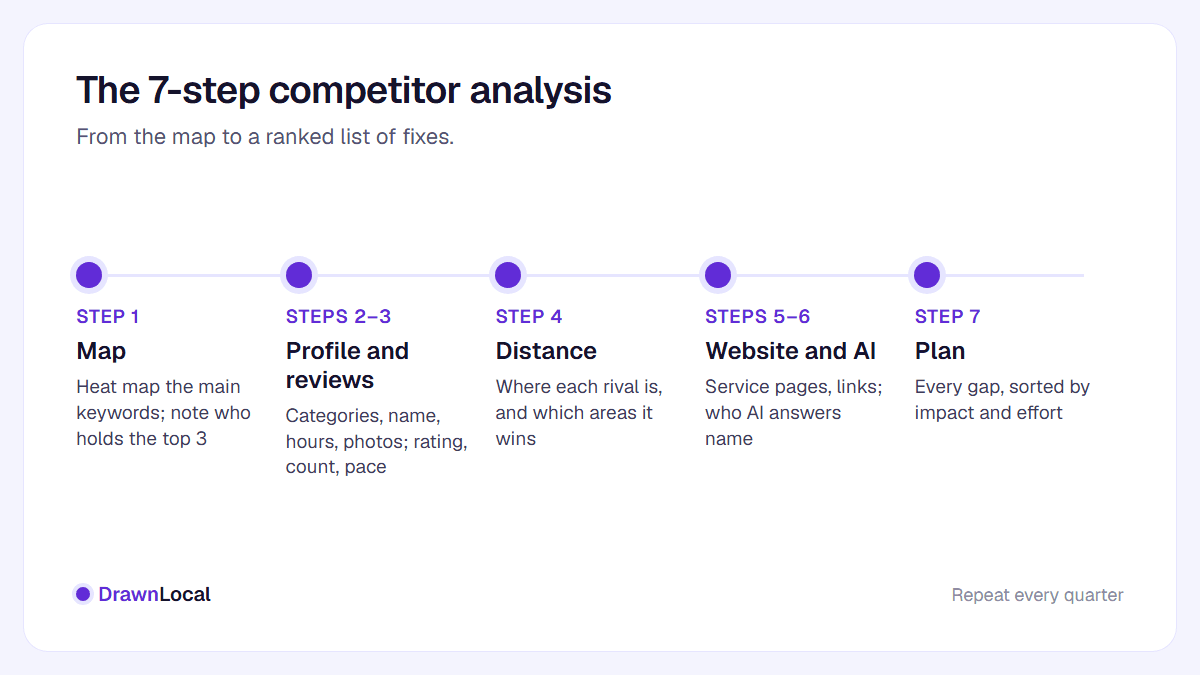
The method in one picture. Each step below has the detail, and the last one turns everything into a plan the client can approve.
1. Start the local SEO competitor analysis from the map
Run a heat map of the client’s main keyword across its area and note who holds the top 3 at each point. The two or three names that appear most are the competitors to study; the rival the owner mentions may not appear at all. Repeat for the two or three keywords that bring the most valuable jobs, because the winners often change by service.
A free heat map shows the full 7×7 grid with competitor names by email. How to read a local SEO heat map explains the patterns.
A live example: who competes with a Boise plumber
To show the method on real data, we looked at Boise plumbers on Nov 21, 2026. We took two Google Maps top 3s: “plumber” from the city center, and “plumber Boise, ID”. Then we asked ChatGPT and Google AI Mode “best plumber in Boise, ID”, twice each.
Then we counted how often each business turned up across the six lookups. Names are left out; each row is a real business.
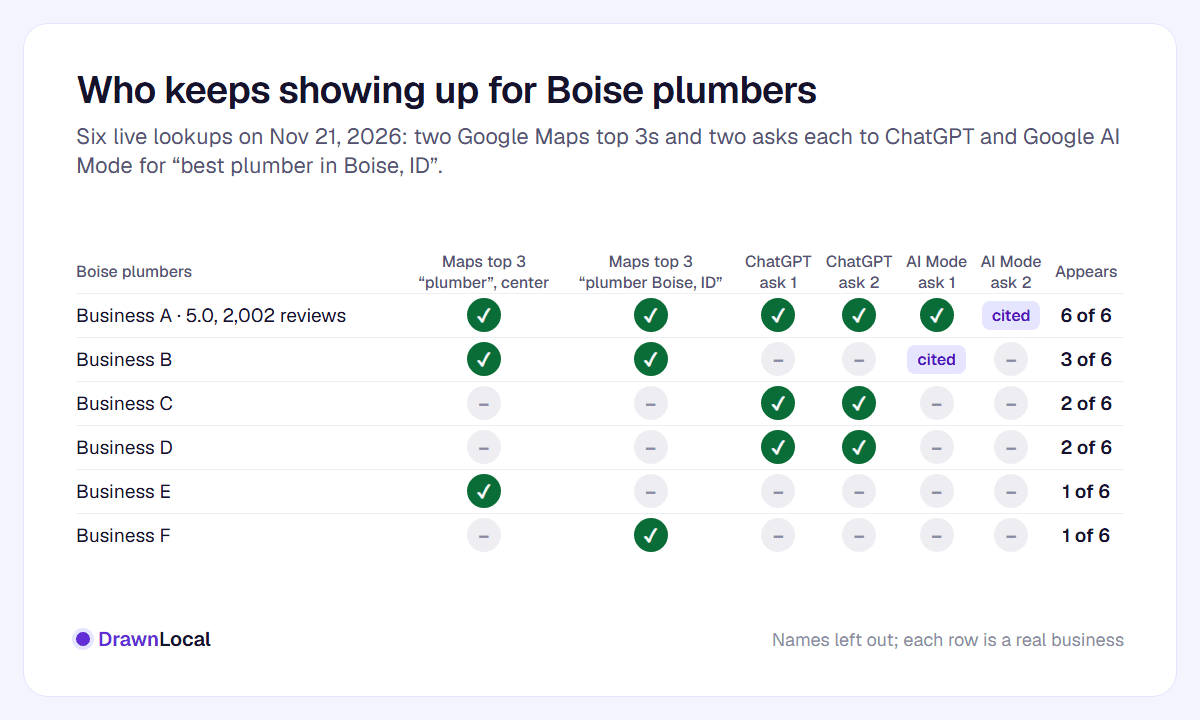
One business appeared in every lookup: a 5.0-rated company with 2,002 reviews. Another held a Maps top 3 place in both searches, but ChatGPT didn’t name it either time. Two others came only from ChatGPT, and two appeared in a single Maps list each.
That’s the competitor list to study first: the one that’s everywhere, then the ones that win Maps, then the ones AI answers favor. The owner’s own list may not match it, which is why the method starts from the data.
Notice too how differently the two kinds of search behaved. The Maps lists agreed on two of their three names. ChatGPT named a different set, and repeated three of five names on the second ask. AI Mode cited different websites each time. A competitor analysis that only checks one of them misses part of the picture.
Each lookup like these takes a few minutes with free tools: a Maps search from a set point, or a question to an AI assistant. For a client, repeat them for each main keyword and save the results with the date, so next quarter’s check has something to compare with. A competitor that appears in most lookups belongs on the client’s saved list.
Where you look changes who you’re up against
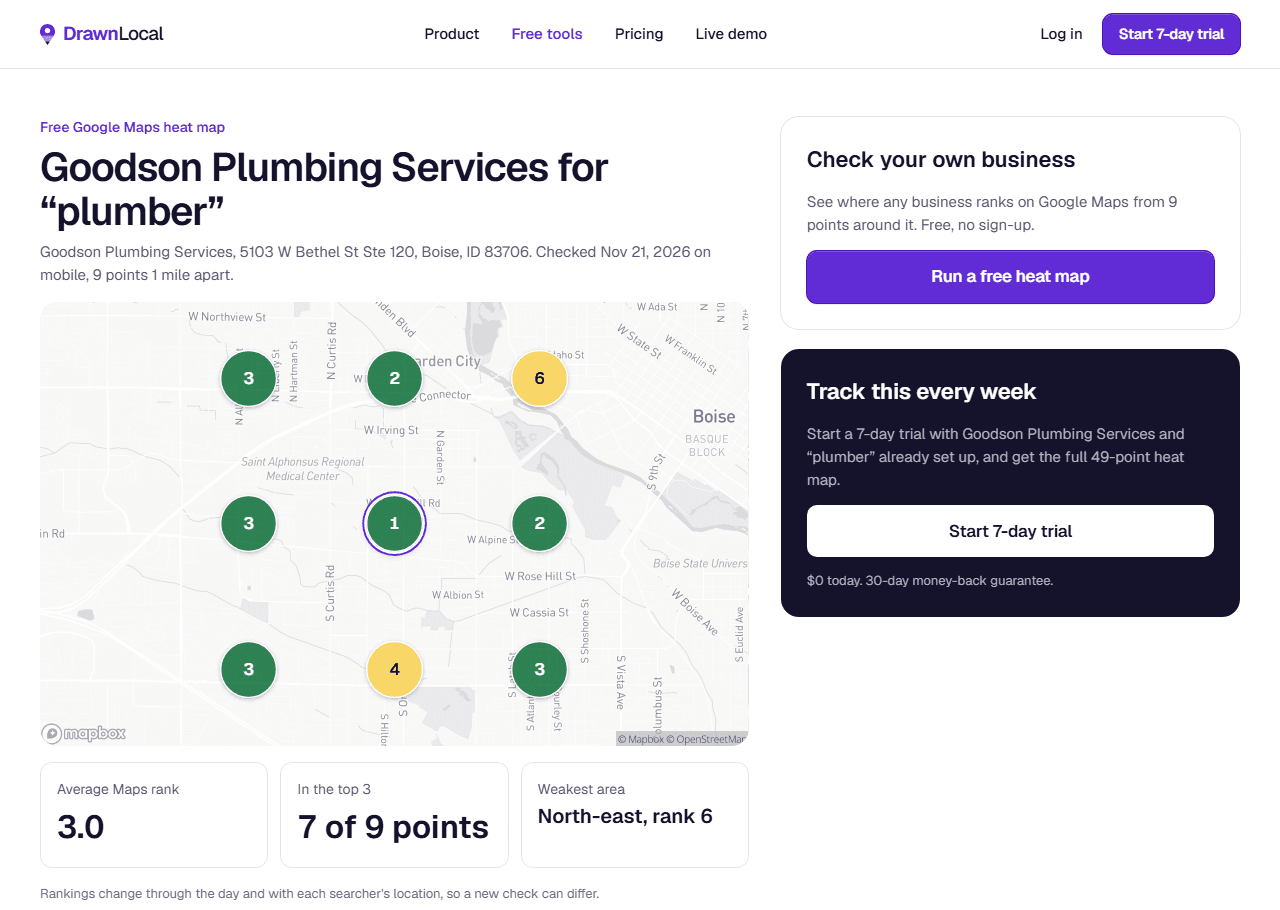
The Boise plumber on the heat map above is first at its own address and in the top 3 at 7 of 9 points around it. But it wasn’t in either city-wide Maps top 3, which were checked from the center of town and for the city name.
So its real competitors depend on the area it serves. Around its own base, it’s already winning. Further out, toward downtown, the businesses from the lookups above take the places. A heat map of its main keyword, and of the areas it wants to grow into, shows which of them to study.
2. Compare Google Business Profiles
The profile carries the heaviest factors: in Whitespark’s 2026 survey the primary category ranked first of 187 Maps factors, keywords in the business name third, and additional categories eighth. Use a sheet like this, one column per business:
| Check | Client | Competitor 1 | Competitor 2 | Competitor 3 |
|---|---|---|---|---|
| Primary category | … | … | … | … |
| Additional categories | … | … | … | … |
| Business name (any extra keywords?) | … | … | … | … |
| Address shown, or service-area only | … | … | … | … |
| Hours (open evenings, weekends, 24/7?) | … | … | … | … |
| Rating and number of reviews | … | … | … | … |
| New reviews in the last 30 days | … | … | … | … |
| Photos, and posts in the last 30 days | … | … | … | … |
| Website page for the main service | … | … | … | … |
| Named in ChatGPT or Google AI answers | … | … | … | … |
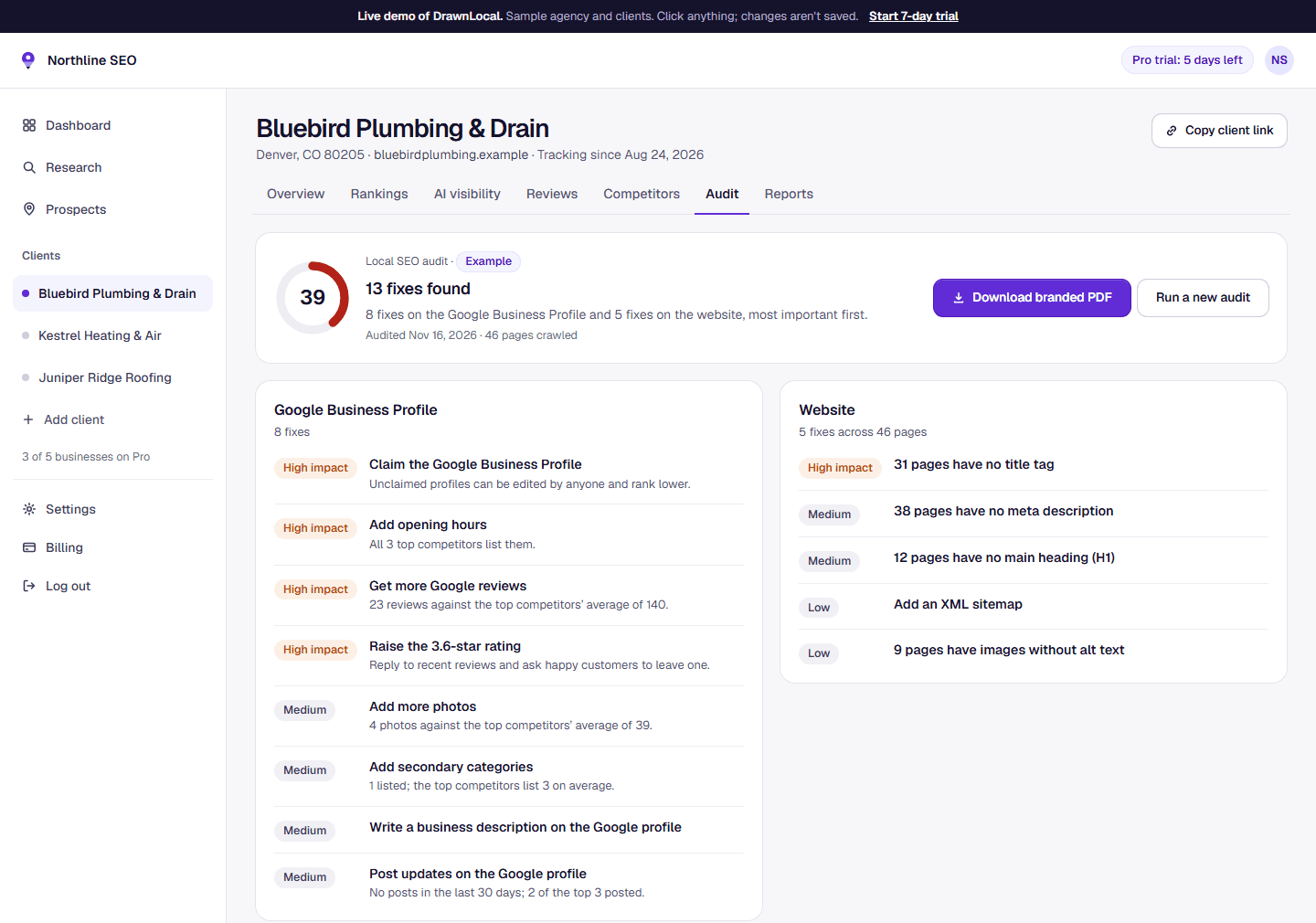
The primary category shows on each profile under the business name. DrawnLocal’s audit compares the client’s profile with the top 3 competitors on categories, photos, hours, reviews and posts in the last 30 days, so most of this sheet fills itself in.
Hours: the quick factor many miss
Being open at the time of the search ranked 5th of 187 Maps factors in the experts’ survey. If rivals list evening or weekend hours and the client doesn’t, that may be costing points at exactly the times people call.
The fix is only honest if the business really answers then. If it does, such as an owner who takes calls until 8 pm, put those hours on the profile. If it doesn’t, note the gap and leave it: wrong hours lead to missed calls and angry reviews.
Reading a rival’s categories
The primary category shows under the business name on the profile. Write it down for each rival, word for word. If all three share a more specific category than the client’s, that’s a strong candidate for the first fix in the plan.
Additional categories aren’t shown on the profile, but tools that read profile data list them. Look for services the rivals claim that the client also offers. Add only the categories the client genuinely covers; choosing a primary category explains how.
Photos and posts: tidy, but lower down
Photos and posts are easy to compare, and owners notice them. They rank well below categories, distance and reviews in the survey, so treat them as tidying rather than the main event. Match the rivals’ pace on recent photos of real jobs, and don’t let a gap here distract from the bigger fixes.
3. Compare reviews
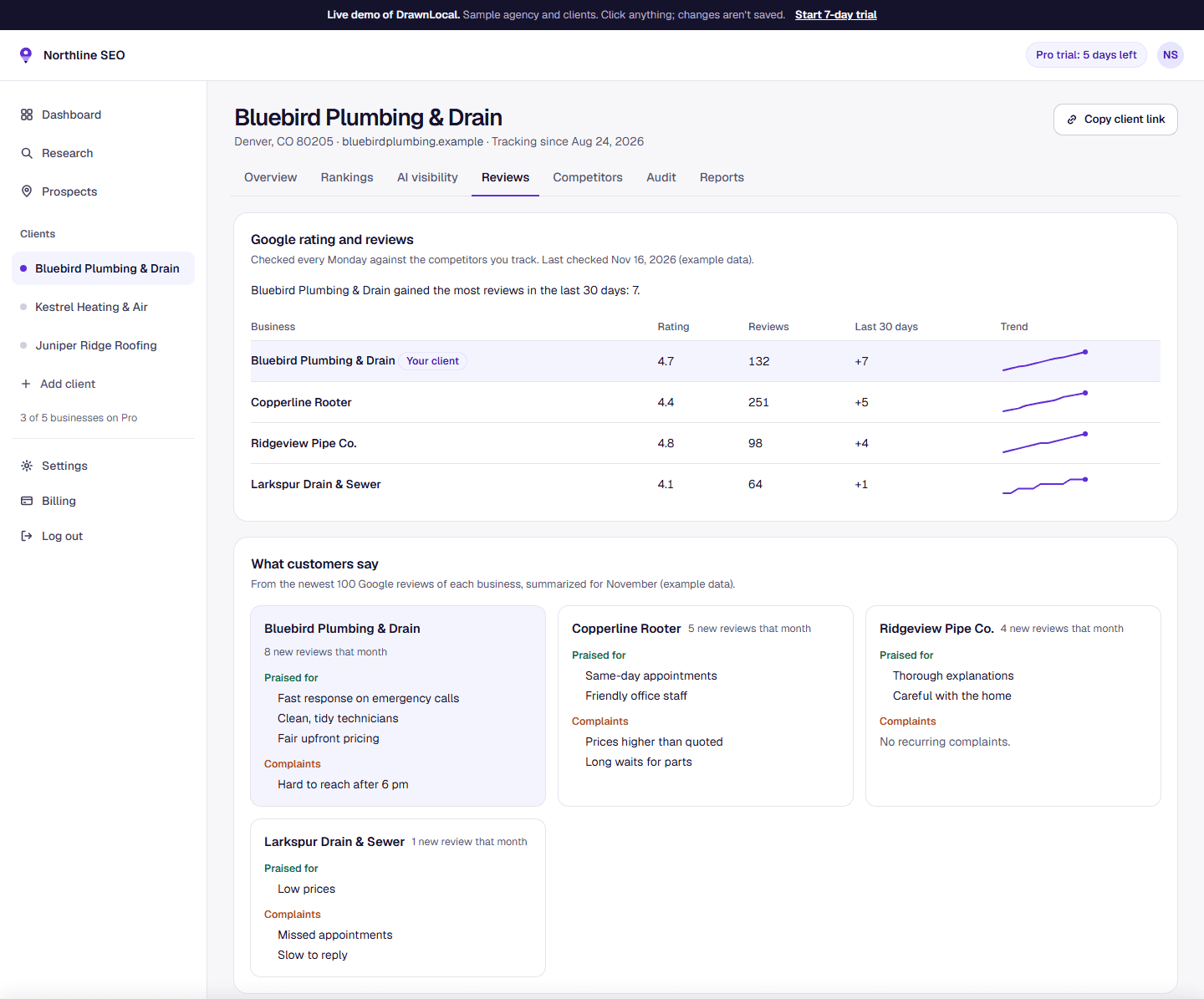
Record each business’s rating, review count and how many reviews it gained in the last month. The experts ranked a high rating 6th, the number of written Google reviews 9th and recency 11th. A competitor gaining ten reviews a month is pulling away, even if its total looks similar. Read the last 20 reviews of each, too: what customers praise and complain about tells you how to position the client. Do Google reviews help SEO covers what to do with the gap.
4. Check distance and address
Distance from the searcher ranked second in the survey, and a physical address in the city searched fourth. Plot where each competitor is. If the client’s top-3 area is a small circle around its address while a rival wins the whole east side from an office there, that’s distance, not something the profile can fix. It shapes what to promise and where to focus pages and links.
5. Compare websites
For each competitor, check whether there’s a dedicated page for each service, which ranked first for local organic results and 24th for Maps in the survey. Then check pages for the towns served, their title tags, and links from local sites such as associations, sponsors and local news. DrawnLocal’s competitor lookup shows any domain’s top keywords and the keywords it ranks for that the client doesn’t.
6. Compare AI answers
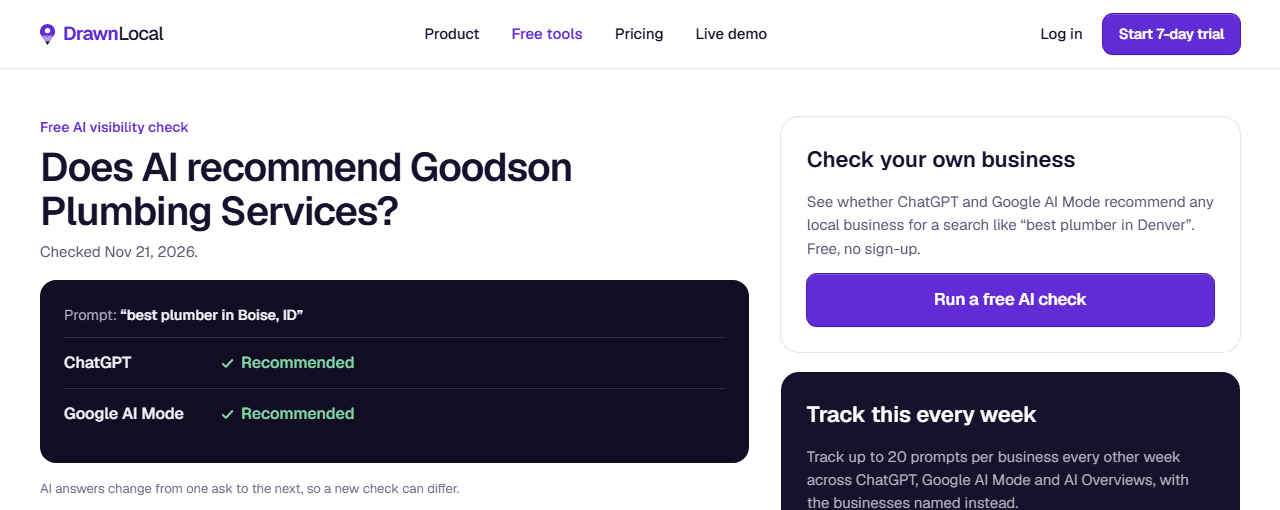
Ask ChatGPT and Google AI Mode the questions customers ask, such as “best plumber in Aurora”, and note who’s named. AI answers vary from one run to the next, so check a few times. The free AI visibility checker does one prompt; Google AI Mode and local SEO explains what drives the answers.
7. Turn the gaps into a plan
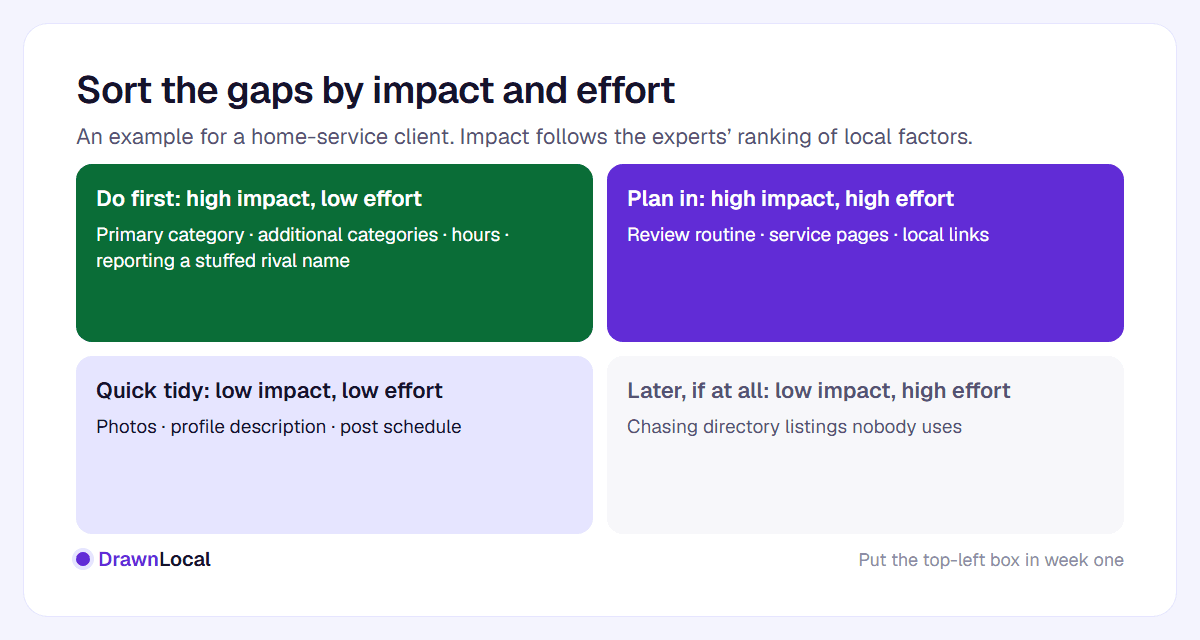
List every gap, then sort by impact and effort. A typical result for a home-service client:
| Gap | Fix | Effort |
|---|---|---|
| Primary category is broader than the top 3’s | Change it to the most specific category that fits | Minutes |
| A top-3 rival has a keyword-stuffed name | Suggest an edit with its real name, with evidence | An hour |
| Rivals gain 8 reviews a month, the client 2 | Start a review routine for every customer | Ongoing |
| No page for the most valuable service | Write one service page, linked from the profile | A day |
| Rivals have links from local associations | Join and get listed; sponsor one local event | Weeks |
Put this table in the proposal or the 90-day plan. Keywords in the business name and how to report fake listings cover the second row.
Save competitors with the client
Once you know who they are, keep the list with the client so every report and audit compares against the same businesses. In DrawnLocal they’re saved on the client’s competitors page:
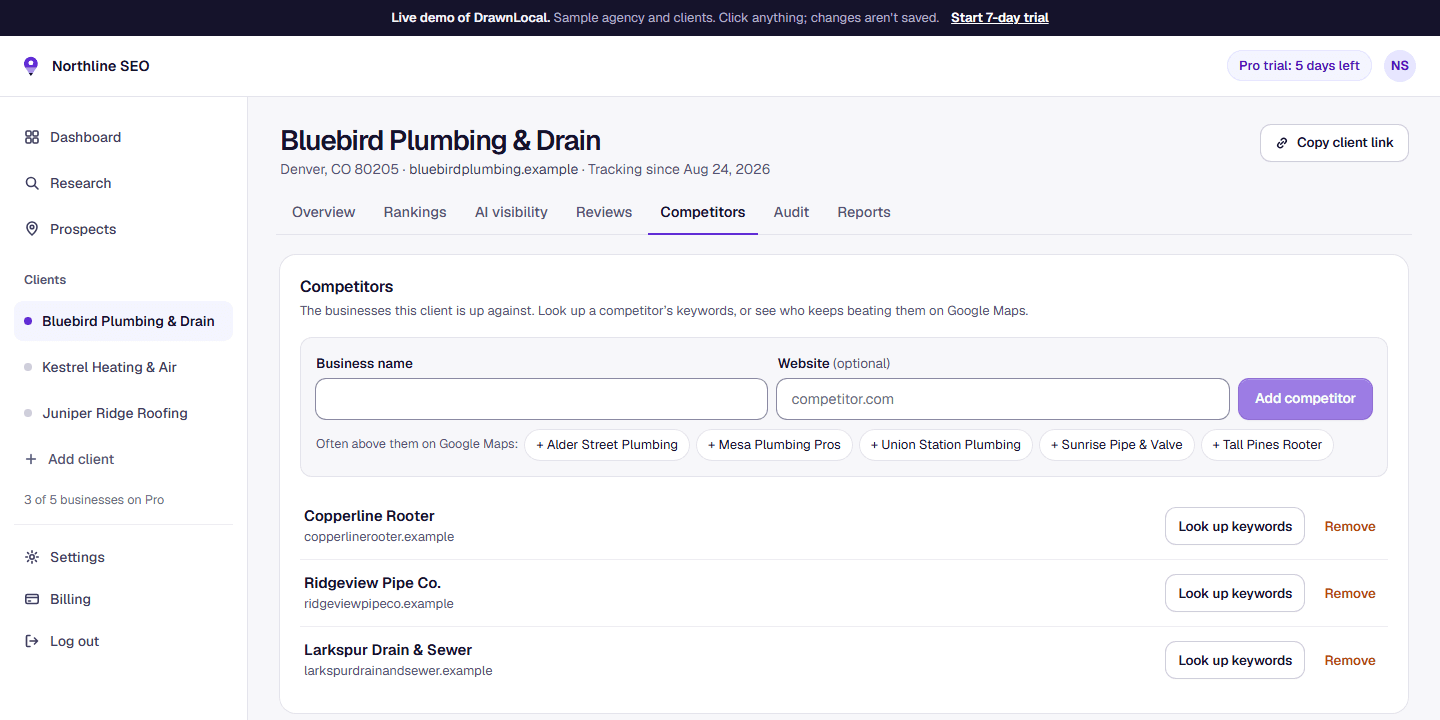
Review the list every quarter. A business that shows up in the top 3 for two months running belongs on it.
See who holds each point on the map
A heat map that names the top 3 at each point shows exactly where each rival wins. Select a point in DrawnLocal’s weekly map to see the three businesses ranking there:
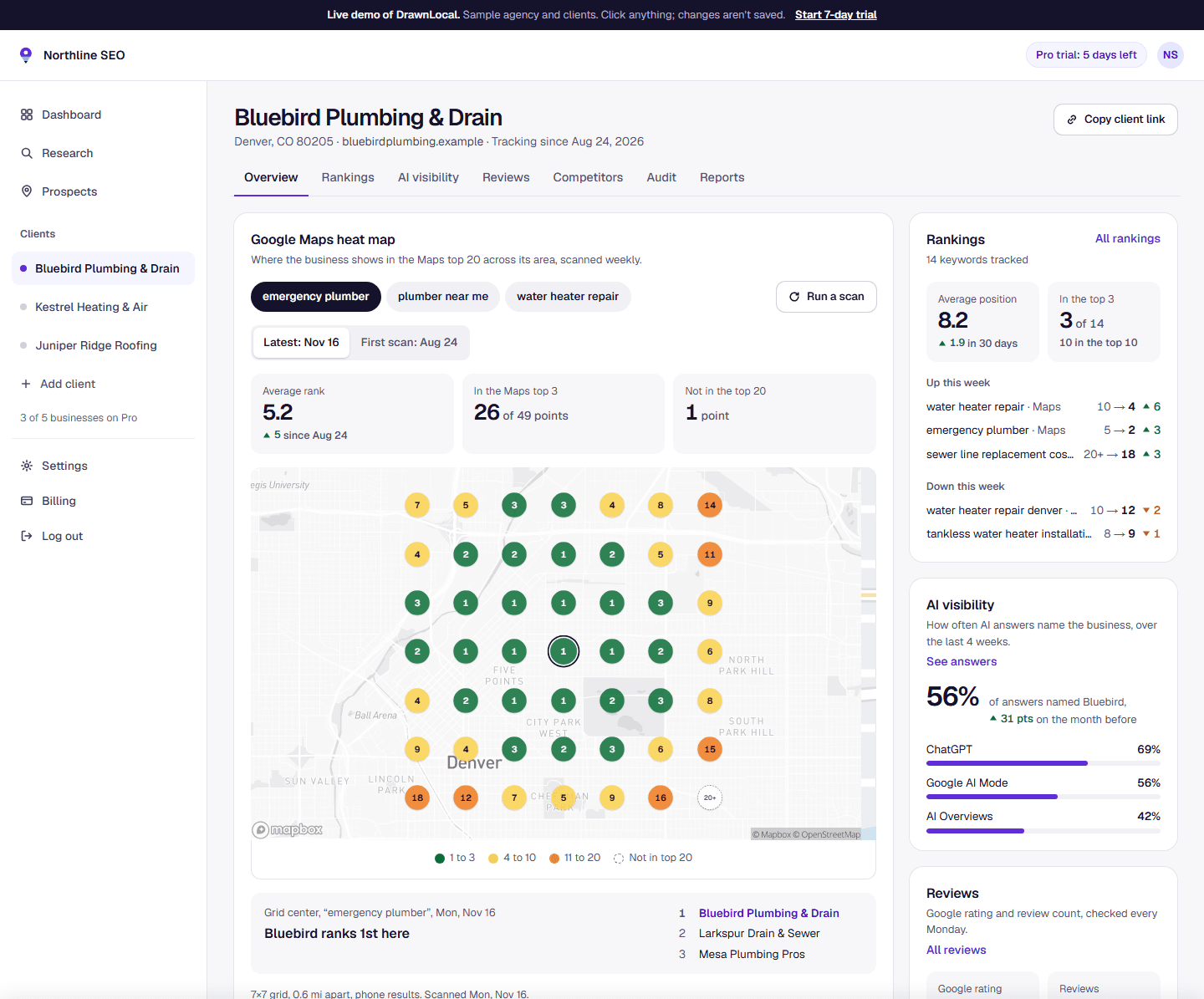
Points where the same rival is first, one after another, often mark its home ground. Points where the top 3 changes often are where the client has the best chance to move in.
Present it to the client in one page
Owners don’t need the whole sheet. One page, in this order, is enough:
- Who you’re up against: the three businesses that hold the top 3 most often, with their rating and review count.
- Where they win: the heat map, with their names at the points they hold.
- What they have that you don’t: three to five gaps, in plain words.
- The plan: the fixes in order, with the first two dated.
End with what you can’t change, such as distance, so expectations stay honest. How to sell SEO services shows how to walk an owner through it on a call.
A worked example of the comparison sheet
A made-up roofer and its top 3 rivals, to show what a filled-in sheet looks like and what it tells you:
| Check | Client | Rival 1 | Rival 2 | Rival 3 |
|---|---|---|---|---|
| Primary category | Contractor | Roofing contractor | Roofing contractor | Roofing contractor |
| Rating and reviews | 4.6, 38 | 4.8, 212 | 4.7, 140 | 4.9, 96 |
| New reviews, last 30 days | 1 | 9 | 6 | 5 |
| Open on Saturdays | No | Yes | Yes | No |
| Page for roof replacement | No | Yes | Yes | Yes |
| Named by ChatGPT for “best roofer” | No | Yes | No | Yes |
Read across each row. The category is the first fix: every rival uses the more specific one. Reviews are the long gap: 1 a month against 5 to 9. The missing service page is a day’s work. Those three, in that order, are the plan.
The 20-minute version for a sales call
Before a discovery call you don’t need the full analysis. Twenty minutes gives you enough to lead the conversation:
- Run a free heat map of the prospect’s main keyword, and note who holds the top 3 where the prospect doesn’t.
- Open the top rival’s profile: primary category, rating, review count, hours.
- Compare the same four things for the prospect.
- Ask one AI question, such as “best [trade] in [city]”, and note who’s named.
- Pick the one gap that costs the prospect the most calls. That’s your opening line.
Save the full analysis for onboarding, once the client has signed. How to sell SEO services covers the call itself.
What a rival’s reviews tell you
Reviews say more than a rating. Read the last 20 for each rival and note what customers praise and what they complain about. Themes repeat: fast response, clean work, fair prices, or the opposite.
Those themes help in two ways. They show where the client can stand out, such as answering the phone after six when a rival is known for missing calls. And they suggest what to put on service pages, in the customer’s own words.
DrawnLocal summarizes what customers say about the client and each saved competitor every month, so the themes are there without reading every review.
Finding a rival’s local links
Links from local websites count toward prominence, and Google says prominence includes how many websites link to a business. To find a rival’s:
- Search the rival’s business name in quotes, and look past its own site for associations, sponsors, suppliers and local news.
- Check the trade associations and chambers in the area for member lists.
- Look at local event pages and sports teams for sponsor lists.
- Note any directory or “best of” list where the rival appears and the client doesn’t.
Each one is a candidate for the client: join the same association, sponsor a similar event, ask the same supplier for a dealer listing. Never buy links; the aim is real local mentions.
The keywords a rival ranks for
On the website side, see which searches bring each rival traffic that the client misses. DrawnLocal’s competitor lookup lists any domain’s top keywords, and the ones it ranks for that the client doesn’t.
Look for services the rival has pages for and the client doesn’t, and towns the rival targets that the client serves too. Each gap is a candidate for a new page, if the client really offers that service there.
Service-area rivals
Many trade businesses hide their address and list service areas, so Step 4’s map of locations is harder. Use what’s public instead: the towns on their website, the areas where they win on your heat map, and the neighborhoods customers mention in their reviews.
The heat map does most of the work here. Wherever a hidden-address rival keeps winning points, its base is probably nearby. Google Maps rankings for service-area businesses covers how those businesses rank.
When a rival breaks the rules
Sometimes the analysis turns up a rival with keywords stuffed into its name, a virtual office for an address, or duplicate listings. Note it in the sheet with evidence, but don’t copy it.
Report it through the right route instead. When a rule-breaking listing goes, the points it held are where the client can move up. How to report fake listings on Google Maps has the routes and an evidence log.
How the analysis shapes the price
A tough market needs more hours. Some top 3s have hundreds of reviews, a page for every service and links from every local association. Catching them takes longer than in a town where the leaders have 40 reviews and no website.
Use the analysis to set the package, not just the plan. Show the owner the gap, explain the hours it takes to close, and price for those hours. How much to charge for local SEO shows how.
A quarterly competitor check
Every three months, rerun the essentials in about an hour per client:
- Heat maps of the main keywords: has anyone new entered the top 3?
- Ratings, review counts and monthly pace for the saved competitors.
- Any profile changes: new categories, new name, new hours.
- New service pages on rivals’ websites.
- AI answers for the main prompts.
- Update the plan: one new gap in, one closed gap out.
Mention the main finding in the monthly report. Owners like to know who they’re up against, and it shows the work continues between visible wins.
Tools for each step
You can do every step by hand. These make it faster:
| Step | Free option | In DrawnLocal |
|---|---|---|
| 1. Map | The free heat map, 9 points | Weekly 49-point heat maps naming the top 3 at each point |
| 2. Profiles | Open each profile on Google Maps | The audit compares the client with the top 3 |
| 3. Reviews | Count and read reviews by hand | Weekly rating, count and pace against saved competitors |
| 4. Distance | Plot rivals on a map | The heat map shows where each rival wins |
| 5. Websites | Browse each site and search its name | Competitor keyword lookup |
| 6. AI answers | The free AI visibility checker | Up to 20 prompts per business every other week |
| 7. Plan | A spreadsheet | The audit’s fixes in order of impact |
Clients with several locations
Each location has its own competitors, because each sits in its own neighborhood with its own top 3. Run the analysis per location, at least for the main keyword, and don’t assume the rival that matters downtown matters in the suburbs.
Look for rivals that appear near several locations. They can be regional chains or franchises, and the same gaps against them may repeat across locations, which makes the fixes efficient. Multi-location local SEO covers the rest.
Questions owners ask about competitors
Short answers for the questions that come up:
- “Why is that company above us? We’re better.” Often it’s category, distance or reviews. The sheet shows which.
- “Can we copy what they do?” Copy what follows Google’s rules, such as categories, pages and a review routine. Report anything that breaks them.
- “They’re a big franchise. Can we beat them?” Near your base, you can compete. The heat map shows where.
- “How long until we pass them?” It depends on the gaps. Quick fixes can move points in weeks; reviews and links take months.
How to tell the analysis worked
Three months after the plan starts, compare against the first analysis. The signs it’s working: points on the heat map taken back from named rivals, the review gap shrinking month by month, and new service pages ranking in normal search.
Report those three things with the names of the rivals, before and after. It turns “we did some SEO” into “you now beat Rival 1 at 12 more points on the map”, which is a result an owner remembers.
Mistakes in competitor analysis
- Studying the owner’s list instead of the map. The rival they resent may not rank at all.
- Checking from one spot. The top 3 changes across the area; one search from the office shows one point.
- Copying a rival’s rule-breaking. A stuffed name or a virtual office can get the client suspended. Report it instead.
- Comparing totals, not pace. A rival gaining ten reviews a month is pulling away even with a similar total.
- Listing gaps without ranking them. Owners need the first three fixes, not thirty.
Questions
How do I find a business’s local competitors?
Run a heat map or check the Maps top 3 for the main keywords from several points across the service area. The businesses that appear most often are the real competitors, whoever the owner thinks they are.
What should a local SEO competitor analysis include?
Google profile categories, name, address, hours, photos and posts, plus rating, review count and recent reviews. Then distance from the searches, website service and area pages, local links, and whether AI answers name them.
How often should I analyze local competitors?
Every quarter, and whenever a new business enters the Maps top 3 for a main keyword. DrawnLocal’s ranking alerts email you when that happens.
Can I see a competitor’s Google Business Profile categories?
The primary category shows on the profile under the business name. Tools that read profile data, including DrawnLocal’s audit, also list the additional categories.
Sources
- Whitespark: Local Search Ranking Factors 2026 (published Nov 6, 2025)
- Google Business Profile Help: tips to improve your local ranking
- DrawnLocal: six live Google Maps lookups (Nov 21, 2026)