Google Local Services Ads: how they work, what they cost, and how to rank
Google Local Services Ads give a home-service business its own ad unit on Google’s search page, and it pays per lead, not per click. Here’s how they work now that the Google Guarantee is gone, what they cost, how they’re ranked, and how an agency runs them for clients.
By the DrawnLocal team · · 16 minute read
What are Google Local Services Ads?
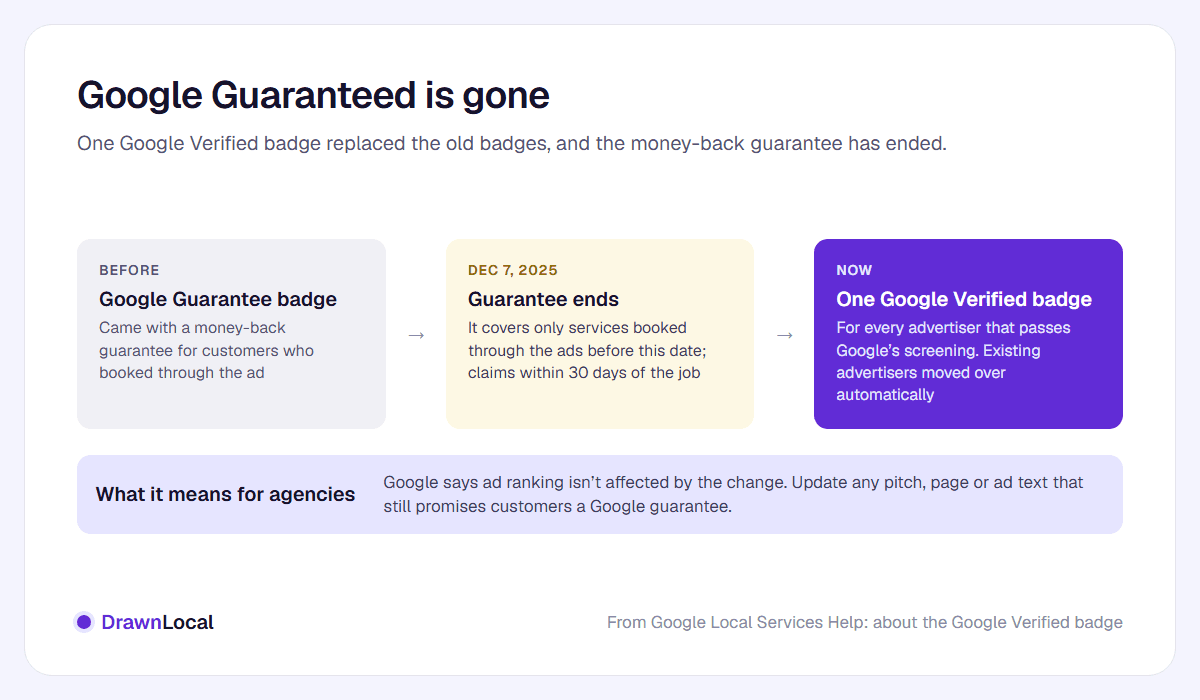
Google Local Services Ads are pay-per-lead ads for local service businesses, shown in their own unit on Google’s search results. Google says the unit is “shown prominently in Google Search results when people search for the services you offer in areas you’ve chosen.”
Each ad is a short profile: the business name, its rating and reviews, its hours, a badge once it has passed Google’s screening, and buttons to call or message. The searcher contacts the business from the ad. The business pays when that contact is a valid lead, not when someone clicks.
They’re separate from the text ads advertisers buy in Google Ads, which charge per click. They’re also separate from the local pack of Google Maps results, which can’t be bought at all. Local Services Ads vs Google Maps rankings compares those two; this guide covers running the ads themselves.
Agencies with home-service clients should understand them even without managing them. Clients in the eligible trades are likely to ask about them. And the work that helps the ads, such as reviews and a complete profile, also helps the Maps rankings you’re paid to improve.
Google Guaranteed is gone: the Google Verified badge
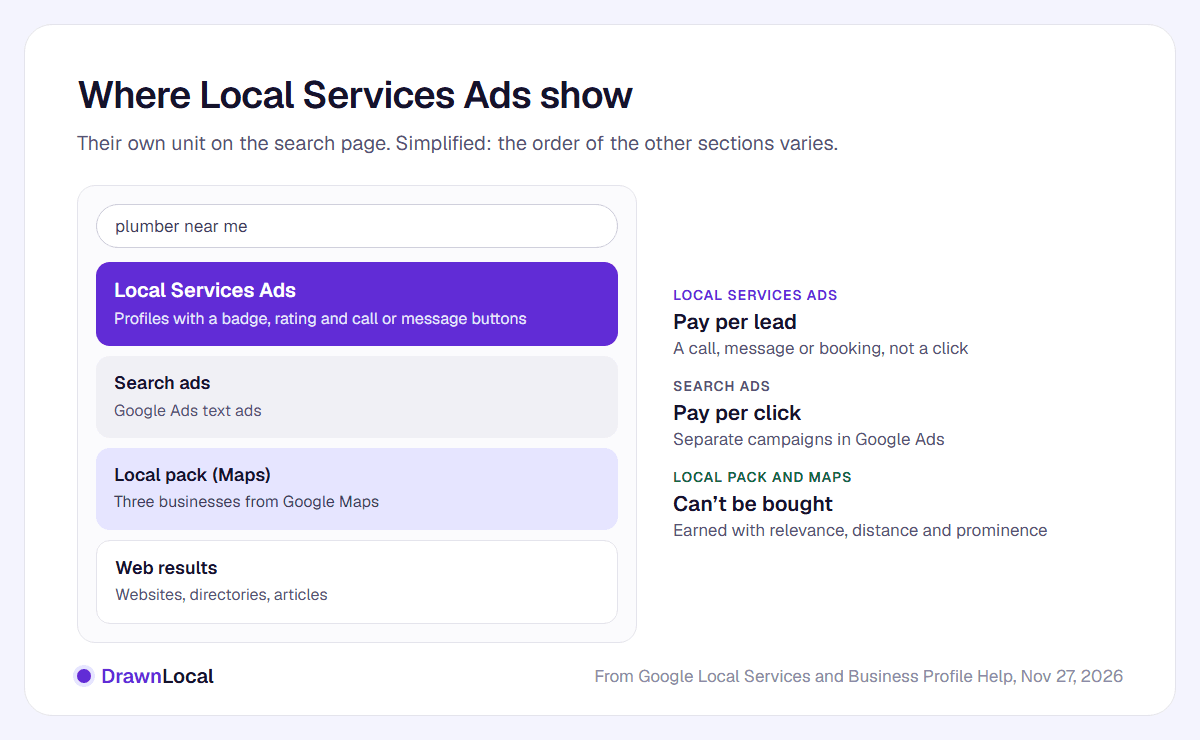
The Google Guarantee badge has been replaced: Google now shows a single Google Verified badge for advertisers that pass its screening. Google describes the change as “simplifying our advertiser badging by launching a single badge for all advertisers.”
The money-back guarantee that came with the Google Guarantee badge has ended too. It covers only services booked through Local Services Ads before December 7, 2025. Claims must be made within 30 days of the job’s completion.
Existing advertisers didn’t have to do anything; Google says they “automatically earn the new Google Verified badge.” New advertisers get it by completing Local Services screening and verification. Google also says the change doesn’t affect how the ads are ranked.
Pages explaining how to get “Google Guaranteed” still rank in Google. If your agency’s website, proposals or ad text promise a client’s customers a Google guarantee, update them. The promise no longer holds for new bookings.
Which businesses can use Local Services Ads?
Only businesses in the service categories Google lists can advertise, and every advertiser needs a public, verified Google Business Profile. Google’s US list covers a long list of home services, plus some categories outside them, such as lawyers, restaurants and salons. The home-service trades, grouped:
| Group | Trades on Google’s US list | Extra screening named by Google |
|---|---|---|
| Plumbing, heating, electrical | Plumbers, HVAC, electricians | Yes, including service professional background checks |
| Locks and doors | Locksmiths, garage door services | Yes; garage door companies also go through Google’s Advanced Verification |
| Building and finishing | Roofers, carpenters, painters, flooring, handyman | Not named |
| Cleaning and clearing | House cleaning, window cleaning, pool cleaners, junk removal | Not named |
| Outdoor | Landscaping, lawn care, tree services, snow removal | Not named |
| Other home services | Pest control, water damage, appliance repair, moving, towing, solar | Not named |
Screening varies by trade. It can include business and owner license checks, identity checks, insurance and background checks, some of them for select businesses only. Google says verification takes 3 to 4 weeks on average after the documents are submitted.
Some trades can start before the badge arrives. Google calls these pre-badge ads: they need a license or business registration, reviews that meet the category’s requirements, and billing set up. Garage door companies and locksmiths can’t use them.
This guide follows Google’s US help pages. A few features, such as booking requests and listening to call recordings, are limited to certain countries, and the guide says which.
How much do Google Local Services Ads cost?
Google Local Services Ads cost whatever each lead costs, and Google doesn’t publish a price list. Its help says lead prices “may vary depending on your location, the job type, the type of lead, or your bidding mode.”
Message leads are typically priced lower than phone leads, Google says, though “that’s not always the case.” Higher-quality profiles, including those with images, may also pay less per lead.
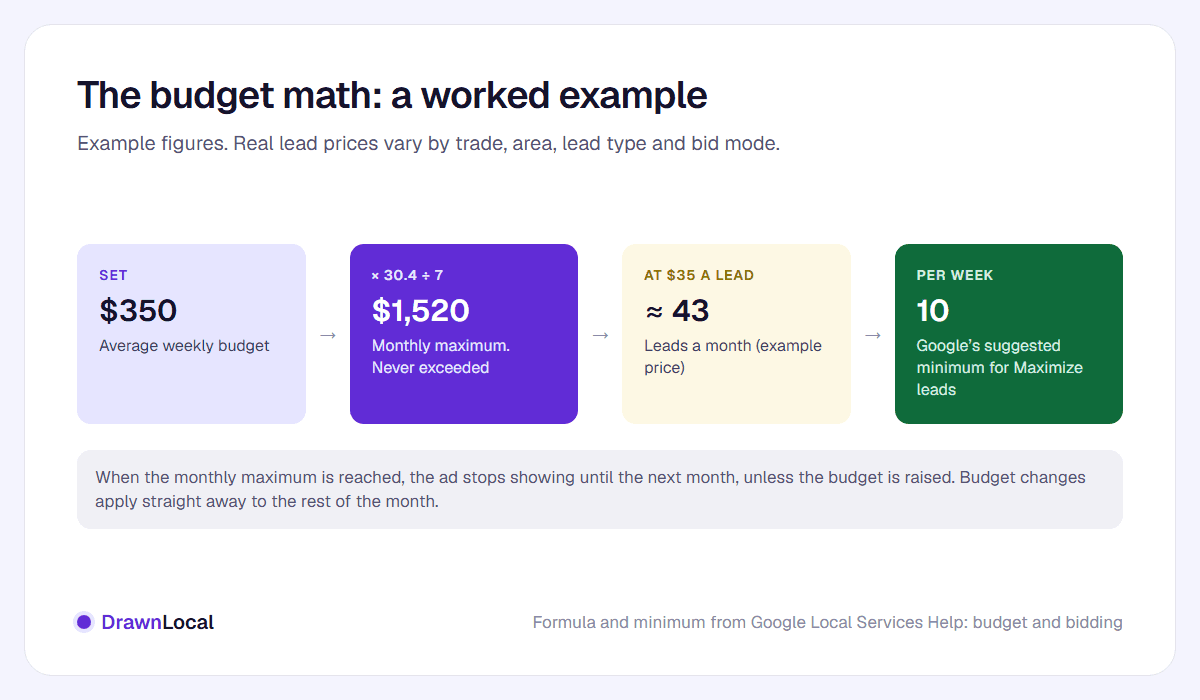
The business controls spend with an average weekly budget. Google sets the monthly maximum from it: the weekly budget × 30.4 ÷ 7. The account never spends more than that in a month. Once it’s reached, the ad stops showing until the next month unless the budget is raised.
A worked example, with example figures: a $350 weekly budget gives a monthly maximum of $1,520 ($350 × 30.4 ÷ 7). If leads averaged $35, that buys about 43 leads a month, or 10 a week. That matches Google’s suggested minimum of a budget for 10 leads a week on Maximize leads.
There are three ways to bid:
| Bid mode | How it works | When to use it |
|---|---|---|
| Maximize leads | Google sets the bids to get the most leads for the budget. Google’s top recommendation | Most new accounts, with a budget for 10 or more leads a week |
| Target cost per lead | Automated bidding that aims at an average cost per lead you set | When you know what a lead is worth to the client |
| Max per lead | Manual: you set the most you’d pay for one lead | When a client needs a hard ceiling on each lead |
Budget changes take effect straight away for the rest of the month. Google says results take about 2 weeks to settle as its model learns the business. Judge a new budget after two weeks, not two days.
The real cost for any client is in its own account. After the first month, divide the total charged by the charged leads in the report. That’s the client’s actual cost per lead, which beats any industry average.
What counts as a charged lead
A lead is charged when a customer contacts the business through the ad in one of the ways Google counts. Google lists five kinds of valid lead:
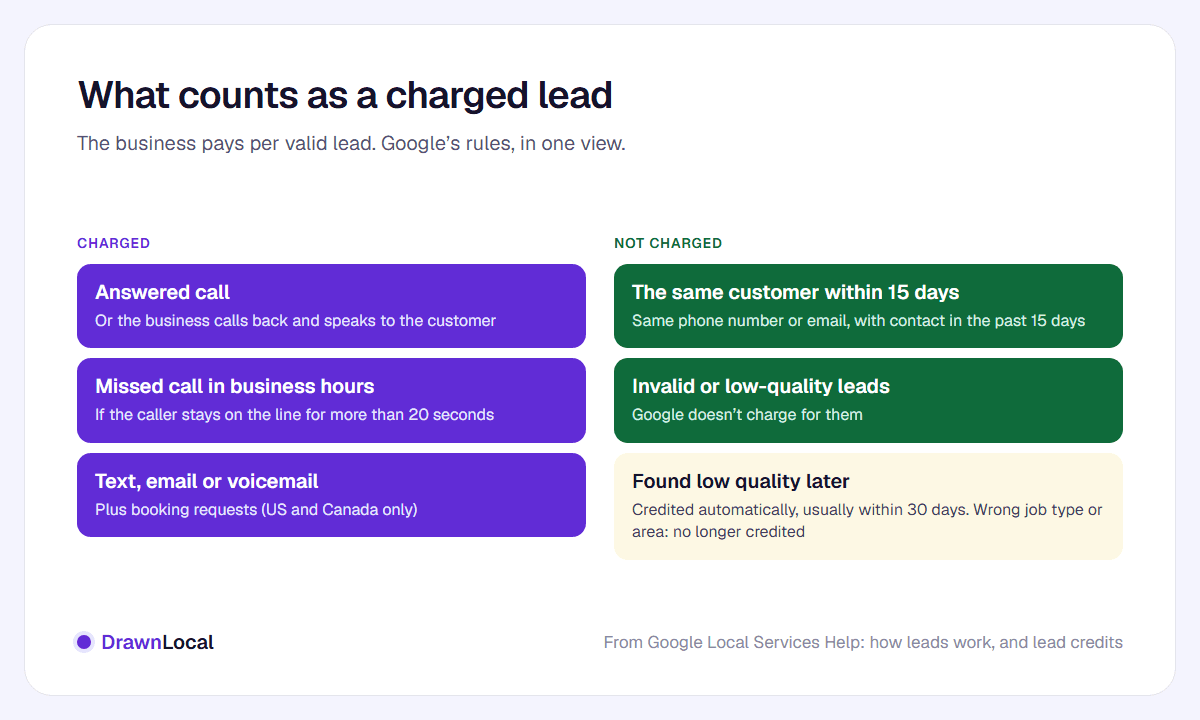
- An answered call, or a call the business returns and speaks to the customer.
- A missed call during business hours where the customer stays on the line for more than 20 seconds. With a phone menu, the 20 seconds start after the first key press.
- A text message or email from the customer.
- A voicemail. A call that reaches voicemail or a greeting during business hours is charged if the caller stays on for more than 20 seconds, message or not.
- A booking request (United States and Canada only).
Repeat contact is free for a while. If the same phone number or email gets in touch again with interaction within 15 days, it isn’t a new lead. After 15 days without activity, the next contact is.
Business hours come from the Google Business Profile, which makes accurate hours a money question. A missed call during listed hours can be charged, so a business that stops answering at 5 shouldn’t list 8.
Lead credits: what Google refunds now
Google now credits poor leads automatically: charged leads “get reassessed by our models over time.” Those later found to be low quality, duplicate or invalid are credited, in most cases within 30 days.
Two limits matter for agencies. Google “no longer supports credits for ‘job type not serviced’ and ‘geo not serviced’ leads.” So a lead for a job the client doesn’t do, or from outside its area, is the client’s cost.
And lead credits aren’t available for health care, tax specialists or advertisers in Europe, the Middle East and Africa. For home-service clients in the US, the automatic credits apply.
That makes the account setup the real defense. Set only the job types the client actually does, use the excluded service areas for places it won’t travel to, and recheck both whenever the client drops a service.
You can still rate leads. Google says it may “occasionally credit leads you report as poor quality” through its lead feedback survey. Rate the bad ones every week; the ratings are also a record to show the client.
How Google Local Services Ads are ranked
Google Local Services Ads are ranked in an auction “taking into account bid and overall profile quality.” The bid is the most the business will pay for a lead, though it may pay less. The rest is how likely the ad is to bring a lead:
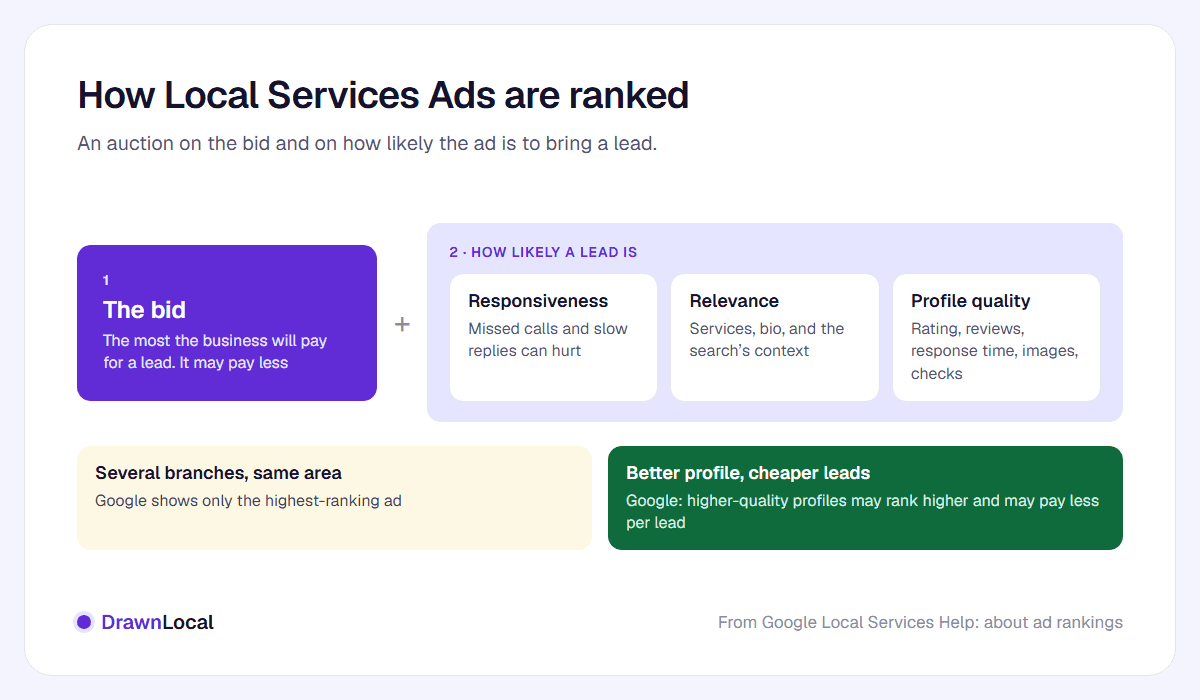
- Responsiveness: Google says missed calls may hurt it, and businesses that regularly fail to answer calls or respond to messages may see their ranking affected.
- Relevance: the services offered, the business bio, and the context of the search, such as the service, the time and the location.
- Profile quality: the rating, the number of reviews, the average response time, high-quality images and the verification checks completed.
- Lead options: whether message and booking leads are turned on.
Two more rules matter. Where several locations of one business serve the same area, Google shows only the highest-ranking ad. And Google says higher-quality profiles “may rank higher and may also pay lower costs per lead.”
So before raising the bid, fix what’s free: answer every call, reply to messages fast, add good photos of real jobs, and keep the reviews coming.
How to set up Local Services Ads for a client, step by step
Setting up takes a day of work and about a month of waiting. In order:
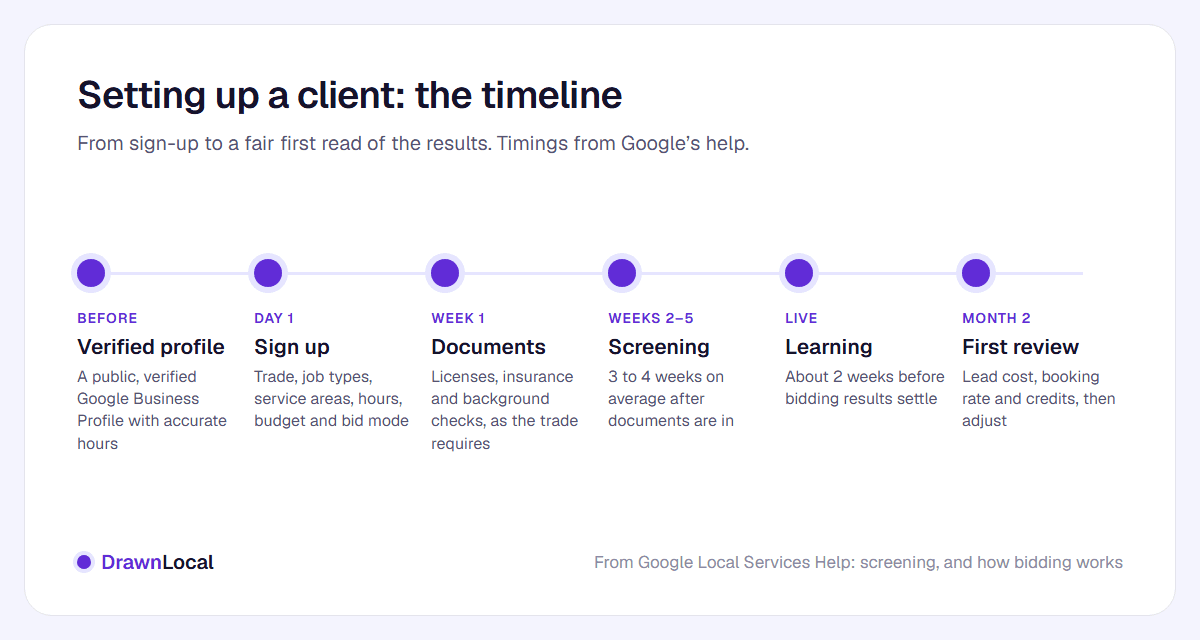
- Check the profile. The business needs a public, verified Google Business Profile with accurate hours. If you don’t have access yet, get manager access to the client’s Google Business Profile first.
- Check eligibility. Confirm the trade is on Google’s list, using the eligibility check on Google’s Local Services Ads sign-up page.
- Sign up under the client’s business. Create the account with the owner on the call, so the business owns it from day one. Pick the industry, the job types the client does, and the service areas by county, city or zip code.
- Set hours, budget and bid mode. Use the hours the phone is really answered. Start on Maximize leads with a budget for about 10 leads a week, if the client can afford it.
- Submit the screening documents. Licenses, insurance and background checks, as the trade requires. Collect them in the onboarding call; every missing document adds to the wait.
- Wait for verification. Google says 3 to 4 weeks on average after the documents are submitted.
- Let it learn, then review. Bidding takes about 2 weeks to settle. Do the first proper review after a full month: cost per lead, leads booked, and credits.
Add the setup to your client onboarding checklist, so the documents are requested with everything else in week one.
Running Local Services Ads as an agency: access and billing
An agency can manage Local Services Ads through a Google Ads manager account, while the client keeps its own account. Google says Local Services Ads “use Google Ads to set up manager accounts.” Linking to one is required for features like consolidated monthly billing.
Inside the account, Google offers five access levels: Email-only, Billing-only, Read-only, Standard and Administrative. Standard users can view leads, the business profile and settings. Administrative users can also manage users and access and edit bidding and budget. Who should get what:
| Person | Suggested level | Why |
|---|---|---|
| The business owner | Administrative | The business must always control its own account and lead history |
| The agency account manager | Administrative, or through the manager account | Budget and bid changes need it |
| The office manager who answers leads | Standard | Sees leads and settings; budget changes need Administrative |
| The bookkeeper | Billing-only | Handles payment, nothing else |
To add someone: Admin menu, Access and security, the plus button, choose the level, enter the email and send the invitation. The person needs a Google Account.
Keep ownership with the client. Put who owns the account in the local SEO contract, so nobody has to ask the agency for the client’s own lead history if the client leaves.
Google’s Local Services Ads Partner Program isn’t for agencies: Google aims it at local services marketplaces, which can manage verification for their providers. Agencies with many accounts can pull reports through Google’s Local Services API from a manager account.
Managing leads: answer fast, mark bookings, use the recordings
Answer every lead fast, mark the booked ones, and use the call recordings to judge lead quality; all three happen in the lead inbox. Google counts a lead as “active” for 15 days after the last call or message.
In the US and Canada, Google records inbound calls from the ads, and callers hear a recorded notice first. In the US, the business can listen to the recordings in the inbox. For an agency, they’re the quickest way to hear whether the leads are good and whether the office turns them into jobs.
Mark leads as booked (US and Canada). Google’s reports then show how leads turn into jobs, and you get the booking rate the cost-per-job sum needs.
Message response time counts as well. Google measures it within the business’s hours, or from 7 AM to 9 PM if none are set.
If the client is fully booked, pause the ads from Profile & budget rather than letting calls go unanswered. Google says regularly missed calls and messages can hurt the ranking.
A weekly routine for client accounts (copy this)
Fifteen minutes a week per client keeps the account healthy. A checklist to copy:
- Listen to three recorded calls (US) and note whether they were the right jobs and how the office handled them.
- Rate the poor leads with the lead feedback survey.
- Check missed calls and slow message replies, and tell the owner the same day.
- Mark the booked jobs, or ask the office to.
- Check spend against the monthly maximum, so the ads don’t stop mid-month without anyone deciding it.
- Check that the job types and service areas still match what the client does.
- Send the review link to every customer from the week’s finished jobs.
Reviews and Local Services Ads
Reviews count directly. Google says “star ratings and number of reviews affect how your business is ranked within Local Services Ads.” The ad shows reviews from the client’s Google Business Profile, and they’re managed there, not in the ads account.
Google also warns that serious or repeated negative feedback may lower an ad’s ranking, including not showing it at all. So the review routine you run for Maps also protects the ads.
Ask every customer the same way, with the direct review link; Google says customers are more likely to leave a review when the request comes from the business directly. The ads account also has an ask-for-reviews feature in the US and Canada. Never pick who gets asked: review gating explains why.
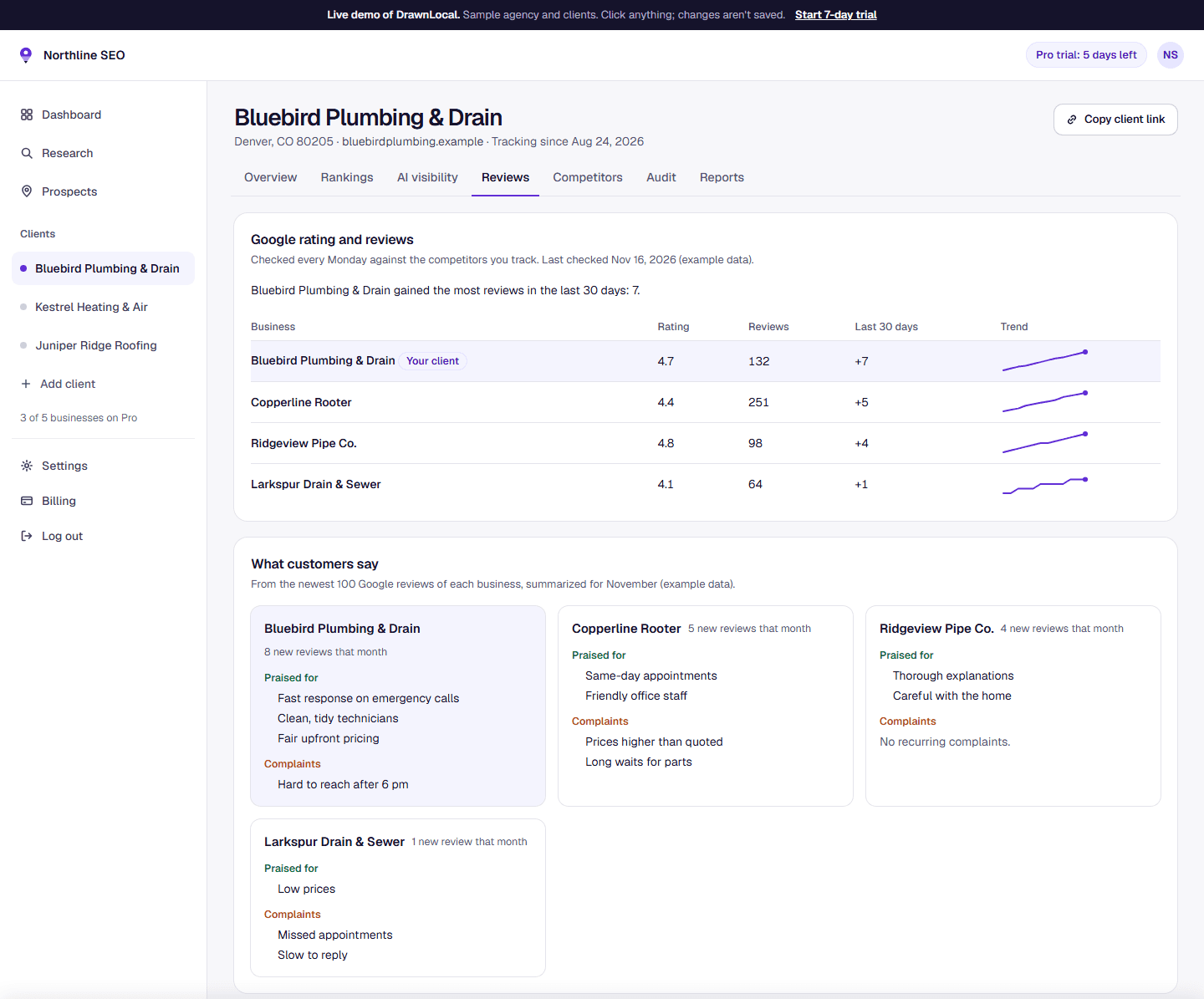
How to get more Google reviews has a request routine for contractors, and do Google reviews help SEO covers what reviews do for Maps. Track the client’s rating and count against the businesses it competes with; DrawnLocal’s review insights do that monthly, beside the Maps rankings.
Are Google Local Services Ads worth it? A worked example
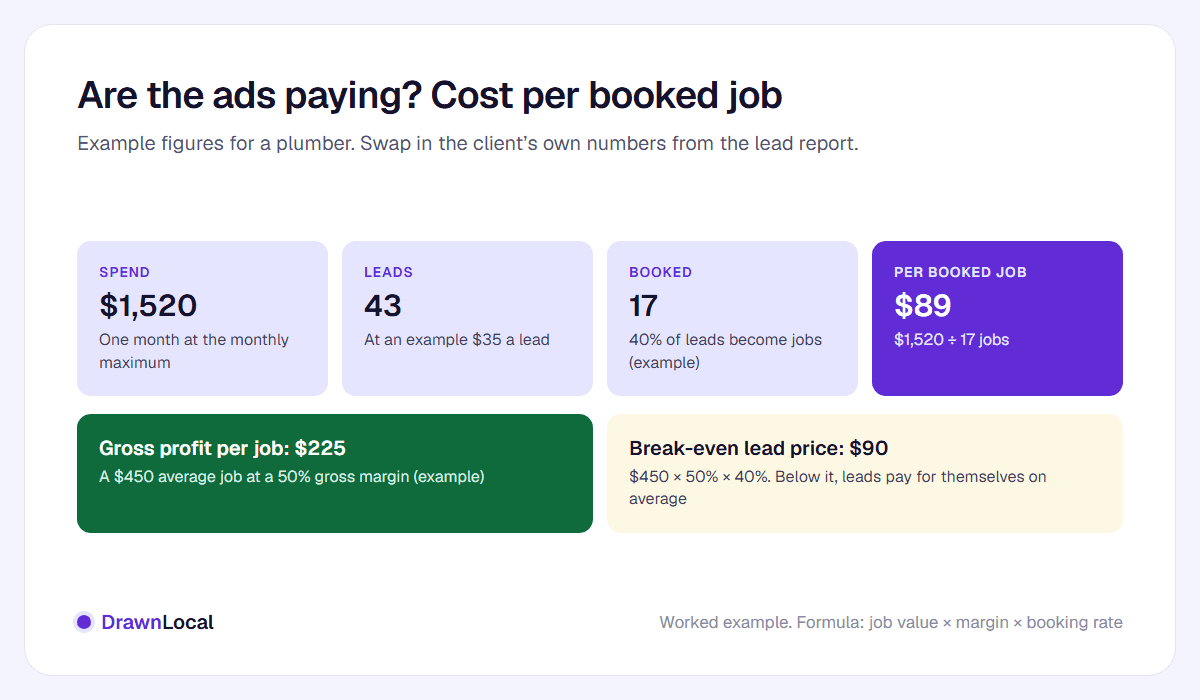
They’re worth it when the cost per booked job is well below the profit on a job, and only the client’s own numbers can show that. The formula is short:
Break-even lead price = average job value × gross margin × booking rate.
Take example figures for a plumber: a $450 average job, a 50% gross margin, and 40% of leads booked. Break-even is $450 × 50% × 40% = $90 a lead. At $35 a lead, the $1,520 monthly maximum buys about 43 leads and 17 booked jobs.
| Line | Example figure | How it’s worked out |
|---|---|---|
| Monthly spend | $1,520 | $350 a week × 30.4 ÷ 7 |
| Leads | 43 | $1,520 ÷ $35, rounded down |
| Booked jobs | 17 | 43 × 40%, rounded down |
| Cost per booked job | $89 | $1,520 ÷ 17 |
| Gross profit per job | $225 | $450 × 50% |
| Gross profit after the ads | $2,305 | 17 × $225 − $1,520 |
| Break-even lead price | $90 | $450 × 50% × 40% |
Real numbers will differ. Repeat customers and follow-on jobs make a lead worth more than its first job, so the sum is a floor rather than the whole value.
If the cost per booked job is above the profit per job, look at the booking rate before cutting the budget. Listen to the calls first: an office that misses calls or quotes badly wastes leads at any price.
Run the sum every month and put it in the report. It turns the ads from a cost the owner resents into a number they can judge.
Local Services Ads vs Google Ads vs Maps rankings
They’re three different ways onto the same search page, paid for differently. Side by side:
| Local Services Ads | Google Ads search ads | Google Maps rankings | |
|---|---|---|---|
| You pay for | Each valid lead | Each click | Nothing per lead; the cost is the work |
| Decided by | Bid, responsiveness, relevance, profile quality | A separate Google Ads auction | Relevance, distance and prominence |
| Badge | Google Verified, after screening | None | None |
| Stops when | The budget runs out or the ads are paused | The budget runs out or the campaign is paused | Holds while the signals hold |
| Good for | Calls now, in eligible trades | Searches the ads unit doesn’t cover | Calls without a fee each time |
Google says “there’s no way to request or pay for a better local ranking on Google,” and it doesn’t say running Local Services Ads changes Maps rankings. Local Services Ads vs Google Maps rankings goes deeper on the two.
Do Local Services Ads help Google Maps rankings?
Google doesn’t say they do, and it says a better local ranking can’t be bought. Maps rankings rest on relevance, distance and prominence; how Google Maps rankings work explains each.
The two share groundwork, though. A verified profile, accurate hours, good photos and a steady flow of reviews help both. That’s the case for running them together: the ads buy leads now, and the shared work builds the calls from Maps that cost nothing per lead.
Measure the Maps side separately, point by point across the client’s area. Here’s a live example from DrawnLocal’s free heat map: a Boise plumbing company is first at its address for “plumber” and in the top 3 at 7 of 9 points.
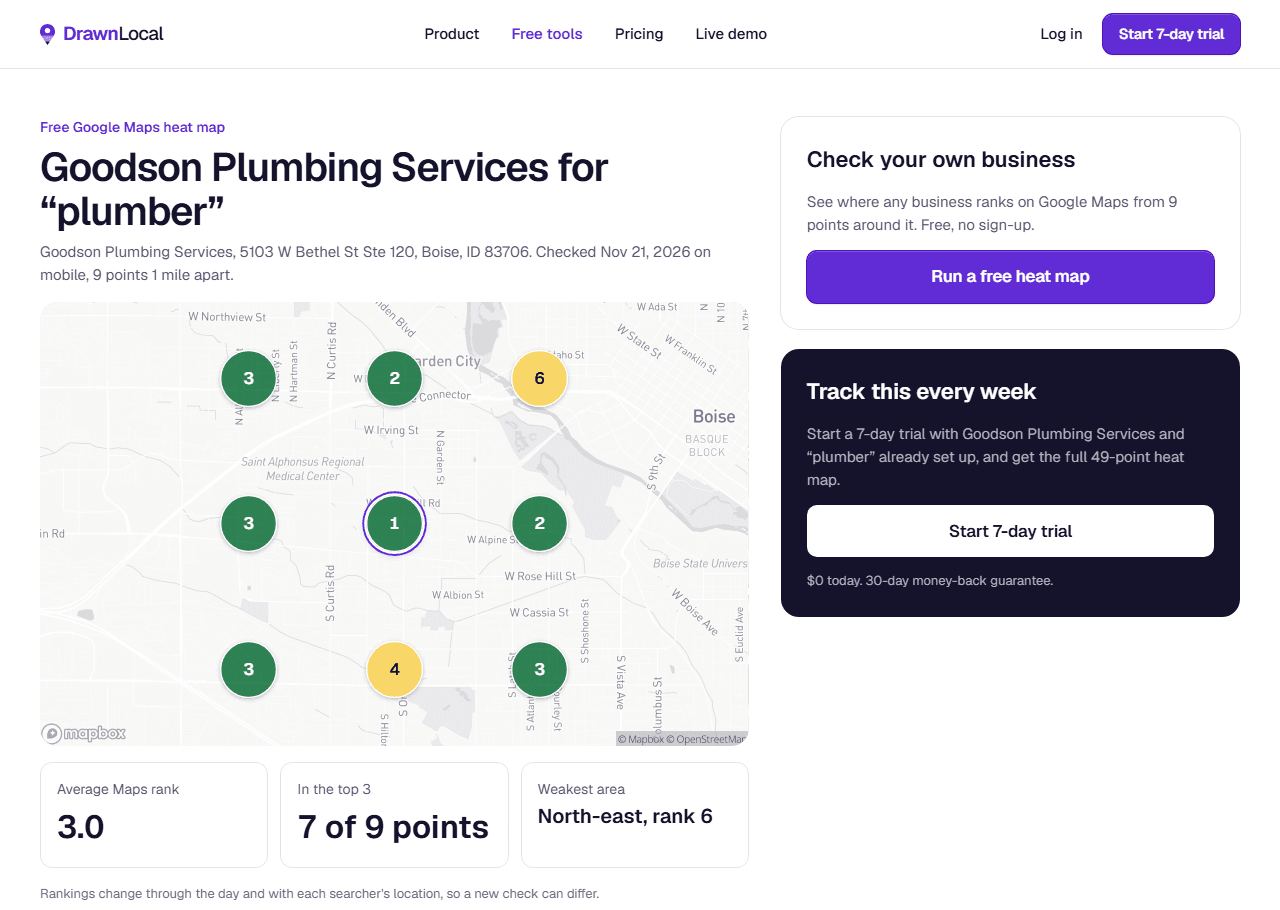
Where the map is weak, the ads can cover the gap while the Maps work catches up. Where it’s strong, ask whether the client needs to pay for leads there at all. Run a free heat map for any business to see which parts of town it already wins.
Reporting Local Services Ads to clients
Report the ads on one page with the Maps results, so the owner sees paid and earned calls together. Google’s own reports, in the lead inbox’s menu, give the ad numbers:
- Charged leads in the period, split by call, message and booking.
- The total amount charged, with the same split.
- Lead credits received in the period.
- A list of every lead, with filters.
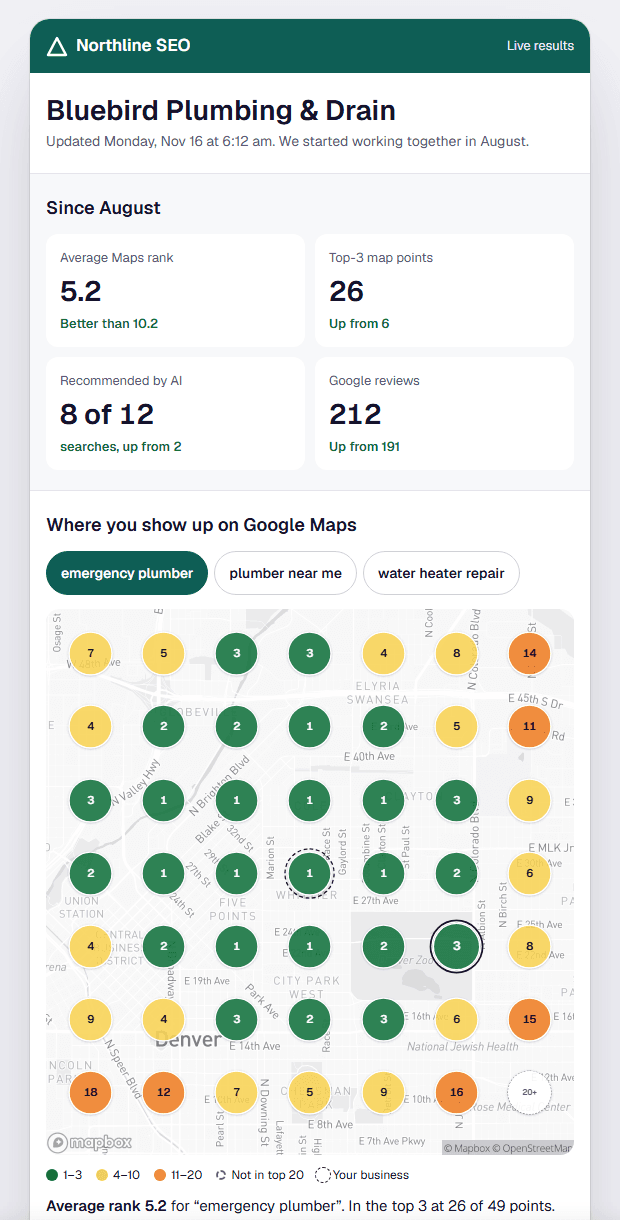
Add three lines Google doesn’t give you: booked jobs, cost per booked job, and the Maps heat map for the same month. DrawnLocal doesn’t track the ads; it covers the Maps rankings, reviews and AI answers on a client page like this one.
A monthly block to copy, with example figures:
Local Services Ads: 43 leads (31 calls, 12 messages), $1,520 charged, $70 credited. Booked: 17 jobs, $89 per booked job. Google Maps: top 3 at 26 of 49 points for “emergency plumber”, up from 6. Reviews: 212, up from 191. Next month: one change, such as adding a job type.
The monthly local SEO report template has the rest of the report, and the features page shows what DrawnLocal tracks.
Common mistakes with Local Services Ads
Each of these costs the client leads or money, and each is simple to avoid:
- Promising customers a Google guarantee, which only covers services booked before Dec 7, 2025.
- Listing longer hours than the phone is answered, then paying for missed calls.
- Leaving in job types and areas the client doesn’t serve, now that Google no longer credits those leads.
- Judging a budget change after a few days, when Google says bidding takes about 2 weeks to settle.
- Raising the bid before fixing responsiveness, photos and reviews.
- Letting the agency, not the business, own the account.
- Reporting leads without booked jobs, so nobody knows the cost per job.
- Expecting two branches in the same area to both show, when Google shows only the highest-ranking one.
For the wider picture of winning local search for trades, read local SEO for home-service businesses, and see DrawnLocal’s plans for tracking the Maps side for every client.
Questions
How much does a Google Local Services Ad cost per lead?
Google doesn’t publish prices. Lead prices vary with the location, the job type, the type of lead and the bid mode, and messages are typically cheaper than calls. Find a client’s real cost by dividing the amount charged by the charged leads in its report.
How long does Local Services Ads verification take?
Google says 3 to 4 weeks on average after the documents are submitted. Screening varies by trade: plumbers, electricians, HVAC companies, locksmiths and garage door companies get extra checks. Then allow about 2 weeks for bidding to settle.
Is Google Guaranteed still available?
No. Google replaced its badges with a single Google Verified badge and ended the money-back guarantee, which covers only services booked through the ads before December 7, 2025. Existing advertisers received the new badge automatically.
Can an agency manage Local Services Ads for clients?
Yes. Link each client’s account to a Google Ads manager account, which Google requires for features like consolidated billing, or have the owner invite you under Access and security. Keep the business owner as an administrator of its own account.
Do I need a Google Business Profile for Local Services Ads?
Yes. Google says advertisers must have a public and verified Google Business Profile. The ads show reviews from that profile, and its business hours decide when a missed call counts as a charged lead.
Sources
- Google Local Services Help: getting started with Local Services Ads (US)
- Google Local Services Help: how providers qualify for Local Services Ads
- Google Local Services Help: how leads work
- Google Local Services Help: about ad rankings
- Google Local Services Help: about automated lead credits
- Google Local Services Help: about the Google Verified badge
- Google Local Services Help: business screening and verification requirements (US)
- Google Local Services Help: how bidding works
- Google Local Services Help: how to edit your budget
- Google Local Services Help: about Target CPL bidding
- Google Local Services Help: manage access to your account
- Google Local Services Help: about the Local Services Ads Partner Program
- Google Local Services Help: manage leads and jobs
- Google Local Services Help: view reports
- Google Local Services Help: reviews and ratings
- Google Local Services Help: about booking leads
- Google Local Services Help: edit your industries, service areas and job types
- Google Business Profile Help: tips to improve your local ranking